
DytchsEnd
Java mod listed for Minecraft 1.21. Downloads from the MC Java Mods app on Android.
⬇ Download on Modrinth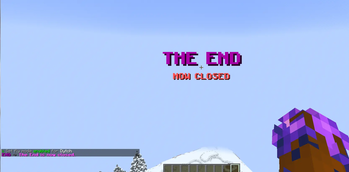
DytchsEnd
Simple End plugin to open/close The End for events.
Lock The End until your event goes live, then open it to the whole server with a single command — complete with a server-wide announcement, portal blocking, and an optional sweep of stragglers back to spawn. Tiny, no-fuss, zero dependencies.
✨ Features
- One-command control —
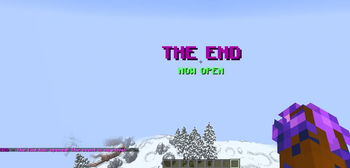
/dytchsend openand/dytchsend close. The End starts closed, and the open/closed state survives restarts. - Event-worthy announcements — opening or closing broadcasts a chat message plus a big on-screen title and sound to everyone, so the moment is impossible to miss.
- Portal blocking — while closed, players can't enter the End; they get a clean, throttled "closed" message at the portal instead.
- Sweep on close — optionally teleport anyone still in the End back to spawn when you close it (configurable location, with an option to let staff stay).
- Bypass permission — let staff into the End to set up while it's still closed.
- Fully configurable — every message, the title + sound, the reminder interval, and the spawn point are editable.
- Lightweight — one small jar, no dependencies. Paper 1.21+.
📋 Commands
| Command | Description | Permission |
|---|---|---|
/dytchsend open |
Open the End (announces it server-wide) | dytchsend.admin |
/dytchsend close |
Close the End + sweep out stragglers | dytchsend.admin |
/dytchsend status |
Show whether the End is open or closed | — |
/dytchsend reload |
Reload the config | dytchsend.admin |
Aliases: /dend, /dytchend
🔑 Permissions
| Node | Default | Grants |
|---|---|---|
dytchsend.admin |
op |
Open / close / reload the End |
dytchsend.bypass |
op |
Enter the End even while it's closed |
⚙️ Configuration
The End starts closed. Open it with /dytchsend open, close it with /dytchsend close — the state persists across restarts. Everything is editable in config.yml:
- Edition: Minecraft Java
- File type: .jar
- Minecraft versions listed: 1.21, 1.21.1, 1.21.2
- How to install: Install the matching mod loader (Forge, Fabric or NeoForge) for your Minecraft version. → Download the .jar. → Put it in the .minecraft/mods folder and launch that loader profile.
- Where to get it: Opens on Modrinth — not every file is mirrored on our own servers.
Install steps are the general flow for this file type — How to install Minecraft Java mods & modpacks walks through it step by step.
- Ships as DytchsEnd.jar — drop this file into the mods folder
- Download size: 12 KB
- Download link checked 4 Oct 2026 — working
These come from our own check of the pack file, not from the source page.