
Lazy Chunk Load
Java mod listed for Minecraft 26.x. Downloads from the MC Java Mods app on Android.
The vanilla chunk loading system schedules a massive number of chunks around the player all at once, causing instant server CPU overload and TPS collapse
I don't know my version or loader
Lazy Chunk Load
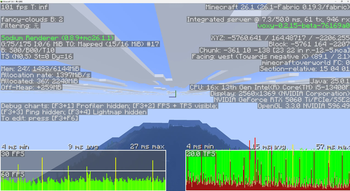
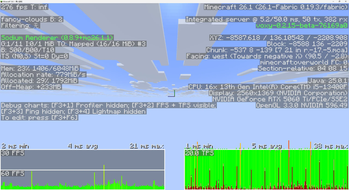
The vanilla chunk loading system schedules a massive number of chunks around the player all at once, causing instant server CPU overload and TPS collapse. Lazy Chunk Load improves this process: it controls chunk loading speed like a faucet — automatically turning down when the CPU is busy and opening up when idle — so exploring new terrain no longer stutters.
What This Mod Does
🚶 Anti-Lag Exploration
With this mod installed, the server automatically adjusts chunk loading frequency based on current CPU usage. Full speed when usage is low, automatically slows down when usage spikes — TPS stays rock-solid throughout.
- It doesn't make chunk loading faster — it makes it smoother. Trade a bit of instant speed for a stutter-free experience.
- True prevention, not an after-the-fact fix.
🔄 Background Preloading
When you're standing still, the mod automatically uses idle CPU to preload ungenerated chunks around you.
Priority: chunks under your feet first, then in your line of sight, then to the sides and behind.
- Enabled by default, works while idling.
- Automatically pauses when the CPU is busy — never steals resources.
- Status output to log every 5 seconds.
🛡️ Additional Protections
- Login Warmup: No limits for the first 10 seconds after joining a world, ensuring initial terrain loads quickly.
- Save Safety: Automatically pauses all chunk loading during world saves to prevent save stalling.
- Emergency Bypass: When the player steps on an unloaded chunk, all limits are bypassed and the chunk loads immediately.
- Hotspot Chunk Tracking: Frequently-accessed chunks are marked as hotspots; preload extends their retention time.
- Dimension Whitelist/Blacklist: Restrict preloading scope via
dimension_blacklist/dimension_whitelistto avoid wasting CPU in custom dimensions.
Installation
Drop it into your mods folder — no configuration needed to work out of the box. Server-side only; clients do not need to install it.
Singleplayer works perfectly fine too.
| Platform | Supported Versions |
|---|---|
| Fabric | 1.21.x |
| Fabric | 26.1+ |
| Forge | 1.20.1 |
| NeoForge | 1.21.1 |
💡 Fully compatible with optimization mods like C2ME, Lithium, and VulkanMod. Does not modify chunk generation algorithms — only adjusts loading rhythm.
🗺️ Automatically detects Chunky pre-generation tasks and lifts CPU limits during generation for full speed; restores automatically when complete.
Monitoring
Every 5 seconds a status line is logged to logs/latest.log:
[LazyChunkLoad] Tick:1200 CPU:45% Sched:3/t Warmup:N Preload:ON Main:OK
| Field | Meaning |
|---|---|
Tick |
Current tick count |
CPU |
CPU usage percentage |
Sched |
Chunks loaded last tick |
Warmup |
Y=Warming up / N=Normal |
Preload |
ON=Active / OFF=Disabled / PAUSED=CPU too high |
Main |
OK=Full speed / SLOW=Throttled |
Configuration
The config file is located at config/lazychunkload.json (auto-generated, takes effect immediately on changes).
If you just want to use the mod normally, you don't need to read any of this — the defaults are already best practice.
📝 Full Configuration Reference (click to expand)| Option | Default | Description |
|---|---|---|
cpu_threshold |
0.85 | CPU usage threshold for throttling (0~1, higher = more lenient) |
warmup_ticks |
200 | How many ticks after login to skip limits (20 ticks = 1 second) |
preload_enabled |
true | Enable background preloading |
preload_radius |
64 | Preload radius (in chunks) |
preload_delay_seconds |
1 | Seconds of standing still before preloading begins |
distance_weight |
0.5 | Distance priority weight (closer = more priority) |
direction_weight |
0.4 | Direction priority weight (forward-facing = more priority) |
aging_weight |
0.1 | Aging priority weight (long-unloaded = more priority) |
direction_multiplier |
5.0 | Direction bonus multiplier |
aging_factor_ms |
10000 | How many milliseconds count as "aged" |
log_loading |
false | Log detailed info to console |
performance_tips |
true | Output debug log when CPU or MSPT exceeds threshold (no longer sent to chat) |
There is also a runtime config at config/lazychunkload-runtime.json:
| Option | Default | Description |
|---|---|---|
limit_enabled |
false | Set to true to completely disable CPU limits (full speed) |
tips_disabled |
false | Set to true to disable chat performance tips |
How It Works
- Checks CPU usage once per tick (1-second cache, near-zero overhead).
- CPU below 85%: chunks load normally, no restrictions.
- CPU above 85%: chunk loading frequency is automatically reduced — the higher the CPU, the stronger the limit, but even in the worst case, at least one pass is allowed every 0.2 seconds — ensuring terrain never gets permanently stuck.
- When you're standing still: background scanning of ungenerated chunks around you, loaded in prioritized batches.
- When you're exploring: stepping on an empty chunk triggers an immediate emergency bypass with no limits applied.
- Edition: Minecraft Java
- File type: .jar
- Minecraft versions listed: 26.1, 26.1.1, 26.1.2
- How to install: Install the matching mod loader (Forge, Fabric or NeoForge) for your Minecraft version. → Download the .jar. → Put it in the .minecraft/mods folder and launch that loader profile.
- Where to get it: Opens on Modrinth — not every file is mirrored on our own servers.
Install steps are the general flow for this file type — How to install Minecraft Java mods & modpacks walks through it step by step.
- Ships as lazychunkload-fabric-26.1+-1.3.0.jar — drop this file into the mods folder
- Download size: 50 KB
- Download link checked 17 Oct 2026 — working
These come from our own check of the pack file, not from the source page.