
BeautifulButtons
Java mod listed for Minecraft 26.x. Downloads from the MC Java Mods app on Android.
⬇ Download on Modrinth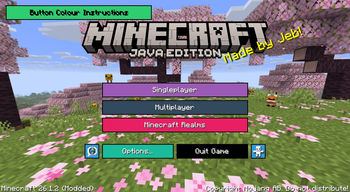
🎨 BeautifulButtons
Give your Minecraft buttons a makeover — because your UI deserves a little personality.
BeautifulButtons is a client-side mod that lets you customise the colour of every button in Minecraft's menus. Pick any hex colour you like, or choose from a built-in palette of 12 presets — then preview your choice live before applying it.
✨ Features:
Full hex colour support — enter any valid hex code to get the exact colour you want
12 quick-pick presets — red, orange, yellow, green, teal, blue, purple, pink, white, grey, dark grey, and black
Live preview — see exactly what your button will look like before committing
Per-button customisation — colour individual buttons differently for a truly unique UI
Reset at any time — one click to go back to default
How to use it:
Once the mod is installed, open the colour settings for any button from the options menu. Type in a hex code (like #2ECC71 for green), or click one of the preset swatches. The preview at the bottom of the screen updates instantly. Hit Apply when you're happy, Reset to go back to default, or Cancel to exit without saving.
- Edition: Minecraft Java
- File type: .jar
- Minecraft version listed: 26.1.2
- How to install: Install the matching mod loader (Forge, Fabric or NeoForge) for your Minecraft version. → Download the .jar. → Put it in the .minecraft/mods folder and launch that loader profile.
- Where to get it: Opens on Modrinth — not every file is mirrored on our own servers.
Install steps are the general flow for this file type — How to install Minecraft Java mods & modpacks walks through it step by step.
- Ships as BeautifulButtons-1.0-SNAPSHOT.jar — drop this file into the mods folder
- Download size: 30 KB
- Download link checked 25 Oct 2026 — working
These come from our own check of the pack file, not from the source page.