AddonsBedrock
Aizhu Essential
An all-in-one utility addon for Minecraft Bedrock Edition featuring mining, farming, building, multiplayer, and quality-of-life improvements while…
⬇ Download on CurseForge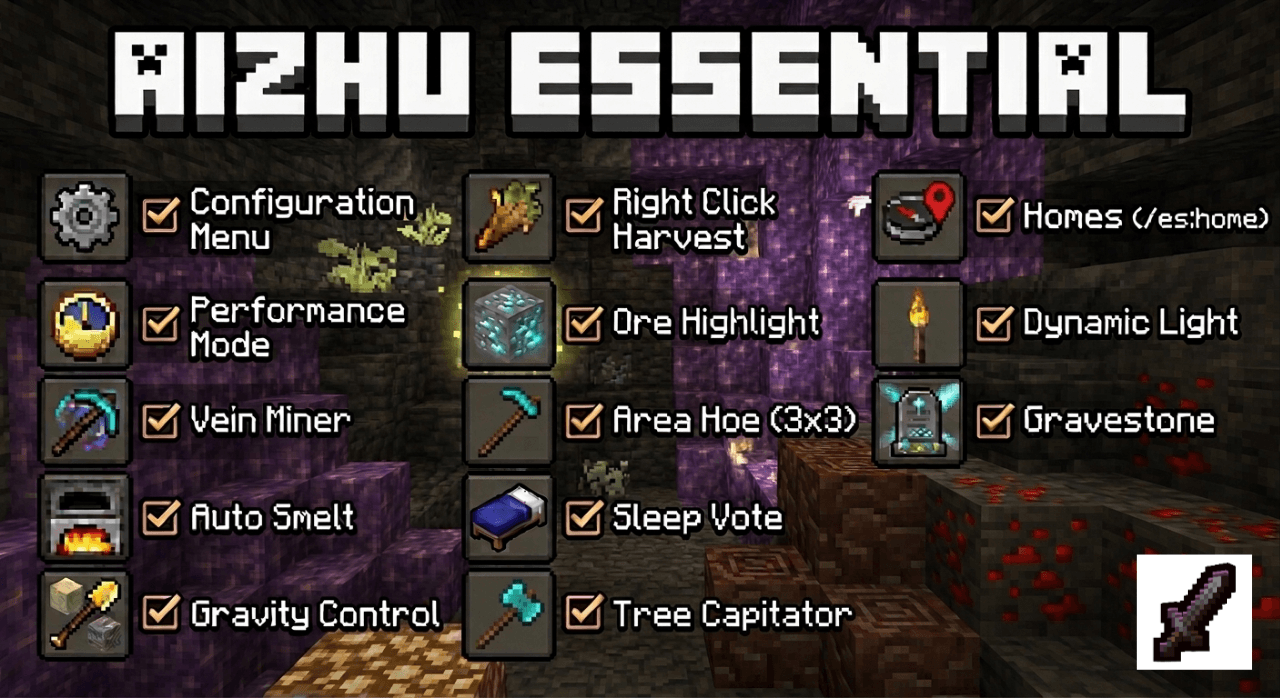
Aizhu Feature Overview
A powerful utility Addon designed to enhance your Minecraft Bedrock experience with clean UI configuration, automated mechanics, and essential quality-of-life features.
Configuration & Performance
- Clean UI Settings: Open the main menu using
/es:configto easily enable or disable modules and tweak settings to your preference. - Performance Mode: A built-in system that monitors game performance. It will temporarily pause heavy modules if lag is detected, automatically restoring them once your game runs smoothly again.
Mining Features
- Vein Miner: Sneak while mining to break entire ore veins at once. Fully honors Fortune and Silk Touch enchantments, consumes the correct tool durability per block, and works perfectly with Auto Smelt.
- Auto Smelt: Converts raw drops like iron, gold, and ancient debris directly into their smelted items while granting the correct XP.
- Ore Highlight: Briefly highlights nearby matching ores after you mine one to help you find more loot. Radius and visual style are fully customizable.
- Gravity Control: Collapse entire columns of sand, gravel, or concrete powder instantly just by digging the bottom block with a shovel.
Farming Features
- One Tap Harvest: Instantly harvest and replant crops (wheat, potatoes, carrots, nether wart) with a single click, without needing extra seeds in your inventory.
- Area Hoe: Tills a full 3x3 area of dirt with a single click.
- Tree Capitator: Fell entire trees just by sneaking and chopping the bottom log. Includes fast leaf decay to quickly clear the canopy.
Building Features
- Scaffold: Helps you bridge through the air easily by placing blocks right under your feet when you sneak at the edge of a block.
- Vein Builder: Extend a straight line of blocks instantly by sneaking while placing. Features particle previews so you never miss a placement.
Multiplayer Features
- AFK Detection: Automatically marks inactive players to keep server logic and gameplay fair.
- Sleep Vote: Skips the night when a specific percentage of active players sleep, showing live progress directly in the chat.
- Togglable PvP: Players can use
/es:pvpto enable or disable combat. You can only be attacked if you have PvP enabled.
Navigation & Quality of Life
- Homes System: Set, list, and teleport to your saved locations using simple home commands.
- Dynamic Light: Illuminates the area around you when holding a torch or any light-emitting item. Works perfectly underwater!
- Gravestone: Stores your items safely when you die so they don't despawn. Only you can retrieve them. Features a beacon beam to help you find your death point easily.
Commands List
/es:config— Opens the Essential settings menu/es:pvp— Toggles combat on or off/es:sethome— Saves your current location/es:home [name]— Teleports you to a saved home/es:delhome— Deletes a saved home
Compatibility
- No Beta API Needed: Does not require Beta APIs to be enabled.
- Achievements Friendly: Achievements remain obtainable and this pack does not disable them.
Connect & Support
- TikTok: @siiaizhu
- YouTube: @siaizhu
- Instagram: @endviii
- Discord: Coming soon
- Support the Creator: SociaBuzz Tribe
Quick facts
- Edition: Minecraft Bedrock
- File type: .mcpack or .mcaddon
- Minecraft version listed: 26.30
- How to install: Download the .mcpack or .mcaddon file. → Open it — Minecraft imports it. → In your world: Behavior Packs → Available → Activate, then the same under Resource Packs.
- Where to get it: Opens on CurseForge — not every file is mirrored on our own servers.
Install steps are the general flow for this file type — How to install Minecraft Bedrock addons & mods walks through it step by step.
Verified by MCModsHub
- Pack type: .mcaddon
- Manifest requires Minecraft 1.21.0 or newer
- Ships one half — this pack asks for another pack that is not included
- Download size: 588 KB
- Download link checked 29 Aug 2026 — working
These come from our own check of the pack file, not from the source page.