
ModsJava
Palettable
Java mod listed for Minecraft 1.21. Downloads from the MC Java Mods app on Android.
⬇ Download on Modrinth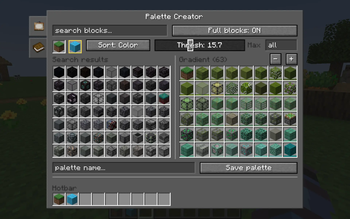
Palettable adds a new menu to help builders in either modded or vanilla. Bound by default to 'P', the Palette Creator menu helps create block palettes and gradients using any blocks in your world, even modded ones!
To get started, select block A and B from the search bar or your hotbar to find all the colors inbetween.
- Thresh controls how similar in color a block must be to appear
- Max controls the amount of blocks in the pallete
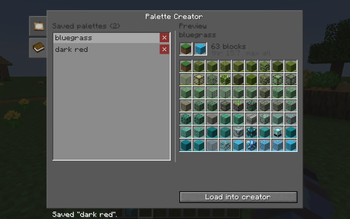
Adjust settings to fine-tune your palette and save it for later use!
Quick facts
- Edition: Minecraft Java
- File type: .jar
- Minecraft version listed: 1.21.1
- How to install: Install the matching mod loader (Forge, Fabric or NeoForge) for your Minecraft version. → Download the .jar. → Put it in the .minecraft/mods folder and launch that loader profile.
- Where to get it: Opens on Modrinth — not every file is mirrored on our own servers.
Install steps are the general flow for this file type — How to install Minecraft Java mods & modpacks walks through it step by step.
File checked by MCModsHub
- Ships as palettable-1.0.0.jar — drop this file into the mods folder
- Download size: 100 KB
- Download link checked 20 Oct 2026 — working
These come from our own check of the pack file, not from the source page.