HomeJavaModsBetter Player Model
Better Player Model
ModsJava

Better Player Model

by Zhoporez · on Modrinth

Play as any character with custom 3D player models and animations, fully synced in multiplayer. Free Minecraft Java mod for 1.20.1, 1.21.1, 1.21.11.

Which build do you need?

This mod ships a separate file for every mod loader and every version of the game. Pick both, then download — the wrong build installs fine and then does nothing in the game.

Mod loader

Minecraft version

⬇ Download for 26.2 · Fabric⬇ Download for 26.1.2 · Fabric⬇ Download for 1.21.11 · Fabric⬇ Download for 1.21.1 · Fabric⬇ Download for 1.20.1 · Fabric⬇ Download for 1.20.1–26.2 · Paper
I don't know my version or loader
Open the Minecraft launcher and look at the profile you play on — it names both, like fabric-loader-1.21.4. The version also shows in the bottom-right corner of the game's main menu.
No loader in the profile name? Then it's plain Minecraft, and these mods won't run — you need Fabric or NeoForge installed first.
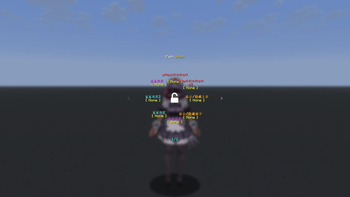
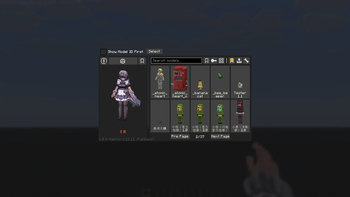
Better Player Model — screenshot 1Better Player Model — screenshot 2

title

Better Player Model

Better Player Model is a powerful Fabric mod designed for animated custom player models, featuring high-performance rendering, local browsing, and seamless multiplayer synchronization.

Key Features

Multiplayer

Compatibility & Setup

Dependencies

Where to find models?

Looking for high-quality player models? You can browse and download hundreds of community-made models from the Yes-steve-model community repository: Download Models Here

For Server Admins

You can find our official Paper/Purpur plugin to sync models without server-side mods right under the Versions tab!

Demonstration

Demonstration Demonstration Demonstration

Contacts

Visit our Official Discord Server for the mod. Get sneak peeks of upcoming updates, suggest new features, report bugs, and chat with the developer and the community.

Credits

This project is built upon the incredible work of the following teams and individuals:

Network Troubleshooting Guide: Model Sync Timeouts and Disconnections

If players with slower or unstable internet connections (such as Wi-Fi, mobile data, or satellite links like Starlink) are consistently disconnected while joining your server or during model synchronization, this guide explains how to fix the issue.


Why Is This Happening?

  1. Bandwidth Saturation (Bufferbloat): When a player joins, the server transfers missing custom player models. If the server tries to push this data faster than the player's connection can download it, the network buffers on the player's router or operating system overflow.
  2. Delayed Ping/Keep-Alive Packets: Because the connection is saturated, critical game packets (like Minecraft's KeepAlive packets which verify the player is still connected) are queued behind the model files. If the client cannot respond to these packets within 15–30 seconds, the server times them out and kicks them.
  3. Large Model Files: If your server hosts many models, or if some models are particularly large (e.g., several megabytes each), the initial download size might be substantial (tens of megabytes), lengthening the critical sync window.

Solution 1: Configure Bandwidth Limits on the Server (Recommended)

Version 1.0.6 introduces a per-player bandwidth limiter to prevent connection saturation. You can restrict the speed at which model chunks are sent.

  1. Open your server's config directory: config/better_player_model-server.toml.
  2. Locate the [server_scheduler] category and configure the limits:
    [server_scheduler]
        # Global bandwidth limit for model distribution across all active players (in Mbps)
        # Default: 100
        BandwidthLimit = 25
    
        # Bandwidth limit per individual player (in Mbps)
        # This prevents slow connections from getting overwhelmed.
        # Default: 5 (Recommended: 3 to 10)
        PlayerBandwidthLimit = 5
    
    Setting PlayerBandwidthLimit to 5 Mbps (~625 KB/s) allows models to download steadily without saturating the link, leaving plenty of room for gameplay and Keep-Alive traffic.

Solution 2: Increase Network Connection Timeouts

By default, Minecraft kicks a player if it doesn't receive network responses within 30 seconds. You can increase this read timeout to 120 seconds.

For Dedicated Servers:

Add the following Java system property to your server's startup script or command line:

-Dnet.minecraft.network.readTimeout=120

For Clients (in Prism Launcher or other launch options):

  1. Open your launcher's settings for the Minecraft instance.
  2. Under Java -> Java Arguments, add:
    -Dnet.minecraft.network.readTimeout=120
    

Solution 3: Use Timeout-Extension Mods

Alternatively, you can install one of the following server-side and client-side mods to handle timeouts automatically:

Built-in Models & Assets Credits

This mod includes the "Wine Fox" (酒狐) model built-in by default to provide a high-quality out-of-the-box experience.

Huge thanks to these creators for their incredible work on the model! If you wish to use this model elsewhere, please ensure you respect the original CC BY-NC-SA 4.0 license.

License

Licensed under MIT. All original licenses and copyright notices are preserved. MIT License

Verified by MCModsHub

These come from our own check of the pack file, not from the source page.

Explore more