
ModsJava
Senarium
Java mod listed for Minecraft 26.x. Downloads from the MC Java Mods app on Android.
⬇ Download on Modrinth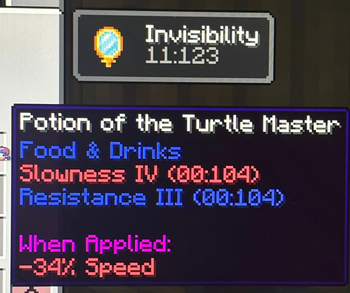
Senarium
What changes
- Item counts
- Potion effects
- Book pages
- Settings
- ...and many other numbers throughout the game. If you notice something I missed, please let me know!
What stays the same
- F3 debug information and game modes
- Numbers shown by Sodium and Mod Menu
- Minecraft version strings
HOW IT WORKS
Minecraft normally uses the familiar decimal system with 10 digits (0-9). Senarium replaces those numbers with sezimal (base-6), which uses only the digits 0-5.
That means 10 in sezimal is equal to 6 in decimal, 11 is 7, 12 is 8, and so on.
- Item counts, experience levels, page numbers, timers, and many other values are displayed in sezimal.
- Percentages are converted to match the new base. For example, 100% becomes 100% in sezimal (which equals 36 in decimal), while fractions such as 1/2 become much simpler to represent.
- Decimal numbers are converted as well, so values after the radix point are represented in base 6.
The goal of Senarium is simple: let you experience Minecraft through a different way of counting.
Enjoy exploring the world in base 6!
Quick facts
- Edition: Minecraft Java
- File type: .jar
- Minecraft versions listed: 26.1, 26.1.1, 26.1.2
- How to install: Install the matching mod loader (Forge, Fabric or NeoForge) for your Minecraft version. → Download the .jar. → Put it in the .minecraft/mods folder and launch that loader profile.
- Where to get it: Opens on Modrinth — not every file is mirrored on our own servers.
Install steps are the general flow for this file type — How to install Minecraft Java mods & modpacks walks through it step by step.
File checked by MCModsHub
- Ships as senarium-1.0.1+26.1.x-beta.jar — drop this file into the mods folder
- Download size: 40 KB
- Download link checked 25 Oct 2026 — working
These come from our own check of the pack file, not from the source page.