DynamicItemScan Modded Bingo
Java mod listed for Minecraft 1.12. Downloads from the MC Java Mods app on Android.
This server side mod lets you play bingo with items as bingo goals. It scans through all other loaded mods and identifies items that are obtainable in…
⬇ Download on Modrinth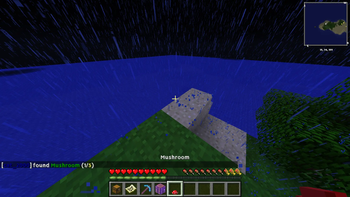
DynamicItemScan Modded Bingo
This is a 1.12.2 server side only forge mod.What is this mod about?
This mod lets you play bingo in Minecraft, with all loaded vanilla and mod items that are obtainable in survival as goals. Each team or single player gets a copy of a bingo card that contains a grid of items. The square grid can be varied in size, from 3x3 to 9x9. Items in the card are crossed out by finding or crafting them in survival mode. The first team or single player to get a full row, column or diagonal, wins!
What´s so special about this mod?
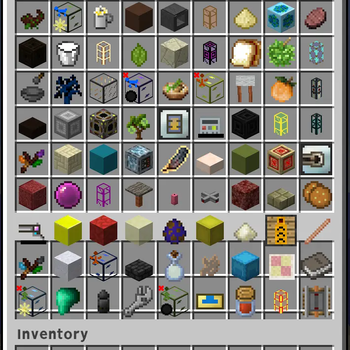
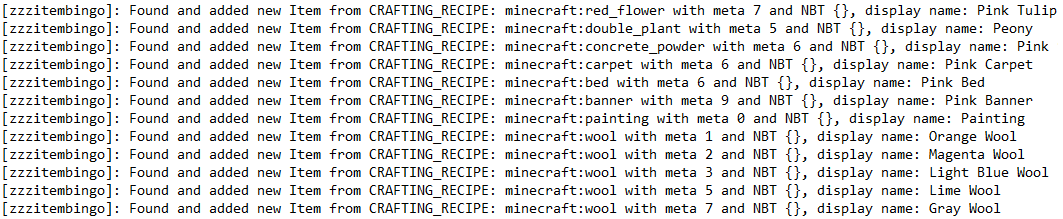
The dynamic item scanThis mod goes through all loaded loot tables, crafting recipes, villager trades and furnace smelting recipes of all present mods and records all new items that it finds. It also tries out every possible combination of LootFunctions, that are applied on items in LootTables, by doing a binary permutation, to catch all items that can appear or be crafted in survival mode.
The full item registry is not searched, because it could contain mere creative mode items that cannot be obtained in survival mode.
Items are ensured to be unique, such that the probability of each item appearing in the bingo card is the same. To be added to the final item list, an item must not be identical in all registry name, metadata and NBT tag to an item already in the list.
Note that this works regardless of what mods are installed. All mods are scanned, if the contents of the mods folder change, after a server restart, the item pool adapts automatically.
Key caveats of the dynamic item scan:
- We cannot ensure the scan will find every obtainable item. If an item is not registered in a crafting or smelting recipe or a loot table, but is rather obtained by a mod-added machine, it will not be detected.
- Crafting recipe ingredients are assumed to be obtainable to mitigate the point above, which may not be the case
- We cannot detect which enchantments are applicable to which items. To add some enchanted items, enchanted books of each registered enchantment are added to the item pool.
The "at least" principle - how are items checked for equality?
The key idea is to treat the required item in the bingo card and the found item in the player´s inventory asymmetrically. Two items are called equal, when the found item meets at least all properties of the required item. The found item can have excess properties.
Note that:
- count is ignored
- Item metadata and item damage use the same variable. If the item is marked to be damageable, if it "thinks that it´s damageable", the variable is used for damage and we ignore it as a property
Consider the following example:
| Property | found item | required item |
|---|---|---|
| Registry name | stone_hoe | stone_hoe |
| Metadata | 0 | 23 |
| Property | found item | required item |
|---|---|---|
| Registry name | stone_hoe | stone_hoe |
| Metadata | 23 | 0 |
The same would be true if the found item is enchanted and the required item is not, or the found item has more enchantments than the required item.
Variable bingo card sizes
Normally, bingo is played with a 5x5 square card. Here, you can customize the bingo card size ranging from 3x3 up to 9x9.
Players can rejoin
When a player leaves, the mod will remember the team that he was in. Once he rejoins and the game is still running, he will be automatically put in the right team, with progress on the card updated.
Game Loop
SET TEAMS -----------> START --------> NATURAL FINISH (BINGO) / CANCEL -------> SET TEAMS
Commands
- /teams: Sets the specified teams
- /start: starts a new game with specified settings
- /cancel: cancels a currently running game
- /teams [player1,player2][player3] (brackets needed!) results in
Team 1 Team 2 player1, player2 player3 - /start 3-9(grid-size) 3-6(backpack-size) true-false(different cards for different teams) true-false(with diamond pickaxe for everyone) true-false(with inventory crafting table for everyone) true-false(keepInventory) true-false(noHunger) The text in parentheses is only for explanation and is not needed in the actual command syntax.
- /cancel
The command thus takes a total of 7 arguments.
For example: /start 5 6 false true true true true will start a game with a 5x5 bingo card, 6x9 backpack, same card for all teams (all chase the same goals), diamond pickaxes and crafting tables for everyone, keepInventory on and no hunger ticks during the game.
/start 9 6 true true true true true will be 9x9 bingo card, 6x9 backpack, different maps for different teams (all have their own goals and can be lucky or unlucky regarding the goals difficulty relative to the other teams), diamond pickaxes, crafting tables, keepInventory and no hunger.
Why the "z"´s?
The item scan implies that this mod needs to be loaded after all other mods have loaded in their items. Therefore, since the forge mod loader tends to load mods alphabetically, the modid as well as the jar name of this mod start with 3 "z".Other
Packets
This mod modifies ingoing and outgoing packets that are necessary for client-server-communication. The mod was tested, but note that any error in the serverbound and clientbound packet pipeline will likely crash the server and/or the client.
Reflection
This project uses reflection to make its features work. Use of reflection is usually not recommended. Please note that this makes the project highly unstable and version specific. The mod was tested with forge version 1.12.2-14.23.5.2847. In theory, other 1.12.2 versions should also work, but weren´t tested. I do not take any responsibility.
Cloning and Building
This Mod was developed for Minecraft 1.12.2, and requires JDK 1.8.0 for building. Test case version was JDK version 1.8.0_302.
- Clone the repository (see sources link) in a local directory of your choice
- Make sure you have a JDK version 1.8.0 installed somewhere on your device
- Open Command Prompt in the cloned directory
- use gradle wrapper to build, specifying the java version used:
- gradlew build -Dorg.gradle.java.home=PATH_TO_JDK_1.8.0 for Windows
- ./gradlew build -Dorg.gradle.java.home=PATH_TO_JDK_1.8.0 for Unix
The generated mod jar file will be located in /build/libs and can be pasted into the mods folder of your server.
- Edition: Minecraft Java
- File type: .jar
- Minecraft version listed: 1.12.2
- How to install: Install the matching mod loader (Forge, Fabric or NeoForge) for your Minecraft version. → Download the .jar. → Put it in the .minecraft/mods folder and launch that loader profile.
- Where to get it: Opens on Modrinth — not every file is mirrored on our own servers.
Install steps are the general flow for this file type — How to install Minecraft Java mods & modpacks walks through it step by step.
- Ships as zzzItem Bingo Mod.jar — drop this file into the mods folder
- Download size: 59 KB
- Download link checked 24 Oct 2026 — working
These come from our own check of the pack file, not from the source page.