

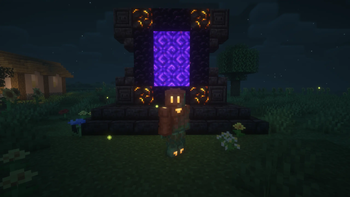

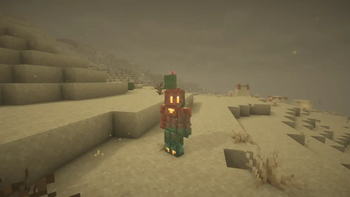

Fine-Tuned is a Vanilla+ modpack dedicated to keeping the Minecraft feel while still improving the game.
Features
Inventory Improvements
- Many items are now animated
- Inventory items now have particle effects
- Mouse Tweaks
- Each enchanting book, painting, and trimmed armor piece has unique textures in their inventory.
- Items now stay inside crafting tables, enchanting tables, and anvils whenever you leave their respective menus.
Graphical Improvements
- Automatically comes with BSL, Complementary, and Solas Shaders pre-installed. (BSL is the default, and my personal choice)
- Many blocks now have emissive textures
- New first-person animations
- Fresh Animations and addons
- New icons on tooltips and menus
- Many optimization mods
- Better explosion vfx
- More particle effects
- Chunks now smoothly load in rather than instantly appearing
- EMF player skin options in the mod menu, including enchanted and emissive pixels on player skins.
- Rain is now replaced by sandstorms in deserts
Audio Improvements
- More ambient sounds
- Sound physics (echoes, muffled sounds, etc.)
- Unique SFX for basically everything, including holding, breaking, placing, and moving items.
- Unique rain SFX for certain materials
Gameplay Improvements
- Improved F3 Menu
- New button on the main menu to quickly join the last played world/server.
- Improved terrain generation
- Improved elytra controls, allowing you to do cool tricks in the air.
- Fast leaf decay
- The ability to favorite worlds
- Adds the option to play on a borderless fullscreen window, letting you do stuff on other monitors or applications.
...and many other small tweaks!
The majority of these things can be fine-tuned to your liking in the mod menu.
*gallery images are downscaled to conform to Modrinth's image size limits.
Credits: Vanilla Tweaks: https://vanillatweaks.net/
Quick facts
- Edition: Minecraft Java
- File type: .jar
- Minecraft version listed: 1.21.11
- How to install: Install the matching mod loader (Forge, Fabric or NeoForge) for your Minecraft version. → Download the .jar. → Put it in the .minecraft/mods folder and launch that loader profile.
- Where to get it: Opens on Modrinth — not every file is mirrored on our own servers.
Install steps are the general flow for this file type — How to install Minecraft Java mods & modpacks walks through it step by step.
Verified by MCModsHub
- Downloads as Dunce's Fine-Tuned 1.0.0.mrpack
- Download size: 762 KB
- Download link checked 24 Aug 2026 — working
These come from our own check of the pack file, not from the source page.