
AuroraRT
AuroraRT is a premium, next-generation visual overhaul for Minecraft, built to deliver a distinct, atmospheric polar aesthetic and cinematic rendering…
⬇ Download on Modrinth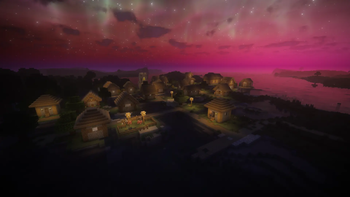
AuroraRT Shaderpack
Short Summary
AuroraRT is a premium, next-generation visual overhaul for Minecraft, built to deliver a distinct, atmospheric polar aesthetic and cinematic rendering quality. Modified from Complementary Shaders under the terms of the Complementary License Agreement 1.6, AuroraRT replaces standard environments with a curated visual identity featuring analytical sky scattering, dynamic aurora borealis, view-space raymarched reflections with advanced temporal denoising, physically based depth-of-field, and a fully calibrated ACES filmic color pipeline. Designed for Minecraft 1.21+ running Iris and Sodium, AuroraRT blends visual grandeur with robust performance profiles.
Detailed Description
Polar & Cosmic Skies
AuroraRT features a bespoke atmospheric system that shifts away from default color maps to establish a majestic, cool-toned environment:
- Analytical Rayleigh & Mie Scattering: A procedural sky dome calculating Rayleigh molecular scattering alongside a Henyey-Greenstein Mie phase function $P_{HG}$ for realistic solar halos that respond dynamically to atmospheric moisture.
- Ozone Twilight Sky Layers (Chappuis Absorption): Simulates sunlight absorption through the upper ozone layer using a wavelength-specific extinction coefficient. During sunsets and sunrises, this creates a beautiful pink-to-rose twilight arch fading into a deep teal zenith.
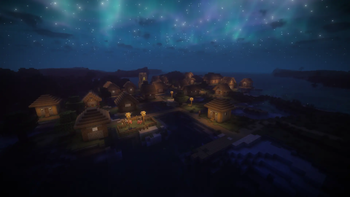
- Dynamic Aurora Borealis: Multi-colored auroral curtains (flowing from neon green and teal to cosmic magenta) project vertically into the night sky, animated with a stable curl noise warp and a slow, majestic drift.
- Cosmic Parallax Nebulae & Twinkling Stars: Procedural, multi-layer gaseous nebulae drift across independent parallax matrices. Stars are rendered as crisp, circular pinpricks of light rather than square blocks, twinkling with independent three-channel color offsets.
Volumetric Atmospherics
- Exponential Height Fog: Implements an analytical integral of exponential density over the view ray. Fog gathers realistically in low-lying valleys and thins out naturally as you ascend, shifting colors dynamically across biomes (such as a dusty gold in deserts, grey-blue in the Pale Garden, and cyan-white on snowy peaks). Fog density scales down on clear nights to open up the stars.
- Beer-Powder Volumetric Clouds: Fluffy, self-shadowing volumetric clouds calculated using a Beer-Powder multiple-scattering model. This creates highly detailed cloud volumes with bright silver linings around the sun or moon, free of high-frequency coordinates warping.
- Nether Biome Storms: Volumetric dust and fog colors transition dynamically based on your coordinates in the Nether (deep crimson in Crimson Forests, turquoise-teal in Warped Forests, ghostly blue-cyan in Soul Sand Valleys, and ashy purple-grey in Basalt Deltas).
- End Black Hole & Accretion Disk: Renders a gravitational lensing effect around the sun/moon vector in the End dimension, distorting surrounding ender stars and cosmic nebulae around a rotating accretion disk and photon ring.
Materials & Physics
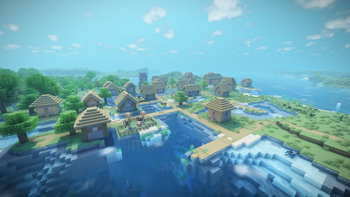
- Next-Generation Water Shader: A fully analytic procedural surface — five large directional wavetrains (wavelengths of roughly 4 to 19 blocks) summed into a rolling swell, with the surface normal taken directly from the analytic height gradient. Because there is no high-frequency normal-texture detail, the surface stays smooth at every scale and is free of the sub-pixel specular shimmer/grain that plagues texture-sampled water; additional distance- and grazing-angle flattening resolves far water into a clean mirror. Deep water uses spectral Beer-Lambert absorption to fade from pale teal shorelines into rich indigo depths, adds volumetric in-scattering so the water column reads as a lit medium rather than a darkening filter, and uses a physically based Schlick fresnel (water IOR 1.33). Surfaces feature sun specular glints derived from the wave gradient, backlit wave-crest subsurface scattering, and dynamic foam on both shorelines and wave crests. The underwater environment adds physically modeled single-scattering volumetric light shafts that dynamically match biome-specific water colors, animated seafloor caustics, a seamless horizon transition (eliminating artificial vertical borders), real-time transmission of the sun, moon, and sky dome through the water surface based on depth, and depth-limited volumetric god rays with dynamic 3D current noise simulating floating organic particles.
- Snow, Sand & Ice Realism: Snow blocks, sand blocks, and snowy world overlays implement a physically based subsurface scattering model (
subsurfaceMode = 4) that softens normal shading contrast and adds a backlit glow. High-frequency procedural micro-crystal normal maps cover snow surfaces, embedded with twinkling sparkles that modulate slowly over a 23-bit integer bitmask hash. Ice and snow sparkles are softened and fade over distance to ensure a smooth, noise-free appearance. - Iridescent Translucents: Clear glass features fresnel opacity and subtle iridescence, while stained glass blocks exhibit high backlit saturation and iridescence.
- Nether Portal Vortex: Transformed with a noise-warped vortex spiral, 3D parallax sparkles, calibrated emission levels to prevent overexposure, and full block shadow voxelization.
- Integrated PBR (IntegratedPBR+): Enabled by default, offering auto-generated normal maps (bump-mapping) and coated textures (dust details) across default blocks without requiring external PBR resource packs.
Lighting & Path Tracing
- Software Path Tracing Engine: A physically rigorous, real-time software path tracer calculated dynamically over the voxelized landscape using cosine-weighted hemisphere sampling and ray-marched secondary bounce evaluation.
- Voxel Global Illumination (Voxel GI): Adds real-time diffuse indirect lighting (GI) and ambient occlusion (voxel AO) generated dynamically from the voxelized scene, calculating bounce transfer from glowing blocks and sky illumination onto surrounding surfaces.
- Jitter-Rotated Shadows with Uniform Vogel Disk Sampling: Shadow maps are sampled using a mat2 rotation matrix driven by Interleaved Gradient Noise. PCF samples are distributed via a uniform Vogel disk distribution (
pow(r, 1.1)) to minimize subpixel temporal dither noise. It features slope-scaled and distance-scaled PCF filtering offsets to dynamically smooth out low-resolution shadow map pixels at grazing angles and in the distance, backed by a slope-scaled shadow bias to completely eliminate shadow acne without peter-panning. - Warm Cozy Blocklight: Torch and blocklight emissions are shifted to a warm peach/golden amber, contrasting beautifully against cool night atmospheres.
- Volumetric Godrays: Volumetric light shafts are shaped using a forward-scattering Henyey-Greenstein phase function. At night, light shafts are dynamically colored by the aurora borealis, streaming green, teal, and magenta rays down onto the landscape.
- Advanced Color Tracing (ACT): Voxel-based floodfill lighting enables colored blocklight emissions (such as colored candle lighting) and light-leaking corrections in caves.
Reflections
- World-Space Player Reflections (WSR): Captures the player's vertex coordinates and UVs in the shadow pass, storing them in a layout-conformed SSBO (
playerVerticesSSBO) and caching the player's skin into a dedicated atlas image (playerAtlas_img). This allows the ray-tracing pass to intersect and shade the player model dynamically in reflective surfaces (water, metals, ice). - View-Space Raymarched Reflections (SSR): Employs perspective-correct 3D raymarching in view space with binary step refinement, preventing the geometric stretching and distortion artifacts typical of 2D screen-space raymarching.
- Ray Reconstruction (Denoising): Reprojects reflections temporally with an 86% history retention and strict depth/normal validation. Banding is smoothed out by an edge-preserving bilateral spatial filter that scales with the quadratic power of roughness, early-outing on perfect mirror surfaces to conserve GPU bandwidth.
- Roughness-Jittered Glossy Reflections: Perturbs reflection vectors inside a roughness-scaled cone using a spatio-temporal dither, resolving into glossy reflections on rough metals, wet blocks, and glazed terracotta.
Post-Processing & Camera
- ACES Filmic Tonemapping: Selectable alongside Lottes, Krzysztof Narkowicz's ACES curve fit provides a punchy, high-contrast cinematic film response. It is integrated with a dynamic contrast slider and targeted saturation/vibrance boosts to preserve color richness.
- Dreamy Ambient Bloom: Bloom weights are shifted towards large-scale blur tiles (LOD 4 to 8) while suppressing sharp highlights, wrapping torches, lava, and glowing ores in a soft, dreamy mist.
- Cinematic Depth of Field (DOF): Simulates physical lens optics in linear space. Foreground objects blur rapidly (macro focus) while background blur is capped to preserve scene context. Blur samples are distributed using a dither-rotated Fibonacci spiral (up to 64 samples) with settings for polygonal aperture blades (5 to 8 blades), anamorphic squeeze, cat's eye lens vignetting, specular highlight boosts, and depth-aware silhouette bleed prevention.
- Cinematic Photo Mode: A dedicated toggle that disables TAA subpixel jitter and history blending to completely eliminate ghosting and motion blur during high-resolution screenshot capture. It automatically hides block selection outlines, leashes, and debug lines, forcing max DOF quality (64 samples) and silhouette bleed prevention.
Performance & Customization Profiles
AuroraRT provides 9 pre-configured quality profiles tailored for different hardware setups, allowing players to scale rendering features from maximum performance to fully path-traced realism.
The 9 Profiles at a Glance
- Potato: Maximum performance optimization. Disables shadows, voxel blocklighting, and block reflections while maintaining the core polar/cosmic color palette.
- Very Low: Introduces low-resolution real-time shadows at a 4-chunk rendering distance, with basic water reflections.
- Low: Scales real-time shadows to a 6-chunk distance, upgrades water reflections to screenspace raymarching (Medium), and enables basic block specular highlights.
- Medium: Extends shadow distance to 8 chunks, enables Fast Approximate Anti-Aliasing (FXAA), and introduces low-quality volumetric light shafts.
- High (Default): The standard intended experience. Features medium shadow quality over 10 chunks, high-quality PBR block reflections, 8-chunk voxel blocklight (Advanced Color Tracing), volumetric clouds, and entity shadows.
- Very High: Upgrades shadow distance to 12 chunks, switches detail/cloud quality to High, enables 8x anisotropic texture filtering, and retains 8-chunk voxel blocklight.
- Ultra: The highest standard preset. Delivers high-quality shadows over 16 chunks, 16-chunk voxel blocklight, 8x anisotropic filtering, and enables full World-Space Reflections (WSR).
- Cinematic: The ultimate visual experience, designed for high-end GPUs or high-resolution screenshot captures. Maxes out shadow distance to a massive 32 chunks, voxel blocklight to 32 chunks, anisotropic filtering to 16x, shadow casting to Full block-entities, and elevates SSAO to High.
- Path Traced: Enables the full real-time software path tracer (cosine-weighted hemisphere sampling with secondary bounces) on top of Voxel GI/AO, 16-chunk colored voxel blocklight, hybrid World-Space + Screen-Space Reflections (WSR+SSR), and world-space player reflections. Shadows and detail match Ultra (high-quality shadows over 16 chunks, 16x anisotropic filtering). Aimed at high-end GPUs and screenshot capture.
Configuration Reference Matrix
| Feature | Potato | Very Low | Low | Medium | High (Default) | Very High | Ultra | Cinematic | Path Traced |
|---|---|---|---|---|---|---|---|---|---|
| Real-Time Shadows | OFF | Very Low | Very Low | Low | Medium | Medium | High | High | High |
| Shadow Distance | 2 Chunks | 4 Chunks | 6 Chunks | 8 Chunks | 10 Chunks | 12 Chunks | 16 Chunks | 32 Chunks | 16 Chunks |
| Water Reflections | Potato | Low | Medium | Medium | Medium | Medium | Medium | Medium | Medium |
| Block Reflections | OFF | OFF | Low | Low | High | High | High | High | High |
| Volumetric Light Shafts | OFF | OFF | OFF | Low | Medium | Medium | High | Very High | High |
| SSAO Quality | Medium | Medium | Medium | Medium | Medium | Medium | Medium | High | Medium |
| Temporal AA (TAA) | ON | ON | ON | ON | ON | ON | ON | ON | ON |
| Anti-Aliasing (FXAA) | OFF | OFF | OFF | ON | ON | ON | ON | ON | ON |
| Detail Quality | Potato | Potato | Medium | Medium | Medium | High | High | High | High |
| Cloud Quality | Low | Low | Medium | Medium | Medium | High | High | High | High |
| Texture Filtering (AF) | OFF | OFF | OFF | 4x | 8x | 8x | 16x | 16x | 16x |
| Advanced Color Tracing | OFF | OFF | OFF | 4 Chunks | 8 Chunks | 8 Chunks | 16 Chunks | 32 Chunks | 16 Chunks |
| Voxel GI / AO | OFF | OFF | OFF | OFF | OFF | OFF | ON | ON | ON |
| World-Space Reflections | OFF | OFF | OFF | OFF | OFF | OFF | ON | ON | ON |
| Software Path Tracing | OFF | OFF | OFF | OFF | OFF | OFF | OFF | OFF | ON |
| Entity Shadows | OFF | OFF | OFF | OFF | Regular | Regular | Regular | Full | Regular |
Custom AuroraRT Settings Screen
The shader options menu is completely reorganized and custom-labeled in the Iris configuration GUI to provide a bespoke user experience:
- §ePerformance Tuning§r: Manage pre-configured presets (Potato to Ultra) and toggle specific performance-scaling options.
- §bCinematic & Camera§r: Configure ACES Filmic vs. Lottes tone curves, dynamic bloom, TAA filters, and physical Depth of Field options.
- §dShadows & Ambient Lighting§r: Tweak PCF filter offsets, slope-scaled biases, warm amber blocklight, and ambient light cycles.
- §cAurora Skies & Atmospherics§r: Tweak dynamic auroral curtains, star scintillation, cosmic nebulae, height fog, and storm limits.
- §aPBR & Surface Materials§r: Configure Integrated PBR+ bump-mapping, procedural water waves, and sparkling snow/ice crystals.
- §7Extra Features§r: Toggle block outline styles, moon phase lighting influences, hand swaying, and debug variables.
Technical Compatibility & Exclusions
Supported Specifications
- Minecraft Version: 1.21+ (and compatible newer versions).
- Required Mod Loaders: Iris Shaders and Sodium (Fabric/Quilt).
- Hardware: Compatible with modern NVIDIA GeForce, AMD Radeon, and Intel Arc GPUs.
Verified Exclusions & Unsupported Features
To ensure complete transparency and prevent configuration issues, the following systems are explicitly unsupported or excluded:
- Hardware-Accelerated Ray Tracing (Vulkanite / Dirt RT): AuroraRT is an OpenGL-based shaderpack and does not support hardware-accelerated Vulkan path-tracing pipelines.
- Vanilla Core Shaders (VPT-1.3.0): Vanilla core shaders are disabled by Iris when a shaderpack is active, making VPT integrations incompatible.
- VTXS Screen-Space Traversal: Hierarchical Hi-Z bitmask raymarching is not included due to copyright restrictions.
- Contact-Hardening PCSS Shadows: Temporarily disabled due to stepping artifacts under shadow map resolution limits.
- Screen-Space Lens Raindrops: Removed from post-processing to maintain high performance and clear viewports.
- Apple Silicon M-Series ACT: Advanced Color Tracing (voxel lighting) is disabled on Apple GPUs due to driver limitations regarding vertex shader image writes.
- OptiFine ACT / Reflection Resolution: Voxel colored lighting is disabled on OptiFine due to lack of image/SSBO support. Dynamic reflection resolution requires Iris 1.7+ and will display an error message on OptiFine.
Legal Credits
AuroraRT is distributed as a Modified Pack under Section 1.3 of the Complementary License Agreement 1.6 (included as License.txt within the shader pack).
- Original Pack: Complementary Shaders by Complementary Development.
- Official Complementary Site: https://www.complementary.dev
- Edition: Minecraft Java
- File type: .zip (resource pack)
- Minecraft version listed: 26.2
- How to install: Download the .zip resource pack — do not unzip it. → Put it in .minecraft/resourcepacks. → Enable it in Options → Resource Packs.
- Where to get it: Opens on Modrinth — not every file is mirrored on our own servers.
Install steps are the general flow for this file type — see the MC Java Mods guides for the full walkthrough.
- Downloads as AuroraRT.zip
- Download size: 521 KB
- Download link checked 7 Sept 2026 — working
These come from our own check of the pack file, not from the source page.