
EzSaturation
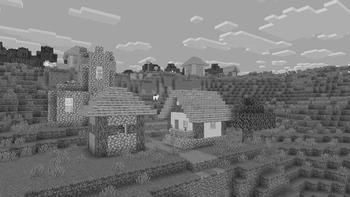
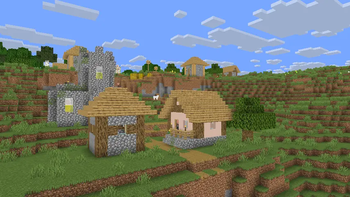
EzSaturation is an ultra-lightweight shader pack for Iris Shaders that adds a configurable Saturation Slider, allowing you to adjust the color intensity of Minecraft without affecting lighting, shadows, or overall performance.
Designed to be simple and efficient, EzSaturation only modifies color saturation, making it ideal for players who want a more vibrant or more muted visual experience while maintaining the game's original look.
FeaturesFeatures Adjustable saturation slider Extremely lightweight with minimal performance impact Does not modify lighting, shadows, reflections, or other visual effects Compatible with Iris Shaders Simple plug-and-play installation Saturation Showcase
- The saturation slider supports the following values:
0.0 0.05 0.10 0.15 0.20 0.25 0.30 0.35 0.40 0.45 0.50 0.55 0.60 0.65 0.70 0.75 0.80 0.85 0.90 0.95 1.00 1.05 1.10 1.15 1.20 1.25 1.30 1.35 1.40 1.45 1.50 1.55 1.60 1.65 1.70 1.75 1.80 1.85 1.90 1.95 2.00 3.00 100
- Slider Reference Value Result 0.0 Completely desaturated (grayscale) 1.0 Default Minecraft saturation 2.0 Twice the default saturation 3.0 Extremely vibrant colors 100 Maximum saturation for experimentation Supported Versions Minecraft 1.17 through 1.21.8 (Iris 1.7.x–1.8.x / Minecraft 1.17–1.21.8) Iris Shaders v1.7.0+ (including Iris 1.8.x) GLSL Version 120 and above
Note: Version support may expand with future updates.
- Edition: Minecraft Java
- File type: .zip (resource pack)
- Minecraft versions listed: 1.17, 1.17.1, 1.18
- How to install: Download the .zip resource pack — do not unzip it. → Put it in .minecraft/resourcepacks. → Enable it in Options → Resource Packs.
- Where to get it: Opens on Modrinth — not every file is mirrored on our own servers.
Install steps are the general flow for this file type — see the MC Java Mods guides for the full walkthrough.
- Downloads as EzSaturation.zip
- Download size: 6 KB
- Download link checked 19 Aug 2026 — working
These come from our own check of the pack file, not from the source page.