
Nether and End Portal Lock System
Bedrock add-on listed for Minecraft 26.x. Download on the author's site.
This script gives server owners and admins a simple way to restrict access to the Nether and the End, without needing commands, plugins, or third-party…
⬇ Download on CurseForge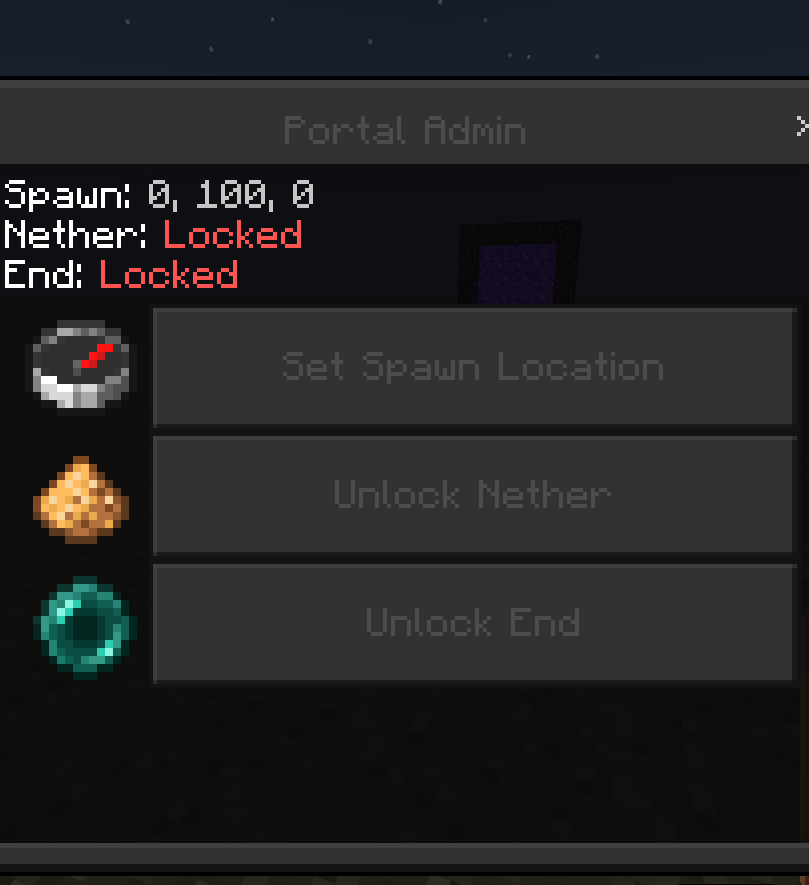
Nether and End Portal Lock System
Take full control of dimension travel on your Bedrock server.
This script gives server owners and admins a simple way to restrict access to the Nether and the End, without needing commands, plugins, or third-party tools. Everything is managed through a clean, easy-to-use in-game menu.
How it works
By default, both the Nether and the End are locked. If a player steps into a portal while it's locked, they're instantly and safely redirected to a custom spawn point set by an admin, no falling into the void, no landing in unloaded terrain, no random "highest block" teleports.
Features
- Portal Locking — Toggle the Nether and End independently. Lock one, both, or neither at any time.
- Custom Spawn Point — Set an exact X, Y, Z coordinate for where locked-out players get sent. No more relying on the world's default spawn or risky auto-placement.
- Admin-Only Menu — Only players tagged
admincan open the control panel, keeping it out of reach of regular players. - One-Item Access — Simply use a Clock while tagged as admin to instantly open the menu. No commands to memorize.
- Live Status Display — The menu shows your current spawn coordinates and whether each portal is locked or unlocked at a glance, color-coded for clarity.
- Instant Feedback — Players who hit a locked portal get a clear on-screen message explaining why they were redirected.
Setup
- Install the behavior pack and enable it on your world.
- Tag your admin(s):
/tag @s add admin - Give them a clock:
/give @s clock - Use the clock in-game to open the Portal Lock Admin menu and configure your spawn point and lock settings.
Perfect for
- Adventure maps and custom game modes where players shouldn't reach the Nether/End early
- Minigame servers that don't want players wandering into other dimensions, limited progression servers where portal access is unlocked as a reward
- Any world where you want tighter control over where players can go
- Edition: Minecraft Bedrock
- File type: .mcpack or .mcaddon
- Minecraft version listed: 26.30
- How to install: Download the .mcpack or .mcaddon file. → Open it — Minecraft imports it. → In your world: Behavior Packs → Available → Activate, then the same under Resource Packs.
- Where to get it: Opens on CurseForge — not every file is mirrored on our own servers.
Install steps are the general flow for this file type — How to install Minecraft Bedrock addons & mods walks through it step by step.
Nether and End Portal Lock System is a free Minecraft Bedrock addon. Compatible with Minecraft 26.30. Downloaded 419 times (via CurseForge). Download it and open it directly in the game.