
Audio Improvements
Java mod listed for Minecraft 1.20–1.21. Downloads from the MC Java Mods app on Android.
I don't know my version or loader


Note:
Currently, due to lack of time, I'm only occasionally working on the Fabric & Forge versions for 1.20.1.
Mod versions for other Minecraft versions (& NeoForge) have been released but you may encounter some issues, as they are outdated.
I plan to make an updated version of the mod for latest Minecraft, but no ETA!
Features
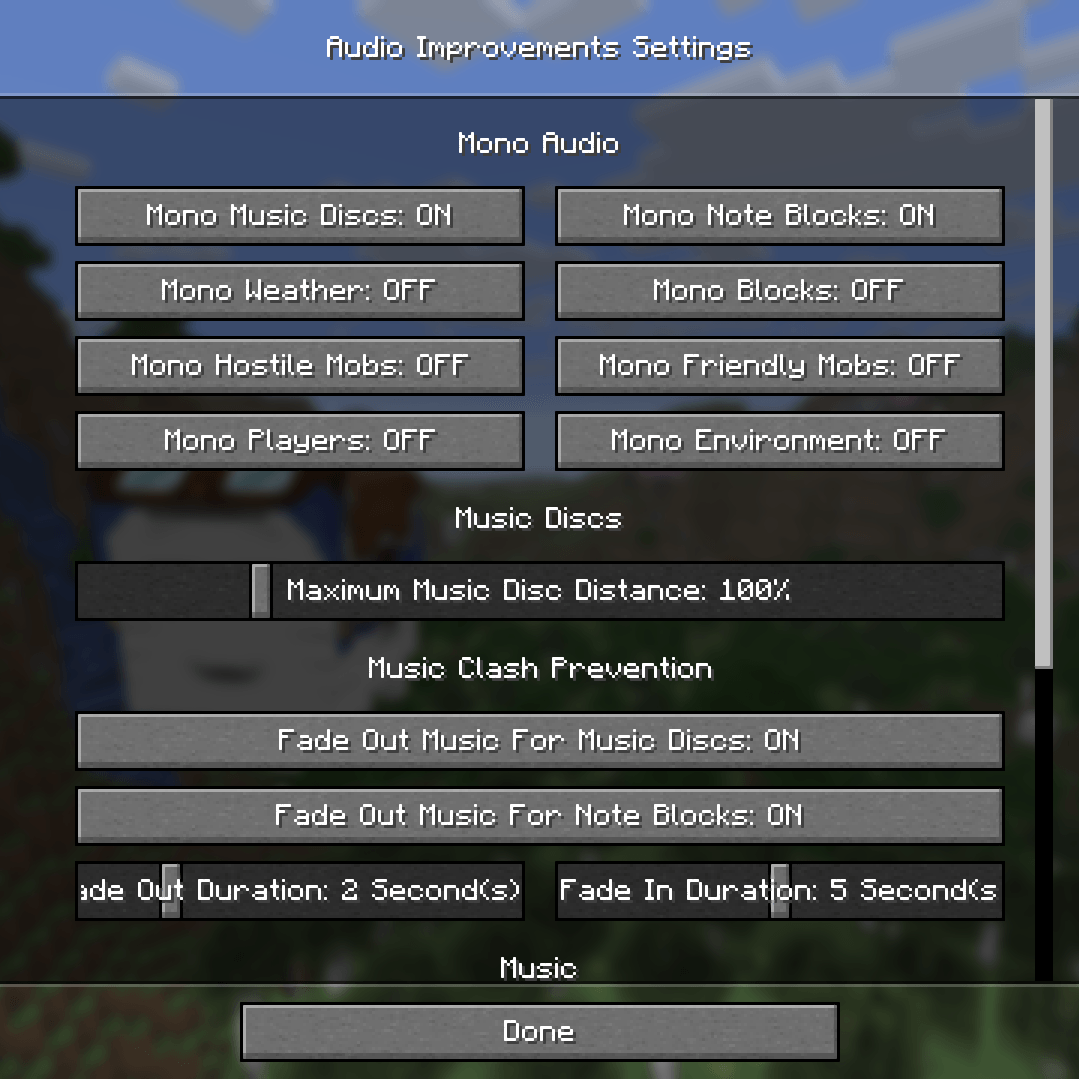
Mono audio option
-> Stops sounds from being affected by the direction you're looking in while still becoming quieter when further away
-> Options for different categories: Jukeboxes, note blocks, weather, blocks, hostile mobs, neutral mobs, players, ambience/environment (only mono jukeboxes and note blocks enabled by default)
Music disc distance multiplier
-> 50% - 300% or global
(100% by default)
Music clash prevention
-> Fades out the regular game music while a music block is playing near you
-> Toggleable seperately for jukeboxes and note blocks (both enabled by default)
-> Customizable fade in/out durations
Music repeat prevention
(enabled by default)
-> Prevents the same music piece from playing multiple times in a row
Custom music frequency
(disabled by default)
-> Replaces the vanilla music frequencies with a customizable random interval
-> Option whether this should also affect the main menu music
Speed of sound simulation
-> Delays sounds based on how far their source is from you
-> Options:
- Thunder sounds (100 blocks/second by default)
- Explosion sounds (100 blocks/second by default)
- All other sounds (disabled by default)
Doppler effect
(100% intensity by default)
-> Pitches sounds up/down depending on how fast the distance between you and them changes
-> Doesn't work on mono sounds due to sound engine limitations
Fix for vanilla bug MC-98200
(Sound category volume sliders not affecting the volume of certain sounds at higher percentages - e.g. music discs already reached 100% volume at 25% category volume)
Stereo spatialization fix
(enabled by default)
-> Fixes resource pack and mod audio that incorrectly uses stereo files for in-world sounds by converting them to mono, so the sound engine can then correctly position it instead of always playing directly at the listener
Settings
This mod is made to be highly customizable!
The settings can be opened via the Mod Menu mod on Fabric, the inbuilt mod lists on NeoForge and Forge or generally by using the command "/audioimprovements".
- Edition: Minecraft Java
- File type: .jar
- Minecraft versions listed: 1.20.1, 1.20, 1.21.8
- How to install: Install the matching mod loader (Forge, Fabric or NeoForge) for your Minecraft version. → Download the .jar. → Put it in the .minecraft/mods folder and launch that loader profile.
- Where to get it: Opens on CurseForge — not every file is mirrored on our own servers.
Install steps are the general flow for this file type — How to install Minecraft Java mods & modpacks walks through it step by step.
- Ships as Audio Improvements v1.1 - NeoForge 1.21.6+.jar — drop this file into the mods folder
- Download size: 57 KB
- Download link checked 7 Oct 2026 — working
These come from our own check of the pack file, not from the source page.