
Elite Holograms
Java mod listed for Minecraft 1.19–1.21. Downloads from the MC Java Mods app on Android.
Elite Holograms - floating, fully customizable text for your server or single-player world. Create, edit, and style multi-line holograms, item displays…
I don't know my version or loader


Elite Holograms

Elite Holograms is a lightweight Minecraft mod for creating, managing, and customizing floating text (holograms) right from in-game commands. Perfect for server info, leaderboards, waypoints, shops, live stats, rules, and decorative text.
Works in single-player worlds, modpacks, and on multiplayer servers. It runs server-side, so on a server your players join with a vanilla client and still see everything. No external placeholder API, no fuss. Just drop it in and start building.
Inspired by Advanced Holograms. Supports Forge (1.19.2, 1.20.1) and NeoForge (1.21.1, 26.1).
For full setup and command details, see the Wiki.
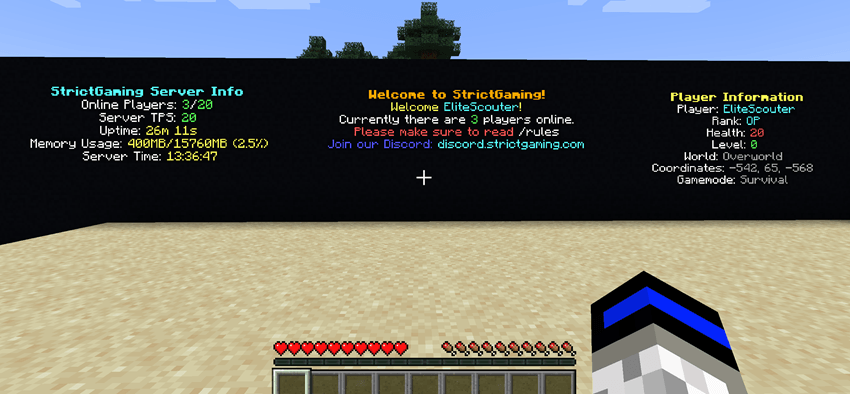
Why Elite Holograms?
- Plays everywhere - single-player worlds, modpacks, and multiplayer servers all supported.
- Server-side only - on a server, players join with a vanilla client and still see everything.
- Modpack-friendly - drop it into any Forge or NeoForge pack with no client-side setup.
- No dependencies required - the placeholder system is built in, no PlaceholderAPI needed.
- Persistent - holograms survive restarts with safe, synchronous saves on shutdown.
- Beautiful out of the box - MiniMessage gradients, hex colors, and rainbows on every line.
- Built for servers - runs on its own manager thread with graceful shutdown and minimal overhead.
What's New in 1.1.0
- Backlights -
/eh backlight <id> <on|off|toggle> [height 1-10]raises a column of full-brightminecraft:lightblocks behind a hologram so it stays readable at night. Backlights follow the hologram when it moves, persist across restarts, and never overwrite player builds (only air and water cells are lit). - Scoreboard Themes - restyle leaderboards with named themes. Ships with
default,ocean,blood,mono,gold, andrainbow, all editable inconfig/eliteholograms/scoreboard_themes.json. Add your own to match your server brand. /eh settheme <id> <theme>- re-skin an existing scoreboard instantly, no need to recreate it. Both arguments tab-complete.- Smarter tab completion - the
<objective>argument now suggests every objective registered on the server, and[theme]suggests available theme names. - Live reload -
/eh reloadrefreshes scoreboard themes from disk without a server restart. - NeoForge 26.1 edition - full feature parity on Minecraft 26.1, built on Java 25.
Key Features
- MiniMessage & Gradients - full Kyori MiniMessage support for gradients, hex colors, rainbows, and rich formatting on every line (legacy
&codes work too). - Persistent Holograms - survive restarts with synchronous saves on shutdown.
- Multi-Line Management - add, insert, set, and remove individual lines.
- Item Holograms -
/eh createitemspawns a floating item above the caption, ideal for shops and showcases. - Scoreboard Leaderboards - display the top players from any objective with custom row counts, refresh intervals, and themes. Online and offline players included; time and number objectives are auto-formatted.
- Animated Lines - rotate text on a timer for countdowns, tips, and announcements.
- Backlights - light up holograms at night without touching the surrounding build.
- Position Control - create at your location, teleport to any hologram, and nudge vertically with
/eh movevertical. - Built-in Placeholders - real-time server and player stats with no external API.
- Advanced Permissions - integrates with LuckPerms and FTB Ranks, with OP level 2 fallback and granular nodes.
- Tab Completion Everywhere - Brigadier suggestions for IDs, objectives, themes, and more.
- Nearby Discovery -
/eh nearlists holograms around you. - Cross-Platform - Forge 1.19.2, Forge 1.20.1, NeoForge 1.21.1, and NeoForge 26.1, in single-player, modpacks, or servers.
Command Reference
| Command | Description |
|---|---|
/eh create <id> <text...> |
Create a hologram at your location |
/eh createitem <id> <item> <text|line|line> |
Create a hologram with a floating item on top |
/eh createscoreboard <id> <objective> [topCount] [interval] [theme] |
Create a leaderboard from a scoreboard objective |
/eh settheme <id> <theme> |
Restyle an existing scoreboard hologram |
/eh addline | setline | insertline | removeline ... |
Manage individual lines |
/eh animateline <id> <line#> <interval> <frame1|frame2|...> |
Animate a line on a timer |
/eh backlight <id> <on|off|toggle> [height 1-10] |
Toggle a light column behind a hologram |
/eh movehere <id> |
Move a hologram to you |
/eh movevertical <id> <up|down> <amount> |
Nudge a hologram up or down (e.g. up 1.5) |
/eh teleport <id> |
Teleport to a hologram |
/eh list / /eh near [page] / /eh info <id> |
Browse and inspect holograms |
/eh delete <id> / /eh reload |
Remove a hologram or reload from storage |
Placeholders
No external API needed. Placeholders update in real time, including per-viewer player values.
Server-wide: %players%, %maxplayers%, %tps%, %uptime%, %memory%, %server_time%
Player-specific: %player%, %player_rank%, %player_health%, %player_level%, %player_world%, %player_coords%, %player_gamemode%
Example:
/eh create welcome <gradient:#00FFA3:#00B7FF>Welcome %player%!</gradient>
/eh addline welcome &7Your rank: &e%player_rank%
/eh addline welcome &7Online: &a%players%&7/&a%maxplayers%  TPS: &a%tps%
Permissions
Elite Holograms auto-detects LuckPerms and FTB Ranks, and falls back to OP level 2 when neither is present. Console and command blocks always have full access.
Granular nodes let you hand out exactly what you want without making anyone an operator:
eliteholograms.create, eliteholograms.delete, eliteholograms.edit, eliteholograms.list, eliteholograms.info, eliteholograms.near, eliteholograms.teleport, eliteholograms.backlight, eliteholograms.admin
See the Permissions Guide for group setups and examples.
Installation
- Download the build matching your loader and Minecraft version (Forge 1.19.2 / 1.20.1, NeoForge 1.21.1 / 26.1).
- Drop the JAR into your
modsfolder - your single-player instance, modpack, or server all work the same way. - (Optional) Install LuckPerms or FTB Ranks for granular permissions on a server.
- Launch the game or restart the server, then run
/ehto get started.
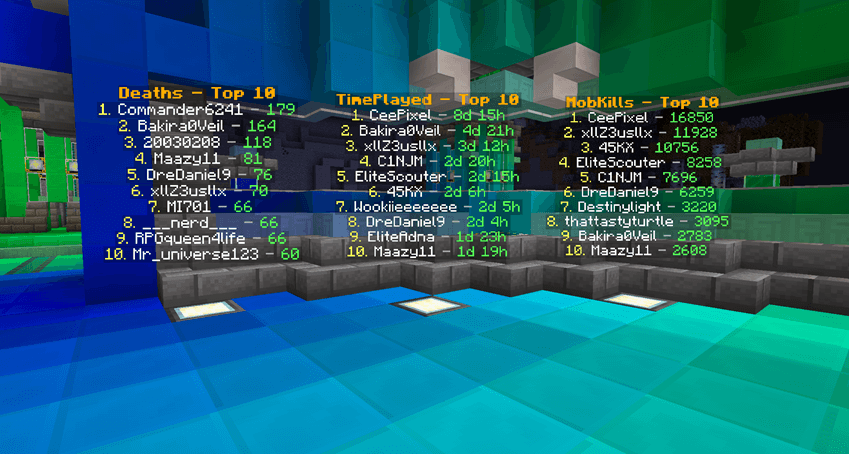
Built for Forge 1.19.2 / 1.20.1 and NeoForge 1.21.1 / 26.1.
- Edition: Minecraft Java
- File type: .jar
- Minecraft versions listed: 1.21.1, 1.20.1, 1.19.2
- How to install: Install the matching mod loader (Forge, Fabric or NeoForge) for your Minecraft version. → Download the .jar. → Put it in the .minecraft/mods folder and launch that loader profile.
- Where to get it: Opens on CurseForge — not every file is mirrored on our own servers.
Install steps are the general flow for this file type — How to install Minecraft Java mods & modpacks walks through it step by step.
- Ships as EliteHolograms-1.20.1-1.1.1.jar — drop this file into the mods folder
- Download size: 822 KB
- Download link checked 28 Oct 2026 — working
These come from our own check of the pack file, not from the source page.