Farming Theme (Legendary Tooltips)
Java resource pack listed for Minecraft 1.16–1.21. Downloads from the MC Java Mods app on Android.
⬇ Download on CurseForgeThis is a resource pack for the mod "Legendary Tooltips" by Grend_G.
This resourcepack makes the tooltip themed around Farming. It was made for my modpack "Farming Valley", but it can be used in any modpacks. There is 4 different styles_ of tooltips, that can be used. This resourcepack can be used in __any pack. The mod makes it so when a player hovers over a item it will display a special style for the tooltip. Given it a completely new _look. Each style is themed around a season (winter, spring, summer, autumn)
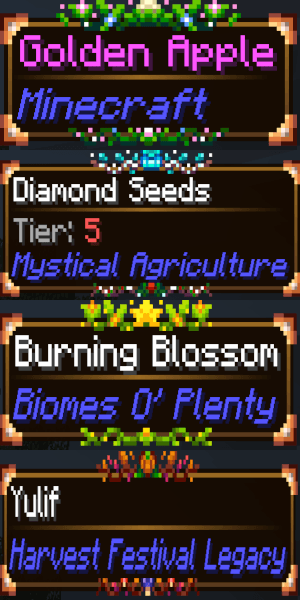
The 4 styles:
Level0: (Spring)
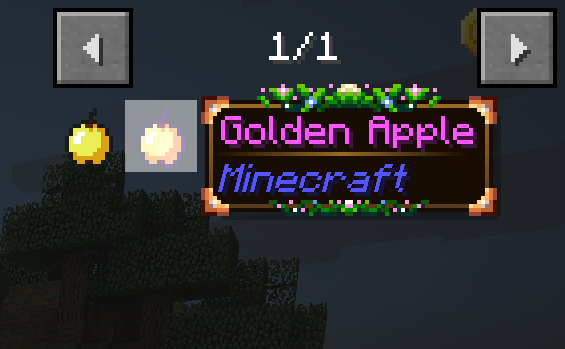
Level1: (Summer)

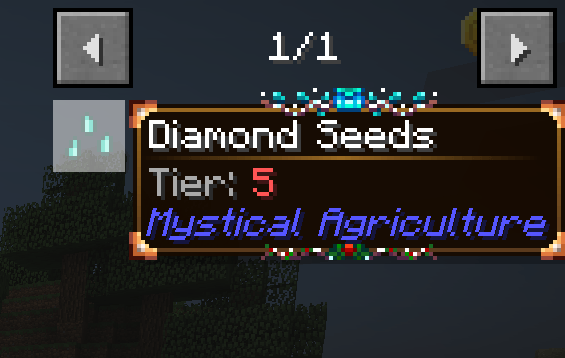
Level2: (Autumn)

Level3: (Winter)
All:
How to use:
* Add the resourcepack.
* Then go to the config of "Legendary Tooltips" called "legendarytooltip-common.toml", open it.
* Scroll down to [client.definitions]
* Here you can set level0, level1, level2 and level3 entries.
Example:
level0_entries = ["@minecraft"]
level1_entries = ["@biomesoplenty"]
level2_entries = ["@harvestfestival"]
level3_entries = ["@mysticalagriculture"]
This makes it so all Minecraft items, uses the level0 style (Which is the spring theme), and all items from biomes o plenty uses level1 style (summer), harvest festival is level2 which is autumn, and then mystical agriculture is level3 which is winter. Read the config file, in Legendary Tooltips, to see how to add each style to a entry. Scroll up to see which level, is which style.
Drawn by amaicitrus / Yanchan.
- Edition: Minecraft Java
- File type: .zip (resource pack)
- Minecraft versions listed: 1.21.1, 1.21, 1.20.1
- How to install: Download the .zip resource pack — do not unzip it. → Put it in .minecraft/resourcepacks. → Enable it in Options → Resource Packs.
- Where to get it: Opens on CurseForge — not every file is mirrored on our own servers.
Install steps are the general flow for this file type — How to install Minecraft Java resource packs walks through it step by step.
Farming Theme (Legendary Tooltips) is a free Minecraft Java resourcepack. Compatible with Minecraft 1.21.1, 1.21, 1.20.1, 1.16.5. Downloaded 3,731 times (via CurseForge). Download it and open it directly in the game.