
TerraForged
Java mod listed for Minecraft 1.16–1.18. Downloads from the MC Java Mods app on Android.
⬇ Download on CurseForge
About:
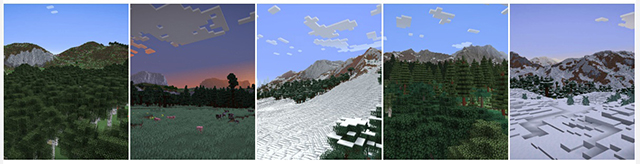
TerraForged is a world generation mod for Minecraft (Java Edition) that creates more immersive, inspiring worlds
to explore. It overhauls the vanilla generation system with all new terrain, better rivers,
custom biome features and tonnes of configuration options to boot!
Discord:
Installation:
1) Install forge for the target version of Minecraft (ie 1.15.2)
2) Add the TerraForged mod jar to your profile's mods folder
3) Select the 'TerraForged' world-type when creating a new world
FAQ:
1) "Will this work with other mods' biomes?"
Yes, it should do. When you select 'TerraForged' as the world type, it will look for all available
overworld biomes (vanilla & modded) and incorporate them into world-gen as best as possible.
2) "How can I use this on my server?"
You need to be running a Forge server. Simply add the TerraForged mod jar to your server's mods
folder and set level-type=terraforged in your server.properties file (do this before starting the server)
3) "Will this be ported to Fabric/Bukkit/Spigot/Sponge or old Minecraft versions?"
No. Other modders are welcome to do so though
Info For Mod Authors
- Biomes - if you'd like TerraForged to use your custom biomes in world-gen please see this information
- Blocks - if you'd like your custom blocks to show up in TerraForged's strata layers please see this information
- Edition: Minecraft Java
- File type: .jar
- Minecraft versions listed: 1.16.5, 1.18.2, 1.18.1
- How to install: Install the matching mod loader (Forge, Fabric or NeoForge) for your Minecraft version. → Download the .jar. → Put it in the .minecraft/mods folder and launch that loader profile.
- Where to get it: Opens on CurseForge — not every file is mirrored on our own servers.
Install steps are the general flow for this file type — How to install Minecraft Java mods & modpacks walks through it step by step.
TerraForged is a free Minecraft Java mod. Compatible with Minecraft 1.16.5, 1.18.2, 1.18.1, 1.16.4. Downloaded 11,791,487 times (via CurseForge). Download it and open it directly in the game.