
The Guild Mod (1.20.4, 1.20.1) – Quests, Adventures and Expeditions
Java mod listed for Minecraft 1.20. Downloads from the MC Java Mods app on Android.
⬇ DownloadThe Guild Mod is a Minecraft mod that adds quests, adventures and expeditions. Choose between 15 different professions (7 available at the moment) and embark on a journey of questing. A quest mod inspired by Bountiful.
Have you ever wanted to go on an adventure? Or maybe you’re more inclined for a stable life? Either way The Guild has got you covered.
Features:
- A quest is a set of randomly generated tasks usually accompanied by a corresponding reward based on said tasks.
- Quests are highly customizable through datapacks, with a solid base of defaults so you can start adventuring out of the box.
How to use:
Getting started:
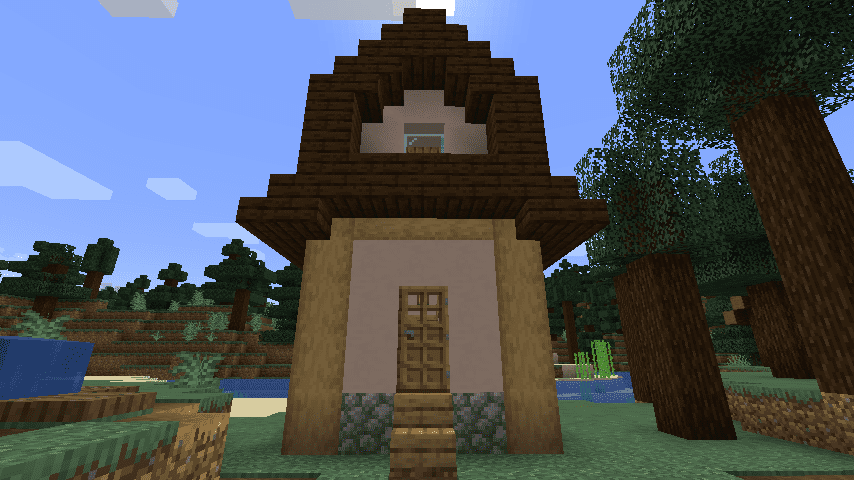
- To start, find a Guild Master in a plains village, and buy a Profession Licence.
- Here’s The Guild, a build found mainly in plains villages and more rarely in other ones. Here you can buy Professions Licences to start accepting quests or to expand your choices.
Quests screen:
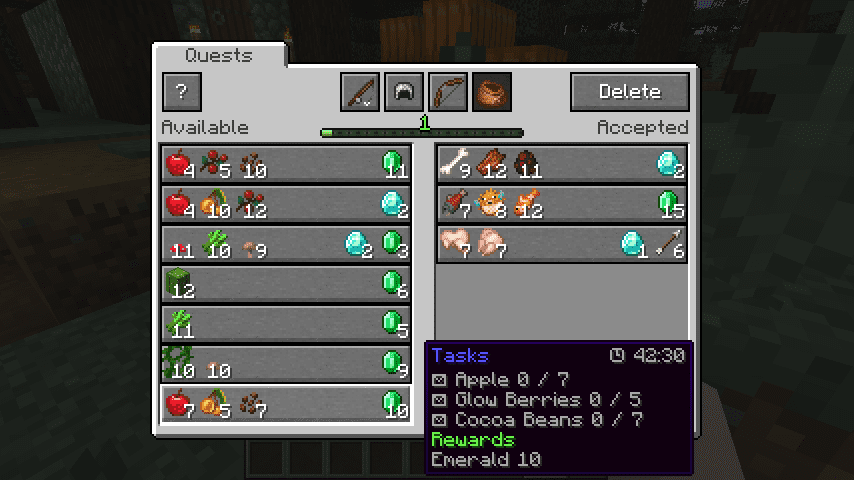
- Obtaining and using a licence will unlock the entire Questing system. To open the Quests Screen press the Guild Screen Key (J by default).
- The Quests Screen showing available quests (on the left) and accepted quests (on the right). Professions are also visible on the top.
The Guild Mod Download Links
For Minecraft 1.20.4
Fabric version: Download from Server 1 – Download from Server 2
For Minecraft 1.20.2
Fabric version: Download from Server 1 – Download from Server 2
For Minecraft 1.20.1
Fabric version: Download from Server 1 – Download from Server 2
For Minecraft 1.19.2
Fabric version: Download from Server 1 – Download from Server 2
For Minecraft 1.19.1
Fabric version: Download from Server 1
For Minecraft 1.19
Fabric version: Download from Server 1
For Minecraft 1.18.2
Fabric version: Download from Server 1 – Download from Server 2
For Minecraft 1.18.1
Fabric version: Download from Server 1
For Minecraft 1.17.1
Fabric version: Download from Server 1
- Edition: Minecraft Java
- File type: .jar
- Minecraft versions listed: 1.20.4, 1.20.1
- How to install: Install the matching mod loader (Forge, Fabric or NeoForge) for your Minecraft version. → Download the .jar. → Put it in the .minecraft/mods folder and launch that loader profile.
- Where to get it: In MC Java Mods, or directly above on this page.
Install steps are the general flow for this file type — How to install Minecraft Java mods & modpacks walks through it step by step.
- Downloads as 201978.mcaddon
- Download size: 1.3 MB
- Download link checked 29 Jul 2026 — working
- Mirrored on our own servers — the download does not depend on the original host
These come from our own check of the pack file, not from the source page.