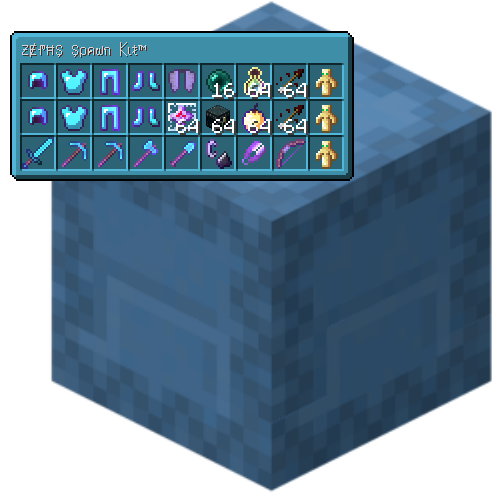
Shulker Tooltip
Java mod listed for Minecraft 1.16–1.21. File opened and checked on 29 Sep 2026; downloads from the MC Java Mods app on Android.
⬇ Download on CurseForgeHave you ever wanted to see what's in a shulkerbox without placing it to open it? With Shulker Tooltip you can! Move your cursor over a shulkerbox to see what's inside.
If you find any bugs please let me know.
Keys (configurable):
Left Alt - Show Tooltip. Press and hold this key to change the tooltip.
V - Toggle View. Press this key to toggle the Shulker Tooltip on or off.
N - Show Contents. A key for an experimental GUI that opens the shulkerbox.
This mod is client side only. Do not install it on servers.
I have not made a fabric version. And I likely never will.
You are free to use this mod in any modpack.
- Edition: Minecraft Java
- File type: .jar
- Minecraft versions listed: 1.21.6, 1.21.4, 1.21
- How to install: Install the matching mod loader (Forge, Fabric or NeoForge) for your Minecraft version. → Download the .jar. → Put it in the .minecraft/mods folder and launch that loader profile.
- Where to get it: Opens on CurseForge — not every file is mirrored on our own servers.
Install steps are the general flow for this file type — How to install Minecraft Java mods & modpacks walks through it step by step.
Shulker Tooltip is a free Minecraft Java mod. Compatible with Minecraft 1.21.6, 1.21.4, 1.21, 1.21.1 and newer. Downloaded 1,319,170 times (via CurseForge). Download it and open it directly in the game.