
Bansoko Mod (1.16.5, 1.12.2) – Useful Modpack Tool
Java mod listed for Minecraft 1.16. Downloads from the MC Java Mods app on Android.
⬇ DownloadBansoko Mod is a simple coremod that streamlines patching of mods. DON’T FORGET TO BACKUP YOUR TARGET JAR FILES FIRST!
How to use:
- Create a folder in
.minecraftnamedbansoukou. You can do this manually or run with this mod in the instance for it to create one. - In
/bansoukou, here is where you can define patches, where folders will represent the jar you want to patch with the names of the folders matching the jars inmods/.
It should look something like this:
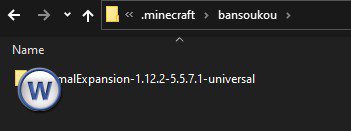
Match the jar file’s directory structure, and place whatever files you want replacing in the same relative paths, such as:
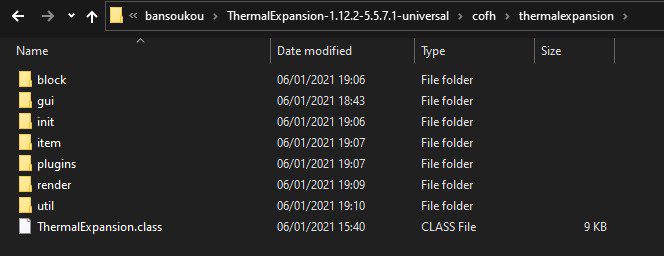
With the jar looking like:
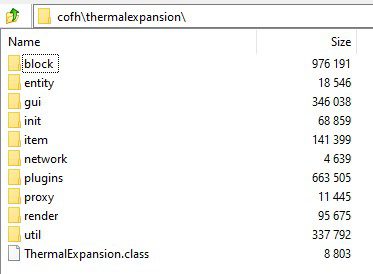
If you want to delete a file from the jar, you simply place an empty file with the same relative path name and Bansoukou will detect that and remove the respective file from the jar at runtime.
Bansoko Mod Download Links
For All Versions from Minecraft 1.12.2 to Minecraft 1.17.1
Forge version: Download from Server 1 – Download from Server 2
- Edition: Minecraft Java
- File type: .jar
- Minecraft version listed: 1.16.5
- How to install: Install the matching mod loader (Forge, Fabric or NeoForge) for your Minecraft version. → Download the .jar. → Put it in the .minecraft/mods folder and launch that loader profile.
- Where to get it: In MC Java Mods, or directly above on this page.
Install steps are the general flow for this file type — How to install Minecraft Java mods & modpacks walks through it step by step.
- Downloads as 202776.mcaddon
- Download size: 187 KB
- Download link checked 23 Jul 2026 — working
- Mirrored on our own servers — the download does not depend on the original host
These come from our own check of the pack file, not from the source page.