
Vault Filters
The author built this one for Minecraft 1.18.2 on Forge. On other versions it may install and then do nothing.
Vault Filters
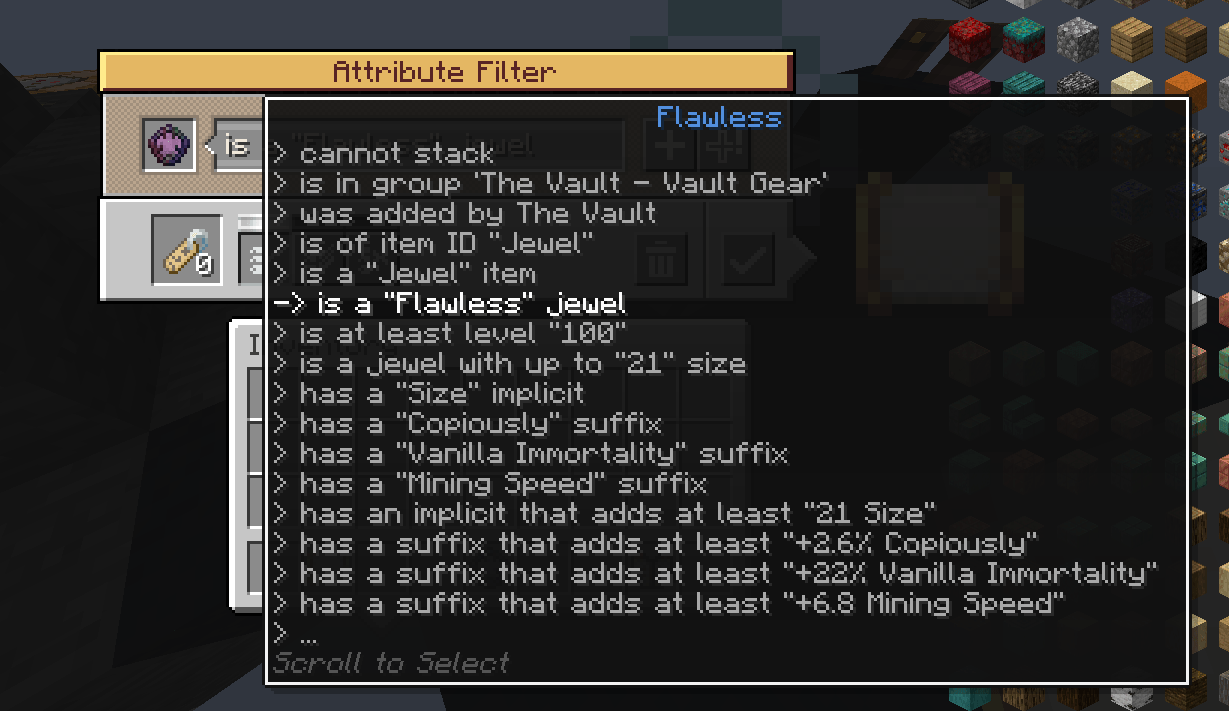
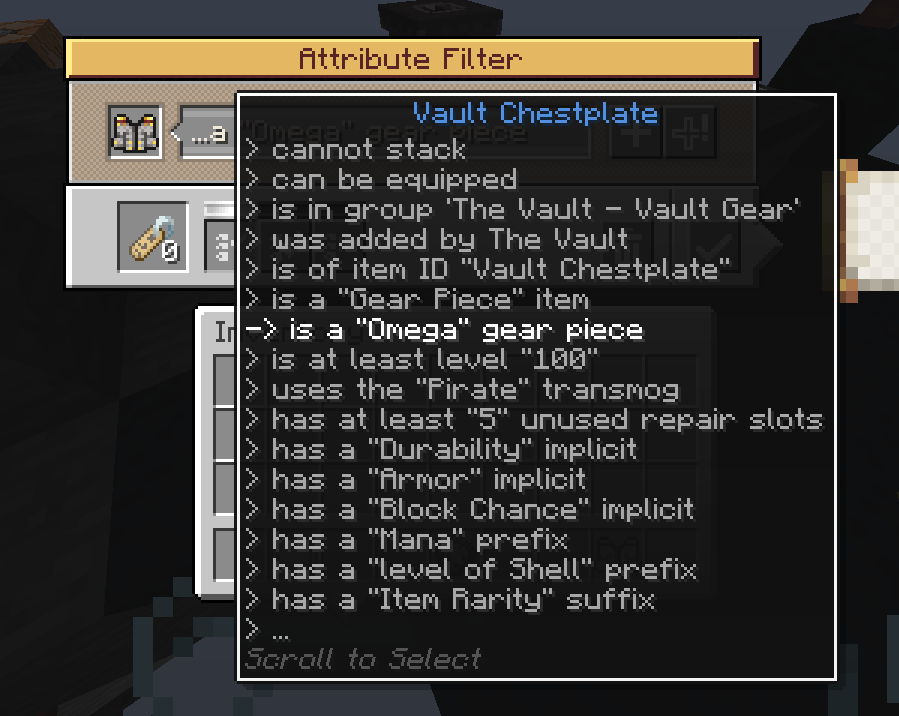
Tired of sorting gear and opening jewel pouches manually? This simple but powerful mod allows you to filter and sort data-heavy items such as gear as well as auto open containers like jewel pouches and card packs according to your preferences with the addition of vault-related attributes to the already existing attribute filter from the Create mod. The mod adds compatibility for the list and attribute filters with several mods including Modular Routers, Refined Storage, Applied Energistics 2, Sophisticated Backpacks and more, and also includes router augments to allow Modular Routers to auto select from jewel pouches and card packs based on your filters. The mod also removes Create as a research requirement for the filters allowing the mod to be used independently of Create using the compatibility features, includes a config to allow server owners to put the filters under their own research category. Wanna filter Omega gear pieces? Put an Omega gear piece in the attribute filter slot and select "is of rarity: Omega". Simple as that! The mod provides a large variety of attributes you can filter by; list below.
Credits
Huge thanks to these people for making this mod possible
- Author: Joseph Franci
- Contributor: JustAHuman-xD Rewrite with both code and performance optimizations, a ton of polishing and mod presence detection
- Contributor: radimous Added a ton of mod compatibility, tags, qol features and pouch/pack opening logic
- Contributor: iwolfking Added a ton of mod compatibility and backpack attributes.
- Contributor: ShiftTheDev Added backpack attributes
- Contributor: TinoMartino094 Added rune attributes
- Contributor: MaxTheMooshroom Assistance with nested filter opening.
Full in depth guide for the mod available here here
Attributes
(Everything inside "" is the parameter of the attribute, with the contents being an example parameter. You can choose different parameters during selection in the filter menu.)
General
- Is a "Trinket/Charm/Gear Piece/Inscription/Jewel/Treasure Key/Catalyst" Item
- Is unidentified
- Is at least level "32"
- Is of item ID "Vault Helmet"
- Is a faceted "Ability Power" focus
Gear Pieces
- Is a "Rare" gear piece
- Is a "Baguette" unique
- Is a gear piece with living
- Is a corrupted gear piece
- Is a crafted gear piece
- Has at least "2" Unused repair slots
- Uses the "Rusty Warrior" transmog
- Has Soulbound as a base attribute
- Has at least "200" max crafting potential
- Has at least "200" crafting potential
Affix Attributes
(Compatible with Gear Pieces, Vault Tools and Jewels)
- Has a legendary modifier/ Has at least "2" legendary modifiers
- Has a legendary "Resistance" affix/ Has at least "2" legendary "Resistance" affixes
- Has a max roll legendary
- Has a "Block Chance" implicit
- Has a "Health" affix/ Has at least "2" "Health" affixes
- Has a corrupted modifier
- Has a corrupted "Fireball" implicit
- Has a corrupted "Resistance" affix
- Has a greater modifier
- Has a greater "Resistance" affix
- Has a frozen modifier
- Has a crafted modifier
- Has an implicit that adds at least "+5% Movement Speed"
- Has an affix that adds at least "+10 Armor"
- Has an affix in group "OnHitEffect"/ Has at least "2" affixes in group "OnHitEffect"
- Has an affix that adds to a specialization of "Fireball"
Jewels
- Is a "Flawed" jewel
- Is a jewel with up to "22" size
- Has been free cut "2" times
Vault Tools
- Is a "Chromatic Iron" vault tool
Cards:
- Is at least a tier "2" card
- Is a "Blue" colored card
- Is a "Foil/Temporal" type card
- Is an upgradable card
- Card with "Lucky hit/ +Chromatic Iron/Door Hunter"attribute
- Card with at least "+0.25% Lucky Hit/ +1 Chromatic Iron/ +15 Seconds of Door Hunter" baseline attribute
- Is a scaling card
- Scales based on "Blue/Diagonal/Foil"
- Has an activation condition
- Has a "at least/at most/between" condition
- Has a condition based on "Red/Diagonal/Stat"
- Has a condition that will allow "3" matching cards
- Is a card that adds to a specialization of "Fireball"
- rewards based on "Loot Wooden Chests"
- requires at most "6" tasks for loot
Card decks
- Is a deck with a modifier
- Is a "Belt Deck"
Booster Packs
- Is an opened card pack
- Is a "Stat" card pack
- Inner filter, detailed below
Jewel Pouches
- Is an opened jewel pouch
- Inner filter, detailed below
Inscriptions:
- Adds a "Wild West" room
- Adds a "Challenge" type room
- Is an inscription with up to "10" size
Catalysts:
- Is a catalyst with up to "10" size
- Is a catalyst with a "Plentiful" modifier
- Is a catalyst with a "Bonus Chests/Cascading" category modifier
Charms
- Is a "Regal" charm
- Adds affinity for "Velara"
- Adds at least "20%" affinity
- Is a charm with at least "7" uses left
Trinkets
- Is a "The Frog" trinket
- Is a "Blue/Red" colored trinket
- Is a trinket with at least "25" uses left
Runes
- Is a rune with a "Strength" modifier
- Is a rune that gives "Booster Pack"
- Is a rune that gives a "Rare" gear piece
- Is a rune that gives a "Resource" booster pack
- Is a rune that gives a "Mine Room" inscription
- Inner filter, detailed below
Companions
- Is a companion on cooldown
- Is a retired companion
- Is a companion with at least "5" hearts
- Is a companion with at least "5" max hearts
- Is a companion of at least level "25"
- Is a companion of the "Creeper" series
- Is a companion with a skin of "JosephFranci"
- Is a companion with a "Door Hunter" temporal modifier
- Is a companion with a "Heart" trail type
- Is a companion egg of the "Creeper" series
- Is a companion relic with a "Strength" modifier
- Is a companion relic with atleast "2" modifiers
- Is a temporal relic with a "Nova Explosion" modifier
Soul value
- Has soul value
- Has exactly "256" soul value
- Has at least "128" soul value
Backpacks
- is an empty bag
- Has the uuid "8356846e-7582-4301-8111-aedd54cf95d6"
- Has a "Deposit Upgrade"
Scav Items
- Is a rotten scavenger item
Artifacts
- Is an artifact with ID "25"
Inner Filters
Some items have inner items inside of them. Placing a filter in the menu of an attribute filter will allow you to choose an attribute for using the filter as an inner filter, matching against the inner items. Example: Putting a filter named "Perfect Jewels" that matches only perfect jewels inside the menu of an attribute filter will allow you to select the attribute "Is a jewel pouch with a jewel matching (Perfect Jewels)", the attribute will now only match open jewel pouches with a perfect jewel inside them (tests the filter named "Perfect Jewels" against the jewels in the pouch)
Available for
- Jewel Pouches
- Card Packs
- Rune rewards
Auto Jewel Pouch/Booster Pack Opening
There are now 2 new augments for use in Modular Router's activator module
- Jewel Pouch Opener Augment
- Card Pack Opener Augment
When these augments are installed, activation on an a Jewel Pouch/Card Pack will select the first Jewel/Card that matches the filter if there is one. Unopened Jewel Pouches and Card packs will be cracked open regardless of content matching
Extra Filtering Features
- The list filter now has a "Match All" option to allow for free logic control
- Holding ctrl while hovering over a filter will now show nested filters
- Ability to delete a single attribute from an attribute filter by hovering over an attribute and holding delete
- An attribute filter will now list its own attributes when placed in a different attribute filter, allowing the copying of attributes between filters
- Placing filters with no NBT along with a filter with NBT in the same crafting grid will allow the copying of filters
- Added text box at the top of the filter UI to allow for renaming from within it, opening an unset filter will no longer cause it to lose its custom name
- Having a filter selected for dragging inside an inventory will now render an icon on every item that indicates if its matching it or not, dragging an item will do the same for filters
- Middle clicking any filter inside the menu of a list filter will open its UI allow you to make changes, pressing the checkmark will allow you to return to the menu of the previous filter
- Caching system to ensure minimal lag even when constantly filtering items
Extra tags
Tags that are auto generated from configs, mainly for use inside looting filters
all_chest_loot
- wooden_chest_loot
- ornate_chest_loot
- living_chest_loot
- gilded_chest_loot
all_skyvault_loot
- hardened_chest_loot
- flesh_chest_loot
- enigma_chest_loot
vault_altar_all
These subcategories are subject to change by config
- vault_altar_resource
- vault_altar_mob
- vault_altar_farmable
- vault_altar_misc
other loot tables
- completion_crates_loot
- treasure_chest_loot
- coin_pile_loot
- champion_loot
- rune_loot
- brazier_pillaging
- treasure_sand_treasure
- treasure_sand_digsite
other
- vault_ores
- burgers
- focuses
- fruits
- keys
Vault Hunters accessibility
- The attribute and list filters from the Create mod now have their own research group, selectable in config (not research locked by default)
- The attribute filter no longer requires brass to be crafted
- New vault-related tooltips added to list and attribute filters.
Due to these changes and the compatibility additions, Create is no longer a requirement to use this mod.
Compatibility
(Filters = List & Attribute Filters) All Mod compatibility can be disabled/enabled in the config and loads conditionally
Modular Routers
- Filters now work as filter items inside modules.
- Filters now work inside MR's Bulk Item Filter.
Sophisticated Backpacks
- Filters now work inside the filter slots of upgrades, such as the pickup and void upgrades.
Refined Storage
- Filters now work inside Exporters, Importers, Grid Filters, Destructors, and External Storages.
Applied Energistics 2
- Filters now work inside of View Cells, Import Bus, Export Bus, Storage Bus, and Formation Planes. Supports normal and Fuzzy card operation.
Tom's Storage
- Filters now work inside Tom's storage filter slots.
- Tom's Storage isn't natively in the pack but compatibility will be applied in the case that it is loaded.
Laser IO
- Filters now work inside Laser IO filter slots.
- Laser IO isn't natively in the pack but compatibility will be applied in the case that it is loaded.
Suggested Extra Mods
- Draggable Bookmarks to allow saving and reusing filters between worlds
- JEI Bookmark Sharing to allow sharing, editing and saving filters, recommended to use along with draggable bookmarks
- This isn't a specific recommendation but tag additions are simple to do and any form of them (script, datapack or mod) works great with vault filters, especially for looting due to the "has tag" attribute
Server / Client Requirements
- As of update 1.27.0+ the mod is required on both the client and the server
- On lower versions the mod isn't required on clients however a client will need to have it installed to use it's features
Disclaimer
- This mod is not a Create addon but a gear sorting addon that utilizes the existing attribute filter.
- Vault Filters is a Vault Hunters 3rd edition addon, intended for use alongside the Modpack.
Licenses
Vault Filters falls under the MIT license. See Vault Filter's license for more information. Certain sections of the code are from the Create mod, which is licensed under the MIT license. See Create's license for more information.
See Video Example
- Edition: Minecraft Java
- File type: .jar
- Minecraft version listed: 1.18.2
- How to install: Install the matching mod loader (Forge, Fabric or NeoForge) for your Minecraft version. → Download the .jar. → Put it in the .minecraft/mods folder and launch that loader profile.
- Where to get it: Opens on CurseForge — not every file is mirrored on our own servers.
Install steps are the general flow for this file type — How to install Minecraft Java mods & modpacks walks through it step by step.
- Ships as vaultfilters-1.10.3-0.5.1f.jar — drop this file into the mods folder
- Download size: 269 KB
- Download link checked 27 Aug 2026 — working
These come from our own check of the pack file, not from the source page.