Stardew Fishing
Java mod listed for Minecraft 1.19–1.21. Downloads from the MC Java Mods app on Android.
I don't know my version or loader

📖 About 📖
Stardew Fishing adds a fun fishing minigame directly inspired by Stardew Valley!
- Bored of right-clicking and instantly catching whatever fish is on your hook? This mod is for you!
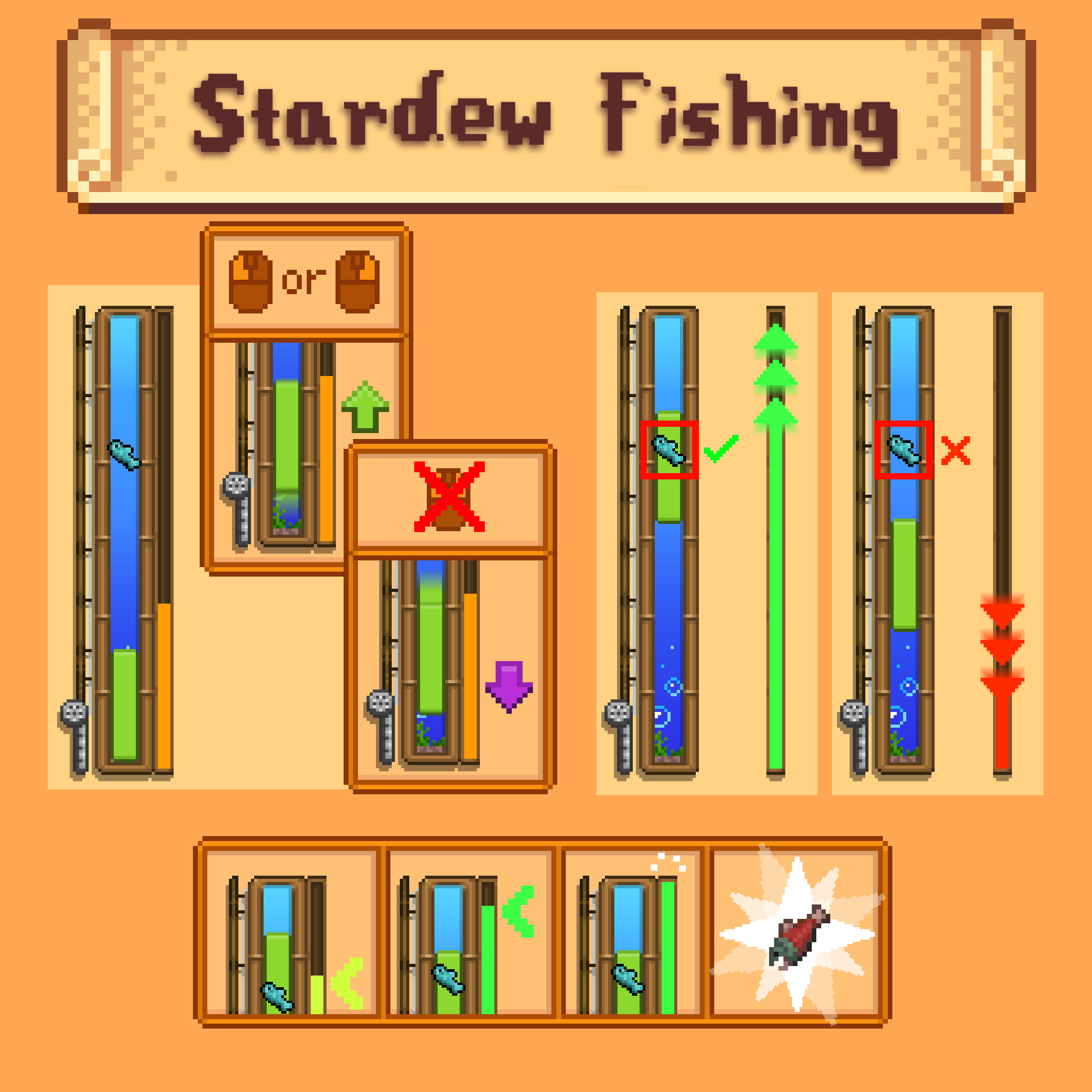
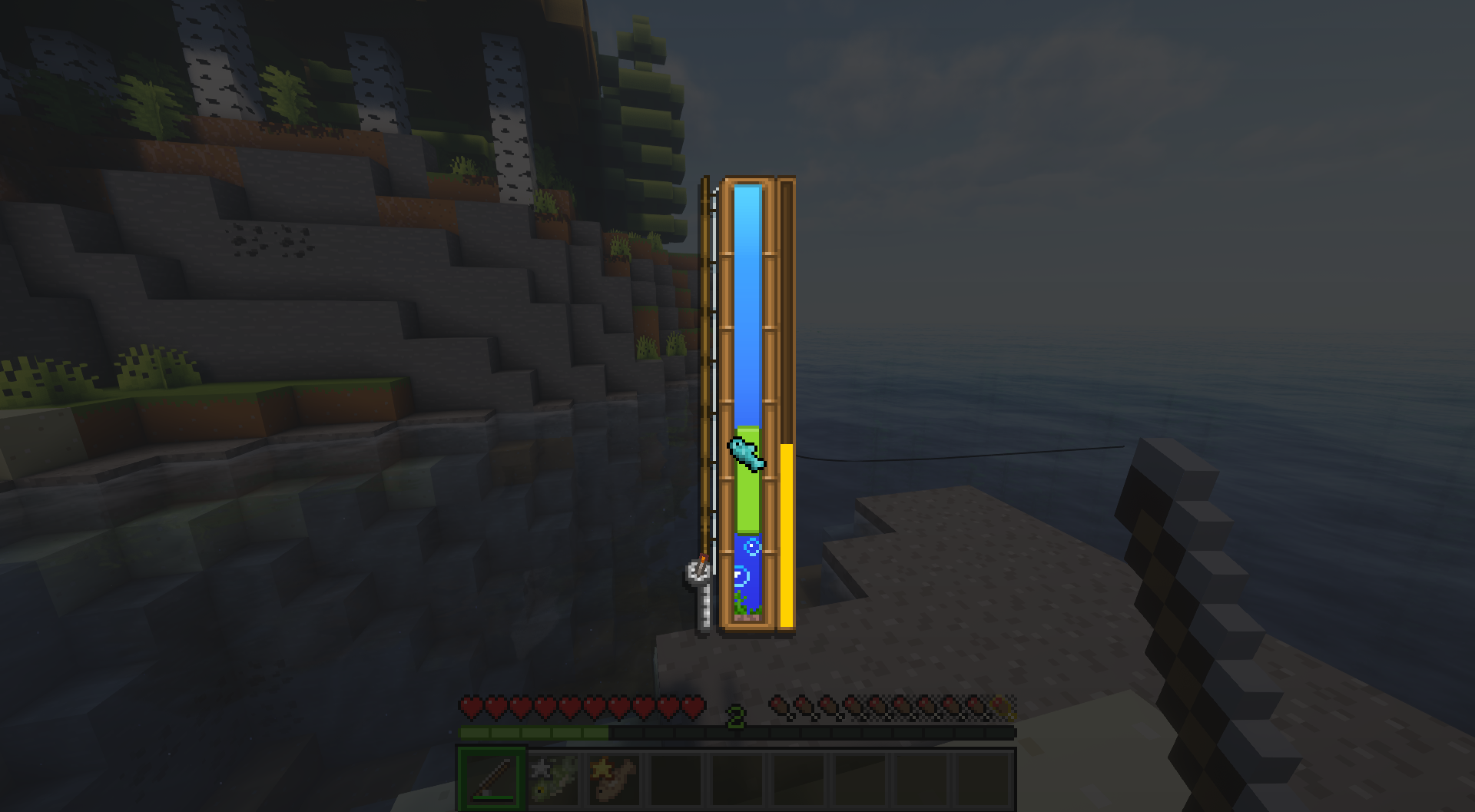
- The fishing minigame involves clicking to bump a small green 'bobber' bar upwards. Keep the bobber bar on the fish to fill the progress bar on the side. Fill it all the way to catch the fish! Take a look at this visual guide below:

- Being more precise with your bobber earns you more XP from the catch, and if you have Quality Food installed, the Quality of the fish you catch is determined by your bobber accuracy, just like in Stardew!
- Find rare Treasure Chests when fishing, or even rarer Golden Treasure Chests, to uncover some neat treasure!
- With Aquaculture or Tide installed, you can craft multiple Bobbers to attach to your fishing rods that add all sorts of unique effects!
- Bobbers currently include:
- The Cork Bobber increases the size of your 'fishing bar', making catching fish easier!
- The Trap Bobber causes fish to escape slower when you aren't reeling them in!
- The Sonar Bobber shows what fish is on your line before it's caught!
- The Treasure Bobber keeps fish from escaping when collecting Treasure Chests, and increases the chances that Treasures will appear!
- The Quality Bobber greatly increases Experience gained from fishing, and if Quality Food is installed, increases the Quality of caught fish!
This mod has compatibility with many fish-related mods such as Aquaculture and Tide, and has a customisable datapack to determine how difficult any given fish is to catch!
This mod was developed by the wonderful bonker!
❓ FAQ❓
Q: How can I equip Bobbers to my fishing rod?
A: Bobbers are available to the player if either the mod Tide or Aquaculture 2 is installed. With Tide, simply craft a Bobber and take your fishing rod to an Angling Table, and place your rod and the bobber inside to apply it. Similarly with Aquaculture, place your rod and the bobber into a Tackle Box to equip it.
Q: How do I catch Treasure Chests?
A: Treasure Chests have a rare chance of appearing when playing the fishing minigame. Keep your fishing bar on them to hook them, but make sure the fish you're catching doesn't escape! If you hook the chest and then catch the fish, the chest will open (with a cool custom animation) to reveal some neat loot!
Q: How can I change how hard it is to catch specific fish?
A: With a simple datapack! You can change the default behaviour of all fish, and set behaviour for specific fish to make some rarer fishes harder to catch. You can change this with several values including their top speed, acceleration, average move distance and more. Examples datapacks and explanations can be found >HERE<!.
Q: Do I have to have Aquaculture/Tide or Quality Food installed for this mod to work?
A: Nope! The minigame itself works with no other mods installed. However without Tide or Aquaculture, Stardew Fishing's Bobbers won't be craftable or usable. As for Quality Food, the 'Quality' of an item is determined by an NBT data dependent on how accurate you are with the minigame, but without the mod installed this tag simply isn't added, so no problems with stacking or anything like that.
Q: Can I make the minigame easier?
A: You can change the datapacks so that all fish have a simpler movement behaviour. An example datapack for how to do this is shown above! Or equip a bobber that makes the minigame easier.
Q: Is this mod compatible with Better Fishing Rods? How about other fishing mods?
A: Stardew Fishing has special compatibility with Tide, Aquaculture 2 and Nether Depths Upgrade. If a mod uses the vanilla fishing bobber (like Better Fishing Rods does) then it should be compatible! Can't guarantee for other mods that add other fishing rods. This mod now also works with Fishing Real and Tactical Fishing!
Q: How can I report a bug/issue?
A: Go to our Issue Tracker and leave an issue and hopefully we can fix it!
Q: Will this mod be updated to 1.xx / Fabric?
A: I don't have the money to pay my dev to update to newer versions. However, Curseforge user kltyton made an Unofficial Fabric Port! Check it out here!
2/09/24: Wow, thanks for 10,000 downloads! New update with more content should hopefully be coming out later this month.
16/03/25: Okay, maybe not later *that* month. But thanks for 700,000 downloads!!!! 2.0 is out now!
- Edition: Minecraft Java
- File type: .jar
- Minecraft versions listed: 1.21.11, 1.21.1, 1.20.1
- How to install: Install the matching mod loader (Forge, Fabric or NeoForge) for your Minecraft version. → Download the .jar. → Put it in the .minecraft/mods folder and launch that loader profile.
- Where to get it: Opens on CurseForge — not every file is mirrored on our own servers.
Install steps are the general flow for this file type — How to install Minecraft Java mods & modpacks walks through it step by step.
- Ships as stardew_fishing-3.7-1.20.1.jar — drop this file into the mods folder
- Download size: 1.3 MB
- Download link checked 7 Oct 2026 — working
These come from our own check of the pack file, not from the source page.