
Cosmetic Armor Mod (1.20.1, 1.19.4) – Additional Armor Slots to the Player's Inventory
Cosmetic Armor Mod is a simple mod that brings 4 extra slots for armor. The armor put in there will display on your character, but won’t provide any defense values or other functionality. (E.g. cosmetic carved pumpkins won’t protect you from endermen, cosmetic golden armor won’t prevent piglins from attacking you)
Features:
- All modded armor should be immediately compatible without any effort from your side.
- The items don’t show “Slot: Cosmetic Something” anymore.
- Heads, skulls and other “head” items (such as carved pumpkins) can now be worn in the cosmetic slot.
- Item tags allow you to define items which can’t be worn in a cosmetic slot ( data/cosmetic-armor/tags/items/blacklist.json ) as well as items which always show and won’t be overriden by an item in the corresponding cosmetic slot ( data/cosmetic-armor/tags/items/always_visible.json ).
Screenshots:
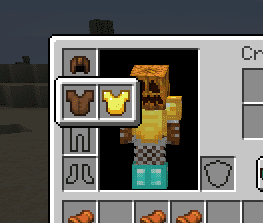
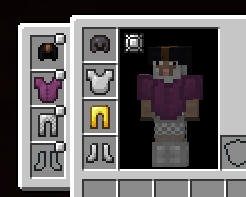
Cosmetic Armor Mod Download Links
For Minecraft 1.20.1
Fabric/Quilt version: Download from Server 1 – Download from Server 2
For Minecraft 1.19.4
Fabric/Quilt version: Download from Server 1 – Download from Server 2
For Minecraft 1.19.3
Fabric/Quilt version: Download from Server 1 – Download from Server 2
For Minecraft 1.19.2, 1.19.1, 1.19
Fabric/Quilt version: Download from Server 1 – Download from Server 2
For Minecraft 1.18.2
Fabric version: Download from Server 1 – Download from Server 2
For Minecraft 1.18.1
Fabric version: Download from Server 1
For Minecraft 1.17.1
Fabric version: Download from Server 1
For Minecraft 1.16.5
Fabric version: Download from Server 1 – Download from Server 2
- Edition: Minecraft Java
- File type: .jar
- Minecraft versions listed: 1.20.1, 1.19.4
- How to install: Install the matching mod loader (Forge, Fabric or NeoForge) for your Minecraft version. → Download the .jar. → Put it in the .minecraft/mods folder and launch that loader profile.
- Where to get it: In MC Java Mods, or directly above on this page.
Install steps are the general flow for this file type — How to install Minecraft Java mods & modpacks walks through it step by step.
- Downloads as 204994.mcaddon
- Download size: 20 KB
- Download link checked 30 Jul 2026 — working
- Mirrored on our own servers — the download does not depend on the original host
These come from our own check of the pack file, not from the source page.