
OhMyMeteors
Java mod listed for Minecraft 1.19–1.21. Downloads from the MC Java Mods app on Android.
⬇ Download on CurseForgeAdd spice to your world, with giant peppers of molten (or frozen!) rock that fall from the sky!
This mod adds meteors, chunks of rock that randomly fall from the sky every now and then, exploding on impact and leaving useful resources in the impact craters they make. The explosions are even better than vanilla's ones!
You will be able to craft lasers to defend yourself from the destructive power of these touchy sky rocks, or maybe you could find some cuteness inside some them! Meow!
Video showcase of version 0.1.0 of the mod by Boodlyneck: https://www.youtube.com/watch?v=LWCvP63pooQ
This mod is extremely configurable, meaning that you can adjust it however you like. Would you like more metors at night? Cool! Would like them not to explode anything? Done! And a lot of other settings!
Inspired by the old meteor mods and commissioned by SlayerTheChikken
The best way to enjoy this mod is with other people on a server, so you can use the code EMALIGHTDEV on Nodecraft for discount!
Also checkout the Tekxit modpack: 
A fan of cool mods? Take a look at what else i've developed, might find something intresting like LightWithn which adds powers unique to each and every player!
Feature list
Meteor sizes
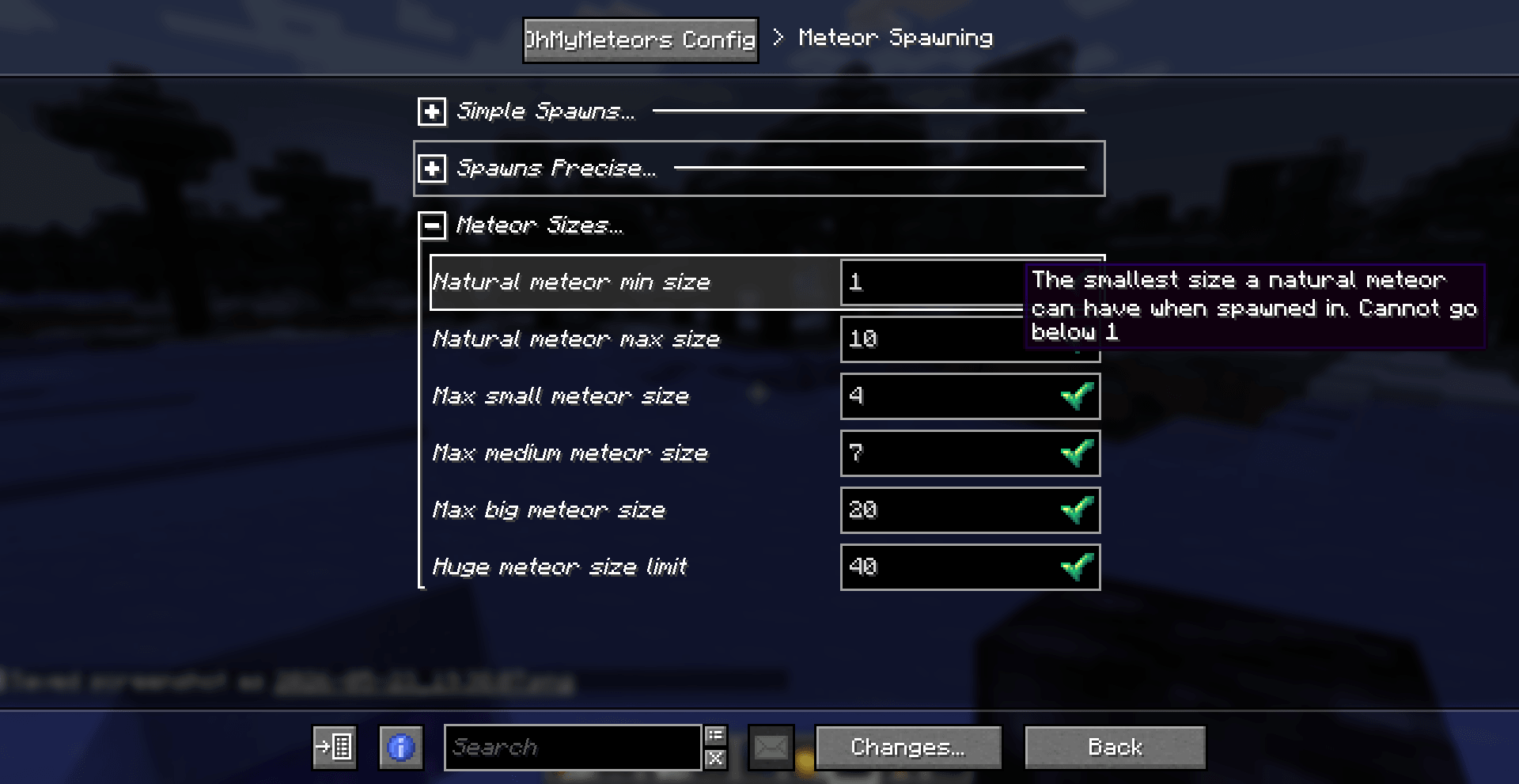
Meteors can spawn in a variety of different sizes, the bigger the size the bigger the damage and the "structure" that will be left behind. You can adjust which size of meteors is able to spawn and how frequently the meteors spawn.
Customizable meteors
You can add your own meteor structures using a datapack, like the example one! You can specify in which size category your structure can be spawned, and if it's special or not. (special ones have a lower chance of appearing). They are NBT structure files, like the ones from the Structure Block. See example datapack
Lasers blocks
They are used to defend your base from the falling meteorites, by shooting a laser at the meteor and destroying it while midair
There are two tiers of lasers:
- The basic one has a shorter, but still very considerable range by default (you can change it in the config file!). It also has a loger cooldown time (3s by default, you can even disable it all together) and won't be able to destroy meteors past a certain size (up to sizes that are 1/3 smaller than the biggest, configurable too)
- The advanced laser, bigger area coverage, shorter cooldown time and can destroy every type of laser. You will however need to gather some meteorich chunks to craft meteoric alloy in order to power up your basic laser to this advanced version
You can interact with the lasers using a Focusing Lenses item to make them display the area that they are currently covering. When a meteor hits this area the laser activates and explodes the meteor.
Items
This mod also adds a few items, Meteoric Chunks which can be obtained when breaking (without Silk Touch) the Meteoric Rock that spawns when meteors explode on land. This can be tuned into 9 raw iron or used to craft Meteoric Alloy. You will need to combine 2 Meteoric Chunks with 2 Iron Ingots to obtain 2 of the alloy, which you can then use in the crafting for the Advanced Laser. Then we have the Focusing Lenses, which are used in the crafting of the two lasers. They require lime glass, amethyst, and quartz.
Meteoric Rock block (1.5.0+)
Now the meteor entity and the meteoric rocks have 3 stages of texture: HOT MID and NORMAL, with the latter being the usual one. The meteoric rock now starts in the HOT state, and degrades all the way to NORMAl with time, cooling down. When HOT it damages players each time like a magma block, when MID it does only sometimes, and NORMAL does nothing.
Using snowballs on the block will make it tick down one state, while using a flint and steel will make it go up in hotness. You can make a state permanent by using an Echo Shard on the block.
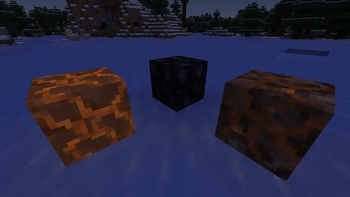
Meteor structure - Customizable meteors!
The ones that spawn when a meteor explodes. They are located in the folder /data/ohmymeteors/structure(s if below mc1.21) and you can customize them using a datapack. They are the same files that you get out of the Structure Block in vanilla. From version 1.2.0 there is an easier way to add custom meteors with a command, see more below in the command section!
And an example datapack is located here. If you want to remove default structures from spawning, you can add a structure file (copy one of the default ones for instance) and name it ignore_<nameofthestructuretoremvoe>.nbt, or if you want to ignore all of the use ignoredefault.nbt.
These structures can also contain entities, like the:
Meteor cat
A cute kitty could be travelling the galaxy at any given moment. And it could land on your minecraft world (as long as you don't shoot it down with a laser that is). They can survive in the fire, have a 15HP instead of 10HP, and if you so chose to dispose of them, they will drop some meteoric chunks (reminding you of your cruelty and cosmic-feline-bloodstained hands)
Meteor showers!
Meteor showers are a rare occurrence where a cluster of meteors fall together at the same time. Three types of meteor showers have been added:
- 'instant' where all the meteors fall at the same time around a central point
- 'delayed' with each meteor spawning a bit after the next one
- 'delayed directioned' with each meteor spawning after the next one but with all meteors following the same general trajectory
Config file
From version 1.5.0 you will need to install FzzyConfig, but in exchange you will get a beautyfull config menu screen which you can open from the mod menu. If you are a server admin or you have the ohmyemeteors.config.edit permission you can edit the server config file directly in game.
The file is located at /config/ohmymeteros/ohmymeteors_config.toml it contains a lot of settings that you can adjust to your liking.
You can reload the config in game using /omm reload or by saving your changes.
Commands
They are are a few commands:
/omm spawn <size> [velocity]Will spawn a meteor in your looking direction with the specified size and the optionally specified velocity/omm spawn randomWill spawn a random meteor in a random direction in a random postiont around you/omm spawn naturalWill spawn a meteor as if it had spawned naturally/omm spawn shower [instant|delayed|delayed_directioned]Will spawn a meteor shower as if it had spawned naturally, with the specified type of shower./omm config reloadWill reload the config file/omm config preset <preset>Will edit the config file to adjust to the preset. Two presets are currently available,performanceandno_griefing
Adding custom meteor structures/schematics
/omm custom And its sub commands will allow you to generate a datapack and add your meteor structures directly in game without needing to touch any files. You can then open the datapack folder and send the datapack to your friends if you want to!
Adding a new meteor
/omm custom add <type_of_schematic> <structureId/schemId> <size> <special>
type_of_schematic: is the type of schematic/structure file that is going to be used to spawn the meteor's structure. Three types are currently supported thanks to SchemConvert, and they are:
structureblock: the vanilla.nbtstructure files that you can create using a structureblockworldedit_schematic: worldedit's.schemfiles which you can create with the//schemcommandlitematica_schematic: litematica's.liteschemfiles Especially for the schematic files it's important to not move them from where they are generated
structureId/schemId: is the name of the structure/schematic file that you want to use. You don't need to specify the extension (like .schem or .nbt). This name is the same one that will be used by the meteor strucuture id, but you can change it later with the edit command if needed
size: the size correspondig to this new meteor structure, can be SMALL,MEDIUM,BIG,HUGE
special: weather or not this is a special meteor aka if this structure has a lower than normal chance of appearing
Removing default meteors
/omm custom ignoredefaults [true|false] If you set ignoredefaults to true this mod's default meteors will be disabled and only custom ones will be used. Make sure to add at least one meteor structure per category otherwise it will give an error.
Removing meteor structures
/omm custom remove <structureId> <size> <special> If you want to remove a meteor that you have previously added you can use this command. You will need to specifiy the structure's name, the corresponding size and if it is a special meteor
Editing meteor structure
/omm custom edit <originalName> <ogSize> <ogSpecial> <newName> <newSize> <newSpecial> You can use this command to edit a structure file name, class and if it's a special one or not. Pretty intuitive by now i think.
Seeing which meteors you have added so far
/omm custom display_current Will display all the meteors corresponding to a certain size and special. It will also display if you have currently disabled default meteors or not
Mod compatibility
You can use Flan and YetAnotherWorldProtector to define regions where meteors won't spawn or explode. Now you will be able to use either Flan or YAWP to define regions where meteors can't spawn or explode. Flan has its own global setting, while to disable the meteor spawning in YAWP you will need to set the flag explosions-entities to denied.
From version 1.5.0 onwards you can also use OPAC to define a claim in which meteors won't spawn or explode, by enabling the "Allow blocks from explosion" flag.
License
MIT
Credits
SlayerTheChikken for some assets and the idea of the mod Explodee mod (by KnownSH) for the code of the spherical explosions https://github.com/KnownSH/Explodee SchemConvert to allow the conversion between schematic formats https://github.com/PiTheGuy/SchemConvert
- Edition: Minecraft Java
- File type: .jar
- Minecraft versions listed: 1.19.2, 1.21.11, 1.20.1
- How to install: Install the matching mod loader (Forge, Fabric or NeoForge) for your Minecraft version. → Download the .jar. → Put it in the .minecraft/mods folder and launch that loader profile.
- Where to get it: Opens on CurseForge — not every file is mirrored on our own servers.
Install steps are the general flow for this file type — How to install Minecraft Java mods & modpacks walks through it step by step.
OhMyMeteors is a free Minecraft Java mod. Compatible with Minecraft 1.19.2, 1.21.11, 1.20.1, 1.20 and newer. Downloaded 408,118 times (via CurseForge). Download it and open it directly in the game.