
Storage Tech is addon for Refined Storage. the mod allow to create custom disk size to store items, fluids, energy and chemicals if Mekanism is loaded.
The mod add a overlay on disks
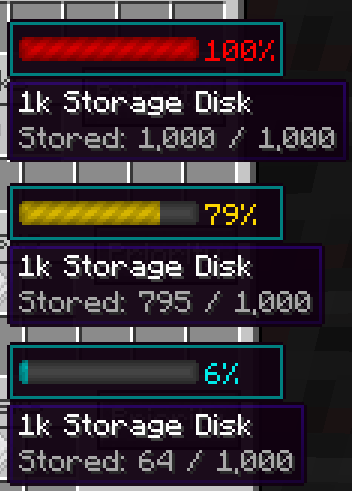
⚠ Mod Exception & Mod bugs :
MC 1.12.2:
if you add Blur_Mod please add javapower.storagetech.gui.GuiContainerDiskWorkbench and javapower.storagetech.gui.GuiContainerFluidDiskWorkbench to guiExclusions in the blur.cfg file :
# Configuration file

general {
    # The time it takes for the blur to fade in, in ms. [range: 0 ~ 2147483647, default: 200]
    I:fadeTime=200

    # The end color of the background gradient. Given in ARGB hex. [default: 75000000]
    S:gradientEndColor=75000000

    # The start color of the background gradient. Given in ARGB hex. [default: 75000000]
    S:gradientStartColor=75000000

    # A list of classes to be excluded from the blur shader. [default: [net.minecraft.client.gui.GuiChat]]
    S:guiExclusions <
        net.minecraft.client.gui.GuiChat
        javapower.storagetech.gui.GuiContainerDiskWorkbench
        javapower.storagetech.gui.GuiContainerFluidDiskWorkbench
     >

    # The radius of the blur effect. This controls how "strong" the blur is. [range: 1 ~ 100, default: 12]
    I:radius=12
}
Quick facts
- Edition: Minecraft Java
- File type: .jar
- Minecraft versions listed: 1.16.4, 1.16.3, 1.16.1
- How to install: Install the matching mod loader (Forge, Fabric or NeoForge) for your Minecraft version. → Download the .jar. → Put it in the .minecraft/mods folder and launch that loader profile.
- Where to get it: Opens on CurseForge — not every file is mirrored on our own servers.
Install steps are the general flow for this file type — How to install Minecraft Java mods & modpacks walks through it step by step.
Storage Tech is a free Minecraft Java mod. Compatible with Minecraft 1.16.4, 1.16.3, 1.16.1. Downloaded 3,174,278 times (via CurseForge). Download it and open it directly in the game.