Hardcore Torches (Forge)
Java mod listed for Minecraft 1.16–1.21. Downloads from the MC Java Mods app on Android.
I don't know my version or loader

Fabric Version Here!
IF YOU ARE USING THE CANARY OR LITHIUM MOD:
If you are using the Canary or Lithium optimization mods, you will need to set these config options in that mod in order for hardcore campfires to work properly:
mixin.world.block_entity_ticking.sleeping.campfire=false
mixin.world.block_entity_ticking.sleeping.campfire.lit=false
mixin.world.block_entity_ticking.sleeping.campfire.unlit=false
Overview
Hardcore Torches adds survival challenges to your primary sources of lighting - torches, lanterns, and campfires. I intend to make this the ultimate mod for additional challenge when lighting up the world, with many configuration options for modpacks. I also will keep the features focused, without lots of unnecessary content.
Features
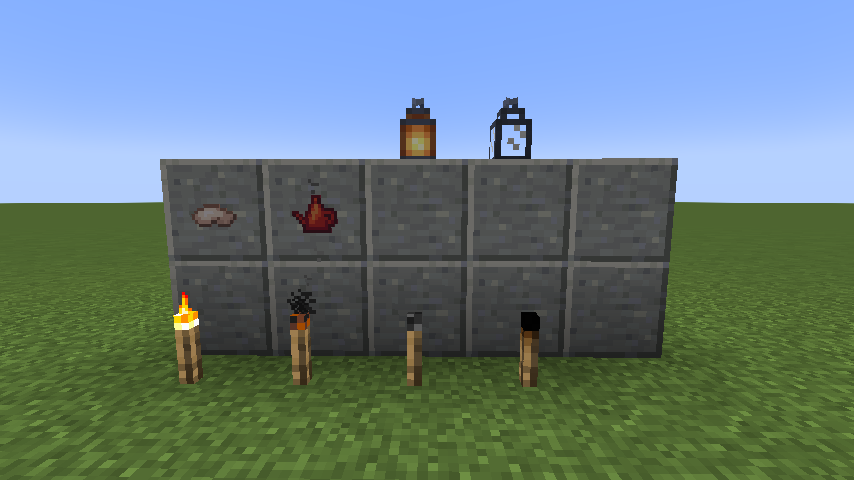
- Lanterns, Campfires, and Torches burn out over time. This is the main feature of the mod. Torches are crafted with a set amount of fuel that eventually extinguishes, while lanterns are crafted empty and can be filled with an oil can. You can configure how long torches and lanterns last and more.
- Lanterns and Torches burn even in your inventory. This option is disabled by default. If enabled, lit torches and lanterns will lose fuel even while in your inventory.
- Torches can be crafted unlit. This option is disabled by default. If enabled, torches are crafted unlit and must be placed down and lit with a flint and steel, lit torch, etc. You can also right click a campfire or lit torch to light it from your hand. You can configure which items can light a torch by overriding the block and item tags.
- Torches drop sticks when broken. You can configure this to drop lit torches like vanilla, drop unlit torches, burnt torches, or sticks.
- Torches will smolder in the rain. If your torches are left out in the rain, they will start smoldering and provide almost no light, while burning fuel at 1/3rd the rate. You can configure them to instead extinguish fully and waste no fuel, or ignore rain altogether.
- Lanterns are crafted unlit. You kill animals to obtain animal fat, then craft this with an oil can to fill it. You then fuel your lanterns with the oil can, and light them with flint and steel. You can configure them to just use coal instead.
- Lanterns can be moved. You can break a lantern easily to pick it up, or sneak and right click on it to do the same. It retains its lit state and fuel.
- World generation is changed. Lanterns and torches that generate in the world are replaced by their equivalents in this mod.
- (Forge only) Lucent and Curios support. Lucent provides default support for all light emitting blocks and items. However, if you install Curios in addition to Lucent, you can place a lit lantern in your belt slot and provide light around you as you walk. A third-person player model for the lantern is planned but not yet implemented.
Tag Configuration
Some configuration options must now be done through tags. You can make a datapack, or add items to tags through a mod like CraftTweaker. The tags are:
Blocks:
hardcore_torches:blocks/free_torch_light_blocks - Blocks you can right click with a torch to light the torch
Items:
Item tags are 3 parts:
consume, damage, free - whether the item will be consumed, durability damaged, or not affected.
torch, lantern - whether this tag applies to torches or lanterns.
light, extinguish, smother - light lights the block, smother makes it smoldering, extinguish makes it unlit. Currently, lantern only has light.
Example:
hardcore_torches:items/damage_torch_light_items - Items which take damage to light a torch (Flint and Steel)
Plans
- Candles which also burn out
- Different types of torches (coal coke, stone rod, etc.)
- Torch Bandolier which condenses torches for easy placement (Curios)
- More configuration options
- Blood Magic support for soul lanterns and torches
Discord
I have a discord for my mods where you can ask questions and get support: https://discord.gg/GS4KfrNBZn
- Edition: Minecraft Java
- File type: .jar
- Minecraft versions listed: 1.21, 1.21.1, 1.20.1
- How to install: Install the matching mod loader (Forge, Fabric or NeoForge) for your Minecraft version. → Download the .jar. → Put it in the .minecraft/mods folder and launch that loader profile.
- Where to get it: Opens on CurseForge — not every file is mirrored on our own servers.
Install steps are the general flow for this file type — How to install Minecraft Java mods & modpacks walks through it step by step.
- Ships as hardcore_torches-1.20.1-2.8.jar — drop this file into the mods folder
- Download size: 153 KB
- Download link checked 7 Oct 2026 — working
These come from our own check of the pack file, not from the source page.