Loot Plus Plus Mod (1.8.9, 1.7.10) – Loot++ Mod, Changing Drops from Entities or Blocks
Loot Plus Plus Mod (or Loot++ Mod) lets you customize many things such as chest loot, as well as add custom items and blocks. This is a mod that allows a Player to change many aspects of the game though customizing config files. The mod also generates a set of files showing info on items, blocks, entities, effects, enchantments, dimensions and ore dictionary entries. These files generate with a world creation. Intructions on specific features of the mod are in each config file. There are a few tutorials about Loot++ and about creating some of the less obvious items like the loot items, command trigger items, customizable spawn eggs, and command trigger blocks.

Features:
- Add or remove items from any chest type (including nether fortress chests and any custom chests added by mods or custom chests you add in the config).
- Add or remove crafting recipes.
- Add or remove smelting recipes.
- Add or remove drops from entities.
- Add or remove drops from blocks.
- Add or remove ore dictionary entries.
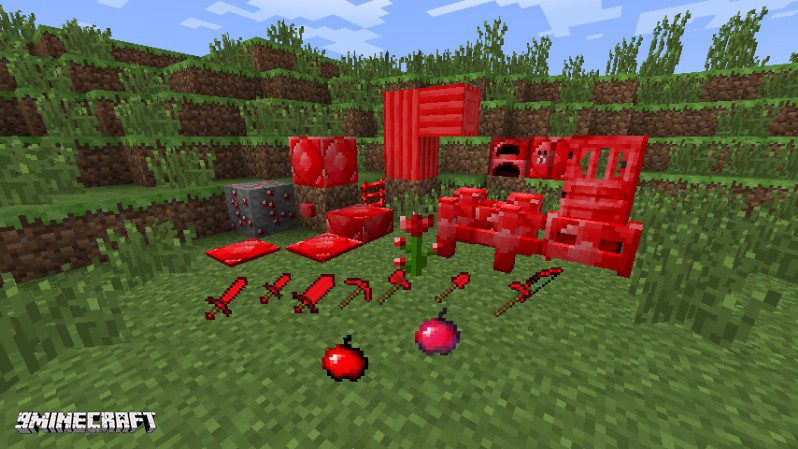
- Add a few types of items (tools, armor, etc.).
- Add a few types of blocks.
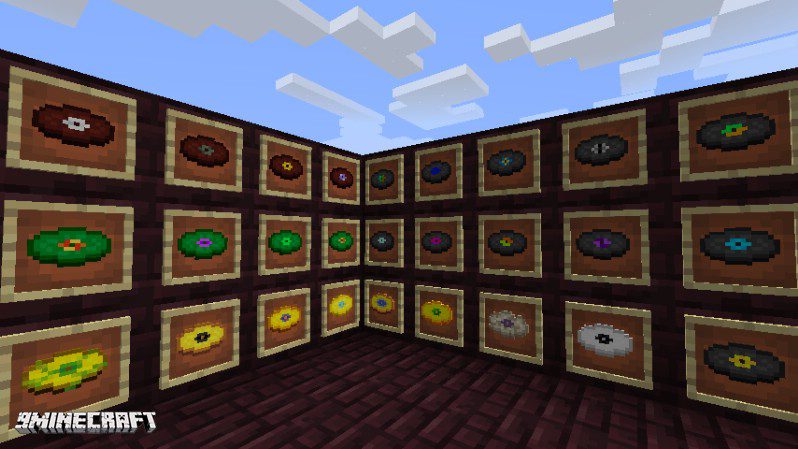
- Add new records.
- Allow items and armour to give you potion effects under certain circumstances.
- Change maximum stack sizes.
Screenshots:
A sample of Custom Records Added
A sample of what kinds of blocks and items you can add
Loot Plus Plus Mod Download Links
For Minecraft 1.7.10
Forge version: Download from Server 1 – Download from Server 2
For Minecraft 1.8.9
Forge version: Download from Server 1 – Download from Server 2
- Edition: Minecraft Java
- File type: .jar
- How to install: Install the matching mod loader (Forge, Fabric or NeoForge) for your Minecraft version. → Download the .jar. → Put it in the .minecraft/mods folder and launch that loader profile.
- Where to get it: In MC Java Mods, or directly above on this page.
Install steps are the general flow for this file type — How to install Minecraft Java mods & modpacks walks through it step by step.
- Downloads as 209265.mcaddon
- Download size: 416 KB
- Download link checked 24 Jul 2026 — working
- Mirrored on our own servers — the download does not depend on the original host
These come from our own check of the pack file, not from the source page.