Extended Days Mod 1.12.2, 1.11.2 allows you to make days and nights longer or shorter. The amount of extra time is configurable and you can adjust days and night independently. It also adds its own clock HUD element. At certain times during the day/night cycle, the mod will “freeze” time. The game will continue to run normally and the sun/moon/stars will move as you would expect. After a configurable amount of time, time is “unfrozen”. These are called extended periods. You can have as many extended periods as you want. Entering a negative number for the added minutes will skip time ahead, instead of extending it. By default, there is one extended period at noon (MC time 6000) and one at midnight (18000).
The default config adds 30 minutes at noon and 10 minutes at midnight. This make days a total of 40 minutes long and nights 20 minutes, for a total of 1 hour per day/night cycle. Add, remove, or change extended periods as you see fit. Shortening days/nights with negative periods will cause the sky to jump ahead. Vanilla clocks will not be very useful. The “/time set” command may not work as you would expect. If playing with Tough As Nails, this might make temperature management more difficult, depending on when your extended periods occur.
Features:
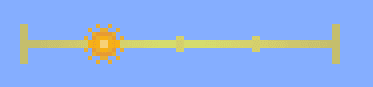
- Clock Bar: This mod adds a clock to your HUD. Normally, this is only visible when you have a clear sky above your head, or when you have a clock or pocket watch in your inventory. Or you can configure it to be visible at all times. The sun (or moon during the night) indicates how far into the day you are. So it goes from sunup to sundown. The clock can be re-positioned through the config file. The mod has a config GUI, so just go into the Mods menu, select Extended Days, then click Config to edit it without restarting the game.
- Pocket Watch: The pocket watch is an upgraded clock, crafted with a clock and some type of quartz (nether quartz will work). It is not animated like the vanilla clock, but just having it in your inventory causes the clock bar to render at all times. An exact time will also be displayed next to the clock bar.
Screenshots:
Clock Bar
Extended Days Mod 1.12.2, 1.11.2 Download Links
For Minecraft 1.11.2
For Minecraft 1.12.2, 1.12.1, 1.12
- Edition: Minecraft Java
- File type: .jar
- How to install: Install the matching mod loader (Forge, Fabric or NeoForge) for your Minecraft version. → Download the .jar. → Put it in the .minecraft/mods folder and launch that loader profile.
- Where to get it: In MC Java Mods, or directly above on this page.
Install steps are the general flow for this file type — How to install Minecraft Java mods & modpacks walks through it step by step.
- Downloads as 209586.mcaddon
- Download size: 45 KB
- Download link checked 30 Jul 2026 — working
- Mirrored on our own servers — the download does not depend on the original host
These come from our own check of the pack file, not from the source page.