Sword Displays
Java mod listed for Minecraft 1.16–1.21. Downloads from the MC Java Mods app on Android.
⬇ Download on CurseForgeSword Displays
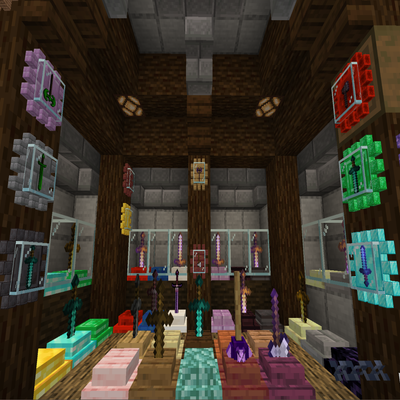
The mod introduces sword displays to your minecraft world.

Usage:
To Insert an item: Right-Click with a sword (type) item | Note: You can only place one sword at a time.
To Withdraw the item: Shift + Right-Click
To Inverse Rotate the item in the display: Right-Click with an empty hand, while the display isn't empty.
Want to add more swords to the list?
To Add/Insert additional item(s) or Replace/Remove currently available ones:
Create a new datapack: "sworddisplay"
Create the following folder structure inside the datapack: 1.21+: "data/tags/item/", pre 1.21: "data/tags/items/"
Create a new file inside items/ called: "swords.json"
Follow the scheme/format of https://minecraft.fandom.com/wiki/Tags
Example:
{

  "replace": false,

  "values": [

    "minecraft:diamond_axe",

    "minecraft:mace",

    "modid:item"

  ]

}
Will there be a Fabric version?
At the current moment there are NO plans to port the mod to Fabric.
- Edition: Minecraft Java
- File type: .jar
- Minecraft versions listed: 1.20.1, 1.21.1, 1.21
- How to install: Install the matching mod loader (Forge, Fabric or NeoForge) for your Minecraft version. → Download the .jar. → Put it in the .minecraft/mods folder and launch that loader profile.
- Where to get it: Opens on CurseForge — not every file is mirrored on our own servers.
Install steps are the general flow for this file type — How to install Minecraft Java mods & modpacks walks through it step by step.
Sword Displays is a free Minecraft Java mod. Compatible with Minecraft 1.20.1, 1.21.1, 1.21, 1.20.2 and newer. Downloaded 2,073,861 times (via CurseForge). Download it and open it directly in the game.