
ModsJava
WAILA Plugins Mod 1.10.2, 1.7.10 (See Information in the WAILA HUD)
Minecraft Java mod. Downloads from the MC Java Mods app on Android.
⬇ DownloadWAILA Plugins Mod 1.10.2, 1.7.10 adds more mod compability to Waila. The benefit of this is you are able to see information about their blocks in the WAILA HUD.
Screenshot:
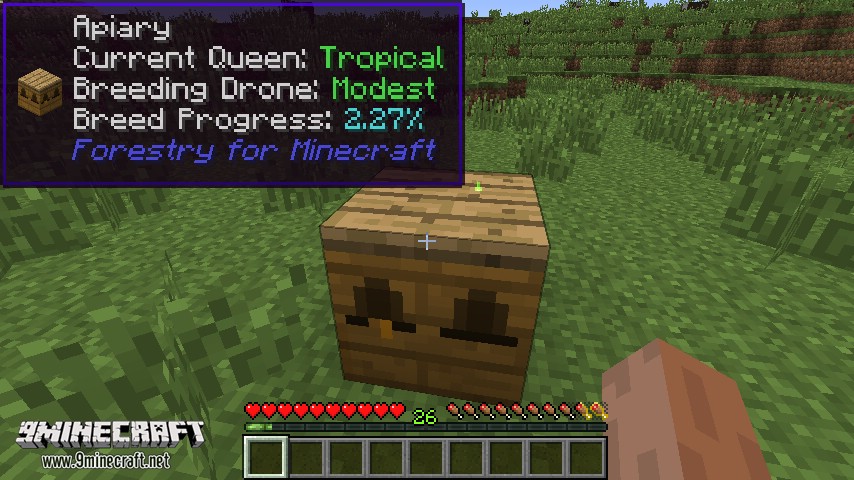
With WAILA Plugins the following information is added to the Waila panel if possible:
Currently Supported:
- Blood Magic (Ported from ImLookingAtBlood, by Pokefenn)
- Capacity, LP, and tier of altars
- Progress of the altar’s current craft
- Current recipe result of Chemistry set
- Progress of chemistry set
- Owner of master ritual stone
- Current ritual of master ritual stone
- Current block/item in teleposer
- Flaxbeard’s Steam Power
- Fluids in crucibles
- Pressure percentages on gauges
- Steam amounts in tanks
- State of valve pipes
- Forestry
- Sapling genomes
- Pollinated leaves info
- Current bees inside apiaries/beehouses/alvearies (and genome info)
- Apiary errors (No flowers, no drone, etc.)
- Progress percentage of current breed
- RF in of engines
- Heat in engines
- Magical Crops
- Growth percentage and hovering icon of the product of the plant
- Mekanism
- Energy amount in all energy storing blocks
- Gas stored in gas storage blocks
- Fluid stored in portable tanks
- Multiplier on salination plant
- Type of factories
- Pam’s Harvestcraft
- Adds a growth percentage to tree fruits
- Railcraft
- Fluid inside machines
- Locomotive information (steam, heat, charge)
- Heat information on coal burning machines
- Whether a multiblock is formed or not
- Amount of charge in blocks
- Engine production rate
- RedLogic
- Ported overlay rendering from the Project:Red plugin in WAILA
- Info for certain gates such as Timer, Repeater, etc.
- Strength of red alloy wires
- Resourceful Crops
- Hovering icon of the product of the plant
- Thermal Expansion
- Augment info
- Minefactory Reloaded [1.7 only, except for DSU]
- IDeepStorageUnit statistics
- Vanilla/Forge
- IFluidHandler information
WAILA Plugins Mod 1.10.2, 1.7.10 Download Links
For Minecraft 1.7.10
For Minecraft 1.10.2
Quick facts
- Edition: Minecraft Java
- File type: .jar
- How to install: Install the matching mod loader (Forge, Fabric or NeoForge) for your Minecraft version. → Download the .jar. → Put it in the .minecraft/mods folder and launch that loader profile.
- Where to get it: In MC Java Mods, or directly above on this page.
Install steps are the general flow for this file type — How to install Minecraft Java mods & modpacks walks through it step by step.
File checked by MCModsHub
- Downloads as 211311.mcaddon
- Download size: 76 KB
- Download link checked 27 Jul 2026 — working
- Mirrored on our own servers — the download does not depend on the original host
These come from our own check of the pack file, not from the source page.