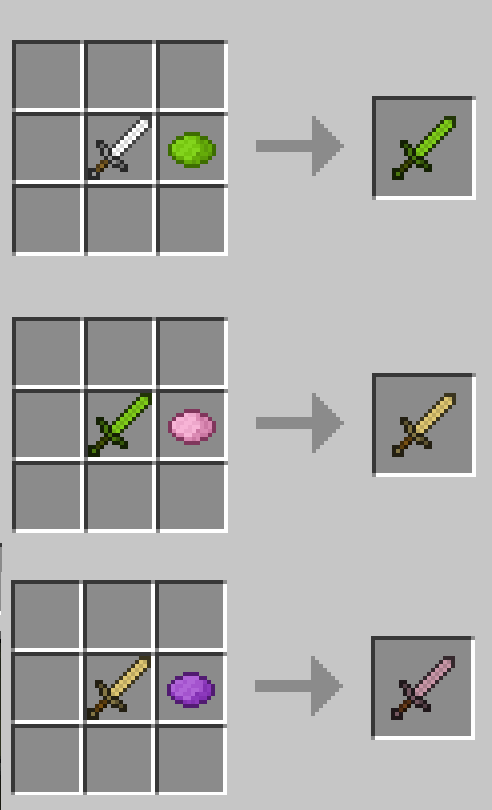
Colorful Tools Mod 1.8, 1.7.10 adds the functionality of dying leather armor to your tools and weapons. Endless color combos to allow you to stand out from the crowd. Simply combine your sword with the dye of your choice, even add more dyes to further tint your tool until you get the desired color. If a tool or weapon is not changing colors, simply place it in a crafting grid and it should replace it with one that will work.
Mod Showcases:
Crafting Recipes:
Download Links for Colorful Tools Mod 1.8, 1.7.10
For Minecraft 1.6.4
For Minecraft 1.7.2
For Minecraft 1.7.10
For Minecraft 1.8
Quick facts
- Edition: Minecraft Java
- File type: .jar
- How to install: Install the matching mod loader (Forge, Fabric or NeoForge) for your Minecraft version. → Download the .jar. → Put it in the .minecraft/mods folder and launch that loader profile.
- Where to get it: In MC Java Mods, or directly above on this page.
Install steps are the general flow for this file type — How to install Minecraft Java mods & modpacks walks through it step by step.
Verified by MCModsHub
- Downloads as 212128.mcaddon
- Download size: 43 KB
- Download link checked 27 Jul 2026 — working
- Mirrored on our own servers — the download does not depend on the original host
These come from our own check of the pack file, not from the source page.