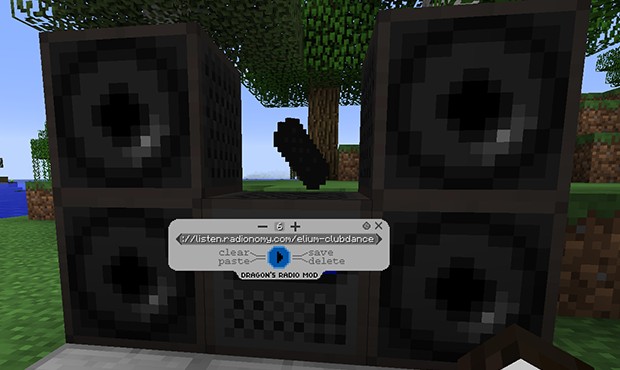
Radio Mod 1.7.10 adds a radio into the world. It is not simply a prerecorded sound player or dummy, It plays actual radio streams from the internet. For that you need a radio stream link that provides mp3 stream with m3u or pls extention. Audio stream will be client sided, so the radio does not cause any lag to server, and client side code is enough effective to play on any configuration and mod-pack without any troubles.
Radio has 9 buttons, and one text insert area. Buttons allow you to connect to stream link that is provided in text box, Play the stream, turn volume up and down, add stream to playlist, delete it, browse the playlist, clear the stream text-box, paste into it and exit the player.
You can use the radio remote to bind speaker to radio to extend it’s range. Just right click on speaker with control and then do the same to radio!
Just remember that one radio can have max 10 speakers. Just to make sure people do not go crazy. However you can add dummy speakers around to make it look there are more speakers!
Mod Showcases:
Download Links for Radio Mod 1.7.10
For Minecraft 1.7.10
- Edition: Minecraft Java
- File type: .jar
- How to install: Install the matching mod loader (Forge, Fabric or NeoForge) for your Minecraft version. → Download the .jar. → Put it in the .minecraft/mods folder and launch that loader profile.
- Where to get it: In MC Java Mods, or directly above on this page.
Install steps are the general flow for this file type — How to install Minecraft Java mods & modpacks walks through it step by step.
- Downloads as 212170.mcaddon
- Download size: 220 KB
- Download link checked 27 Jul 2026 — working
- Mirrored on our own servers — the download does not depend on the original host
These come from our own check of the pack file, not from the source page.