Backpacks Mod 1.8, 1.7.10 is a simple mod which adds backpacks into Minecraft.
Recipes and Guides:
So, to make a backpack you have to first make the leather backpack.
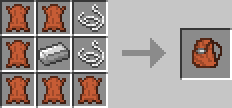
This works as a normal backpack but if you like you can also dye your backpacks with any of the dyes. To open hold shift and right click.
They are shapeless recipes and only require one dye.
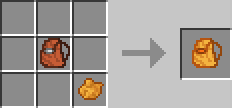
You can also dye already dyed backpacks and wash them to get back to the leather look with a bucket of water.
The Gui of backpacks has 18 slots to put your items. Also be aware that you can’t put backpacks in backpacks.
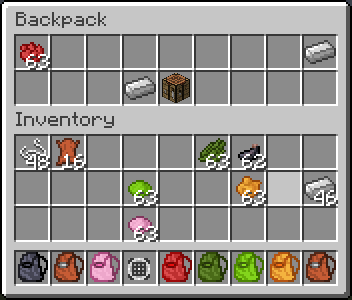
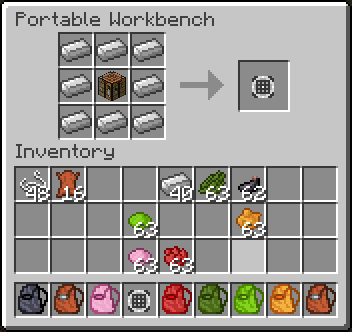
As an added bonus this mod adds in a portable workbench which crafting recipe and what the Gui looks like is below. To open hold shift and right click.
Download Links for Backpacks Mod 1.8, 1.7.10
For Minecraft 1.7.2
For Minecraft 1.7.10
For Minecraft 1.8.0
- Edition: Minecraft Java
- File type: .jar
- How to install: Install the matching mod loader (Forge, Fabric or NeoForge) for your Minecraft version. → Download the .jar. → Put it in the .minecraft/mods folder and launch that loader profile.
- Where to get it: In MC Java Mods, or directly above on this page.
Install steps are the general flow for this file type — How to install Minecraft Java mods & modpacks walks through it step by step.
- Downloads as 212421.mcaddon
- Download size: 114 KB
- Download link checked 27 Jul 2026 — working
- Mirrored on our own servers — the download does not depend on the original host
These come from our own check of the pack file, not from the source page.