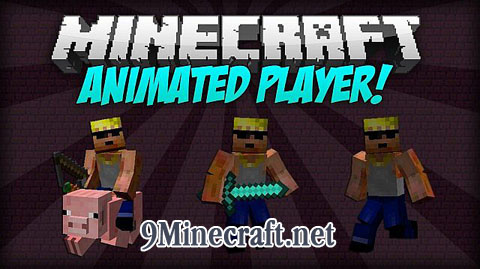
Animated Player Mod 1.7.10 Introduction:
- Do you love Minecraft’s default animations?
- Are you obsessed with the way the Minecraft player looks and acts?
- Do you wish Minecraft’s player would forever look the same way?
Well if you do, then this isn’t the mod for you!
After countless hours of working (it wasn’t that long), Professor HippoMaster now introduces to you the Animated Player Mod! This mod completely replaces and reanimates the player model by adding more joints and better animations. Also, it’s completely client-based, which means it works for servers too (just don’t install it into the server)!
Animations
- Currently this mod replaces animations for walking, running, swimming, jumping, sneaking, riding, bow-aiming, and blocking.
Face Expression
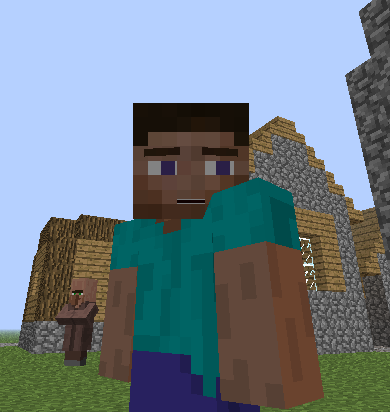
The player now has his own face! It has the following features that can be configured inside the configuration file in .minecraft/config/AnimatedPlayer.cfg:
- Moving eyes depending on where the player is looking.
- Opening mouth that simulates a breathing animation.
- Eyebrows that become sad when hungry and confident (and angry) when energy-replenished!
Hats
Hats now render each pixel individually to make it look better! This can be toggled in the config file. (Still a bit buggy)
Features:
- Replaces the standard player model with an improved one featuring more joints for better movement.
- Adds new animations for walking, running, swimming, jumping, and sneaking.
- Introduces animations for riding, aiming a bow, and blocking.
- Gives the player a face with expressions.
- Eyes move to look in the direction you are pointing.
- A mouth opens and closes to create a breathing animation.
- Eyebrows change to look sad when you are hungry and angry when you are full.
- Improves how hats look by rendering each pixel individually.
- Supports custom player textures, allowing you to adapt your own skin to the new model.
How to Use:
Creating Custom Textures
You can make your own skin compatible with the new animations. To do this, you need to color specific areas of your skin file.
- Color in the ‘Eye Overlay’ sections to give your character animated eyes. You can make 2×2 or 2×3 pixel eyes.
- Fill in the ‘Eyebrows’ section to add animated eyebrows above the eyes.
- Color the ‘Mouth’ section to give your player an animated mouth with teeth.
- Once your skin is edited, upload it to your Minecraft profile to see the changes in-game.
Configuration:
You can customize the mod’s features by editing its configuration file. This file is located in your Minecraft folder at .minecraft/config/AnimatedPlayer.cfg.
- Turn facial features like moving eyes, a breathing mouth, or expressive eyebrows on or off.
- Enable or disable the improved hat rendering.
- Set up custom textures for offline play.
Animated Player Mod Download Links
For Minecraft 1.5.2
For Minecraft 1.6.2
For Minecraft 1.6.4
Download from Server 1 – Download from Server 2 – Download from Server 3
For Minecraft 1.7.2
For Minecraft 1.7.10
- Edition: Minecraft Java
- File type: .jar
- How to install: Install the matching mod loader (Forge, Fabric or NeoForge) for your Minecraft version. → Download the .jar. → Put it in the .minecraft/mods folder and launch that loader profile.
- Where to get it: In MC Java Mods, or directly above on this page.
Install steps are the general flow for this file type — How to install Minecraft Java mods & modpacks walks through it step by step.
- Downloads as 212686.mcaddon
- Download size: 33 KB
- Download link checked 27 Jul 2026 — working
- Mirrored on our own servers — the download does not depend on the original host
These come from our own check of the pack file, not from the source page.