
Transparent
Java mod listed for Minecraft 1.16–1.21. File opened and checked on 19 Oct 2026; downloads from the MC Java Mods app on Android.
⬇ Download on CurseForgeTransparent allows resource packs to give certain entities textures with transparent (or translucent) pixels. To use, simply install the mod and use or create a resource pack that gives one of the supported entities a transparent texture.
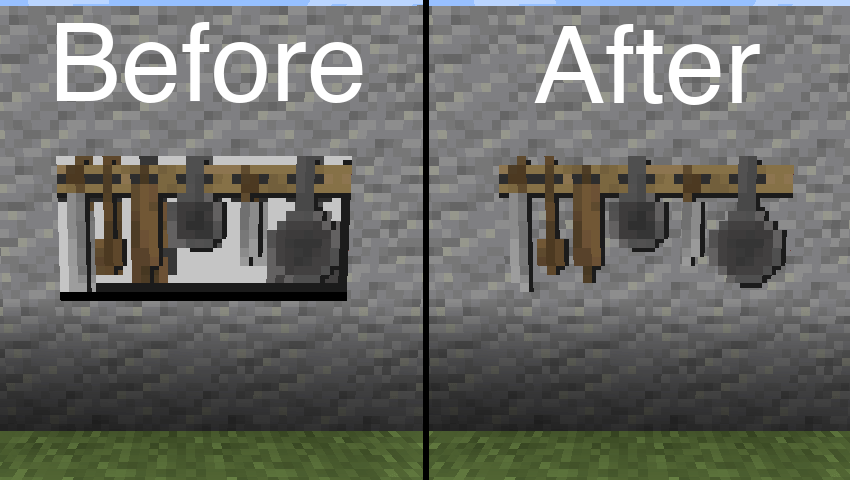
Resource pack used in the above image: BwW Texturepack.
Officially supports Paintings++ Mod!
Supported Entities
- Armor Stand (1.19.4+)
- End Crystal
- End Crystal Beam (1.21+)
- Item Frame
- Painting
- Player Cape (1.21+)
- Player Armor (1.21+)
- Beacon Beam (disabled by default)
If you want another entity to be supported by this mod, please let me know on Discord or GitHub Issues.
Configuration
In order to change the default configuration, paste the following json file content into a file in your resource pack located at /assets/transparent/transparent.json.
{
    "armor_stand": true,
    "beacon_beam": false,
    "end_crystal": true,
    "end_crystal_beam": true,
    "item_frame": true,
    "painting": true,
    "player_cape": true,
    "player_armor": true
}
Report any issues on GitHub. Chat on Discord in the #transparent channel.
Support the development of my mods on Ko-fi.

- Edition: Minecraft Java
- File type: .jar
- Minecraft versions listed: 1.21.5, 1.21.4, 1.21.3
- How to install: Install the matching mod loader (Forge, Fabric or NeoForge) for your Minecraft version. → Download the .jar. → Put it in the .minecraft/mods folder and launch that loader profile.
- Where to get it: Opens on CurseForge — not every file is mirrored on our own servers.
Install steps are the general flow for this file type — How to install Minecraft Java mods & modpacks walks through it step by step.
Transparent is a free Minecraft Java mod. Compatible with Minecraft 1.21.5, 1.21.4, 1.21.3, 1.21.2 and newer. Downloaded 38,144,824 times (via CurseForge). Download it and open it directly in the game.