The mod was originally created by Mapwriter. Original thread
Since he did not update the mod for a long time, I decided to continue the mod.

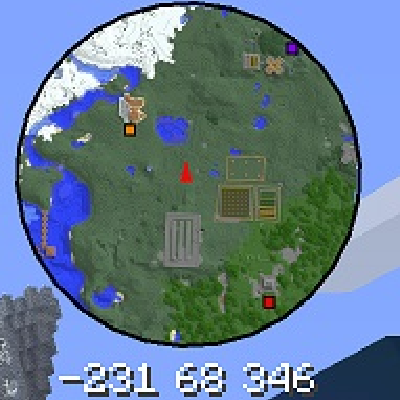
In game mini map mode (circular map mode enabled in map GUI options menu)

In game full screen GUI.

Zooming out to see the world.
Features:
- In game mini-map for multiplayer and singleplayer.
- Client side (server does not need to have the mod installed).
- The areas you explore are saved and can be viewed by scrolling or zooming the map, even when you are in a completely different part of the world.
- Full screen map GUI. Set waypoints by right clicking, pan map by click dragging, zoom with the mouse wheel.
- Rotating circular mini map mode. Can be enabled in the options GUI.
- Colours for blocks automatically generated from the block's texture.
- Support for custom texture packs.
- Support for blocks added by mods.
- Biomes now coloured appropriately.
- Entire map can be written to a PNG image.
- When in the Nether the mini map shows your effective location in the Overworld. This makes placing portals easier.
- Underground map mode (vastly improved in 2.0.14).
- All block colours configurable
For installation instructions, usage instructions, previous versions and more see the main forum post here:
MapWriter on MinecraftForum.net
Source code can be found here:
MapWriter 2 on GitHub
Quick facts
- Edition: Minecraft Java
- File type: .jar
- How to install: Install the matching mod loader (Forge, Fabric or NeoForge) for your Minecraft version. → Download the .jar. → Put it in the .minecraft/mods folder and launch that loader profile.
- Where to get it: Opens on CurseForge — not every file is mirrored on our own servers.
Install steps are the general flow for this file type — How to install Minecraft Java mods & modpacks walks through it step by step.
Mapwriter 2 is a free Minecraft Java mod. Downloaded 2,207,005 times (via CurseForge). Download it and open it directly in the game.