
Carpenter's Slope Mod
Minecraft Java mod. Download on the author's site.
The Carpenter's Slope is a special block that enables you to create sloped structures. Inspired by Kaevator's SuperSlopes, this mod aims to improve on…
⬇ Download
The Carpenter’s Slope is a special block that enables you to create sloped structures. Inspired by Kaevator’s SuperSlopes, this mod aims to improve on lighting, block ID usage, and block compatibility. Like Painter’s Flower Pot Mod, these slopes have the ability to be covered using a wide assortment of blocks. Unlike Kaevator’s implementation, this mod does not employ the use of oblique slopes.
- Want lighted glowstone slopes? No problem.
- Want to cover them with leaf blocks? Sure, why not!
- Want to make a grassy knoll? Absolutely, it works great!
Screenshot:

Recipes:
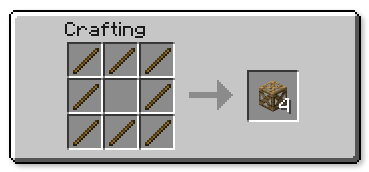
How to use:
- All slopes are made using the Carpenter’s Slope, which looks like a regular block frame as shown by the recipe.
- Slope type is determined by where on a block face you right click, and/or by the direction you are facing.
- Corners are automatically constructed using a simple algorithm. Generally, if you place the corner piece last, it will form into a corner. Corner-checking is not comprehensive.
- If you wish to override block auto-orientation, hold the sneak key while placing the slope.
- If a slope is not forming the way you want, hold the sneak key and left-click on the block to cycle through slope types.
- The slopes are created as empty frames, and must be covered using regular block materials. Blocks that can be anticipated to texture correctly will be accepted as a cover.
- If you attempt to cover a slope that already is covered, the existing cover block will eject from the slope.
- To remove a cover, you must destroy the frame (which is recoverable).
- By default, the configuration file will force the slopes to use log side textures, rather than the inner trunk texture for slope faces. This is a desirable effect when constructing roofs using logs, but can be disabled if you prefer.
- Edition: Minecraft Java
- File type: .jar
- How to install: Install the matching mod loader (Forge, Fabric or NeoForge) for your Minecraft version. → Download the .jar. → Put it in the .minecraft/mods folder and launch that loader profile.
- Where to get it: Opens on the file's original source — not every file is mirrored on our own servers.
Install steps are the general flow for this file type — How to install Minecraft Java mods & modpacks walks through it step by step.
Carpenter's Slope Mod is a free Minecraft Java mod. Download it and open it directly in the game.