Show Me What You Got
Java mod listed for Minecraft 1.17–1.21. Downloads from the MC Java Mods app on Android.
⬇ Download on CurseForge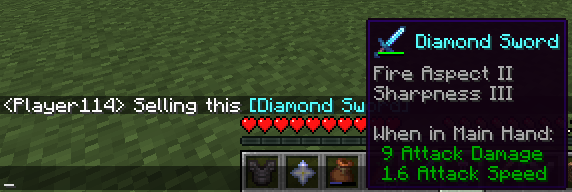
Show Me What You Got
A simple mod which allows displaying your items to other users in chat.
While in your inventory, hold ctrl and then press your chat key while hovering over an item to share it. (so Ctrl+T by default).
Your chat window will open with the linked item inside. Feel free to write a message before or after the item (or both) before sending!
Client or server?
The mod should be installed on the client and the server in order to function properly. Clients without the mod can still see items shared by others with the mod in chat, but can't share items themselves and also won't see the shared item's texture in the tooltip. If you use this mod on your client and try to share an item on a server without the mod installed, you will just send text with the item name.
- Edition: Minecraft Java
- File type: .jar
- Minecraft versions listed: 1.21.3, 1.20.2, 1.20.1
- How to install: Install the matching mod loader (Forge, Fabric or NeoForge) for your Minecraft version. → Download the .jar. → Put it in the .minecraft/mods folder and launch that loader profile.
- Where to get it: Opens on CurseForge — not every file is mirrored on our own servers.
Install steps are the general flow for this file type — How to install Minecraft Java mods & modpacks walks through it step by step.
Show Me What You Got is a free Minecraft Java mod. Compatible with Minecraft 1.21.3, 1.20.2, 1.20.1, 1.20 and newer. Downloaded 12,207,965 times (via CurseForge). Download it and open it directly in the game.