Epic Fight - Impactful
Java mod listed for Minecraft 1.16–1.20. File opened and checked on 4 Oct 2026; downloads from the MC Java Mods app on Android.
⬇ Download on CurseForge*** If you have installed 18.5.3/19.5.3/20.6.2 and the game crashes when you load it, please delete your /config/impactful-common.toml as well as the original mod, and install the latest hotfix version, or manually replace uchigatana with tachi and replace katana with uchigatana in the "weapon_categories_setting" option in impactful-common.toml ***
Modern action games have made many attempts to make player feel the force in every punches. Impactful is one of these attempts brings hit stop and screen shake to Epic Fight.
<Features>
- Customizable hit stop based on weapon categories or specify with attack animation
- Customizable screen shake based on weapon categories or specify with attack animation
- Customizable screen shake based on block type when player is guarding
- Adding screen shake to every ground slam, like meteor slam, etc.
- Customizable radial Blur based on weapon categories or specify with attack animation
- Player Only

How to custom your own setting:
Version after 20.11, need to setup resoucepack and datapack. example for 20.11.1
For visual effects of screen shake and radial blur just need to setup resoucepack in client side.
you can custom the visual effect deponds on items in resoucepack. "modid/item_skin/item_registryname.json". just like how to custom trails
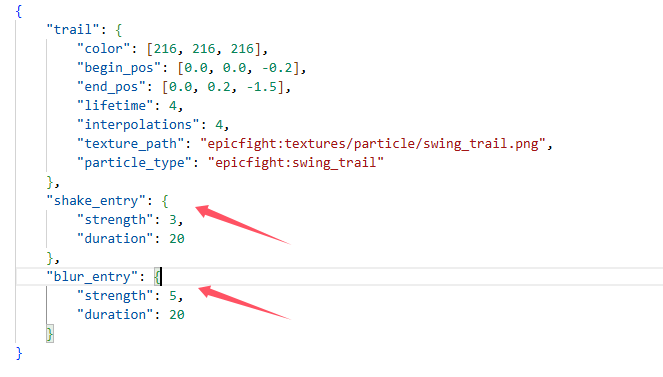 or you can custom the visual effect deponds on animation in resoucepack. "modid/animmodels/animations/biped/combat/visual_effct/animation_registryname.json"
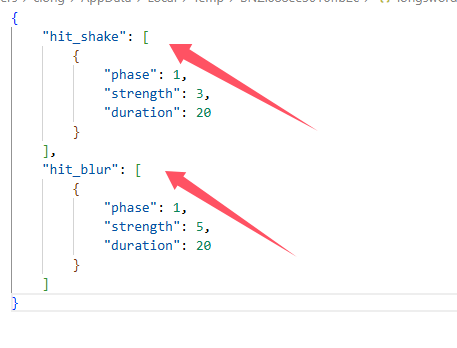
For hit stop need to setup resoucepack and datapack in both side.
custom hit stop setting deponds on item capabilities in datapack "modid/capabilities/weapons/item_registryname.json". just like how to custom weapon capability
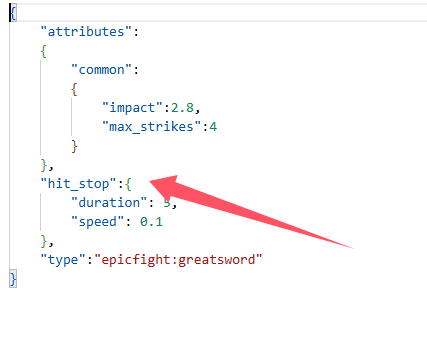
custom hit stop setting deponds on animation
"modid/animmodels/animations/biped/combat/hit_stop/animation_registryname.json"
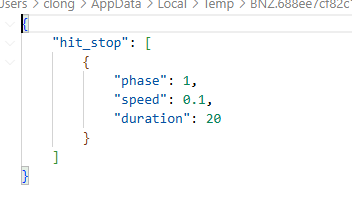
When playing on the server, animation setting of hit stop must setup in server side as a datapack, and setup in client side as a resoucepack.
When singleplayer, just need to setup as a resourcepack
Version before 20.11, only need to set the configuration file impactful-common.toml and impactful-client.toml
- Edition: Minecraft Java
- File type: .jar
- Minecraft versions listed: 1.20.1, 1.18.2, 1.19.2
- How to install: Install the matching mod loader (Forge, Fabric or NeoForge) for your Minecraft version. → Download the .jar. → Put it in the .minecraft/mods folder and launch that loader profile.
- Where to get it: Opens on CurseForge — not every file is mirrored on our own servers.
Install steps are the general flow for this file type — How to install Minecraft Java mods & modpacks walks through it step by step.
Epic Fight - Impactful is a free Minecraft Java mod. Compatible with Minecraft 1.20.1, 1.18.2, 1.19.2, 1.16.5. Downloaded 6,189,838 times (via CurseForge). Download it and open it directly in the game.