Introduction
Inspired by Wynncraft, this mod allows you to check other players' gear. This could be useful in Multiplayer mode, especially when the modpack is heavily gear-driven. For example, when you play on a server that installed Apotheosis, you might want to see your friend's gear because Apotheosis adds many affixes to the gear, in this case this mod can help you by simply middle clicking your friend.
Feature
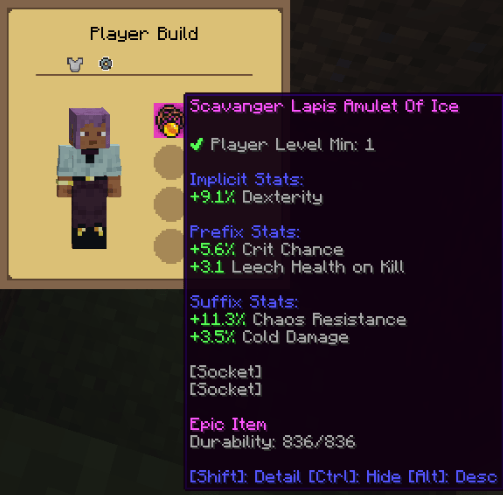
- 🔍Build Viewer: allowing you to check out others' armor by middle-clicking other players. All vanilla gear will be shown on the screen.
- ⭯ Loadout system: allowing you to store and load the build file via an in-game block: Loadout Barrel(check the recipe in JEI).
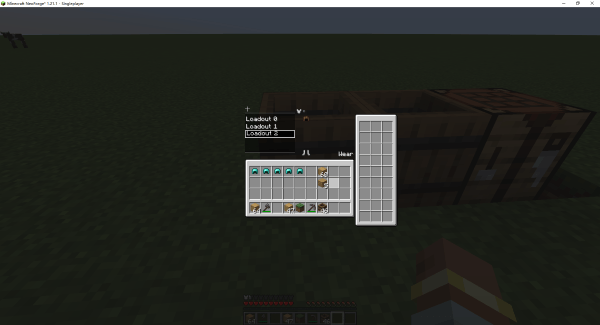 The right container can be used to store your equipment. The middle-left build list allows you to create your own build; the build content will be shown in the middle-right. You can add or remove the equipment in the build without occupying the real equipment. The Wear button allows players to equip the current build by searching for the corresponding equipment in the right-side container.
Compatibility
- Curios: a new menu will be added when Curios is installed
Quick facts
- Edition: Minecraft Java
- File type: .jar
- Minecraft versions listed: 1.21.1, 1.20.1, 1.21.4
- How to install: Install the matching mod loader (Forge, Fabric or NeoForge) for your Minecraft version. → Download the .jar. → Put it in the .minecraft/mods folder and launch that loader profile.
- Where to get it: Opens on CurseForge — not every file is mirrored on our own servers.
Install steps are the general flow for this file type — see the MC Java Mods guides for the full walkthrough.
What's Your Build is a free Minecraft Java mod. Compatible with Minecraft 1.21.1, 1.20.1, 1.21.4. Downloaded 1,671,140 times (via CurseForge). Download it and open it directly in the game.