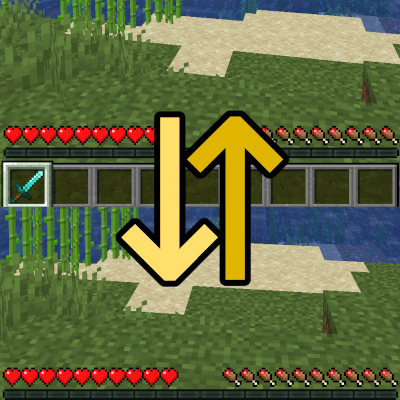
Auto HUD
Java mod listed for Minecraft 1.18–1.21. Downloads from the MC Java Mods app on Android.
⬇ Download on CurseForgeAuto HUD
Auto HUD is a Minecraft mod which hides parts of the user interface (HUD) that are currently not interesting.
It is inspired by similar mods ("immersive hud") for other games. I personally really like the clean view of no visible HUD, but get frustrated by the limitations of using F1 mode.
This is an opinionated rewrite of Head-down Display that never got updated.
Features
- Toggle the whole HUD with a key binding.
- Have parts of the HUD that haven't changed hide away.
- Hide persistent, unchanging status effects, such as water breathing from the turtle helmet.
- Show remaining time of status effects.
- Choose between "move out", "fade out", and "no animation" modes.
- Highly configurable.
Support
Found a bug or have feedback? Leave a comment, open an issue on GitHub or join my Discord!
Visual differences to F1 mode
- Player hand / equipped items remain visible
- Player names remain visible
- The vignette remains active
- Incoming chat messages still pop up
- Crosshair remains visible (see my other mod Dynamic Crosshair for that)
- Configurable what elements are hidden
Dependencies
- Optional dependency on YetAnotherConfigLib for ingame configuration screen
- older versions require Cloth Config instead; see the individual files' dependencies
Fabric only
- requires Fabric API
- Optional: Mod Menu for ingame configuration screen
Mod Compatibility
This mod includes a modified version of magicus' Status Effect Timer, because I could not figure out how to dynamically insert my modifications into it. Since this mod allows for status effect icons to be hidden individually, the non-modified version will draw the timers in the wrong place.
Known to be compatible:
- Dynamic Crosshair augments this mod by dynamically hiding the crosshair as well.
- Raised works perfectly.
- HUDTweaks mostly works. Vertical status effects bar does not work with the timer overlay. Animation direction and offset may have to be tweaked in AutoHud's settings manually.
- AppleSkin appears to work fine.
- DetailArmorBar is supported.
- BerdinskiyBear's Armor Hud is supported in hotbar mode.
- MicroDurability is supported.
- Dehydration is supported.
- OneBar is supported.
- Inventory Profiles Next lock slots are supported in move & instant mode.
- Status Effect Bars is supported.
Known to be incompatible:
- OptiFabric / OptiFine crashes due to mixin conflicts.
- Any other mod that draws status effect timers should have that functionality disabled.
- HUD elements created by other mods will most likely not be moved.
- Bedrockify overwrites the status effect modifications. To get them working, disable the
screenSafeAreamixin. - Running AutoHUD together with Exordium will cause stuttering and delayed animations.
- Edition: Minecraft Java
- File type: .jar
- Minecraft versions listed: 1.21.9, 1.21.5, 1.21.7
- How to install: Install the matching mod loader (Forge, Fabric or NeoForge) for your Minecraft version. → Download the .jar. → Put it in the .minecraft/mods folder and launch that loader profile.
- Where to get it: Opens on CurseForge — not every file is mirrored on our own servers.
Install steps are the general flow for this file type — How to install Minecraft Java mods & modpacks walks through it step by step.
Auto HUD is a free Minecraft Java mod. Compatible with Minecraft 1.21.9, 1.21.5, 1.21.7, 1.21.6 and newer. Downloaded 2,743,519 times (via CurseForge). Download it and open it directly in the game.