
Restore Hardcore World
Java mod listed for Minecraft 1.20. Download on the author's site.
⬇ Download on CurseForge
Hardcore world can be restored by modifying the level.dat in the world directory. The problem is that players are usually lazy to do that or don't know how to do so.
This is why this mod exissts, to easily restore the lost hardcore worlds! It also offer some customizations. The mod will modify the level.dat of the specified world to restore. In case something would go wrong, a backup is done in the same world folder.

When you die in a singleplayer hardcore world, a new button will be there: "Restore World". Depending on the settings (explained below), you'll be able to recover the world still as hardcore or as a survival.
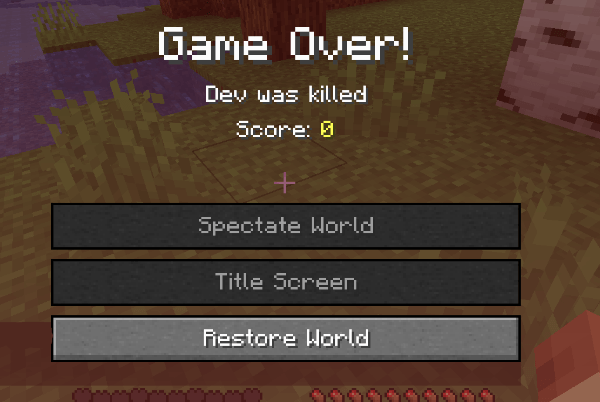

*Just in case, the mod create a backup of the world's data, named under "level.dat_backup_restorehardcoreworld"

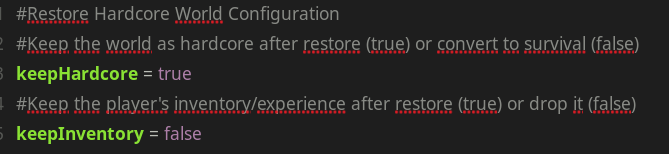
It has no GUI on FORGE yet to configure that ingame, but you can go to config/restorehardcoreworld-client.toml and you will be able to configure that:

Coming soon!
Feel free to add this in any modpack published on curseforge! This is highly appreciated.
The code is open source : https://github.com/AwesomeHippo/RestoreHardcoreWorld under MIT license
- Edition: Minecraft Java
- File type: .jar
- Minecraft versions listed: 1.20.2, 1.20.3, 1.20.1
- How to install: Install the matching mod loader (Forge, Fabric or NeoForge) for your Minecraft version. → Download the .jar. → Put it in the .minecraft/mods folder and launch that loader profile.
- Where to get it: Opens on CurseForge — not every file is mirrored on our own servers.
Install steps are the general flow for this file type — How to install Minecraft Java mods & modpacks walks through it step by step.
Restore Hardcore World is a free Minecraft Java mod. Compatible with Minecraft 1.20.2, 1.20.3, 1.20.1, 1.20.4. Downloaded 822,958 times (via CurseForge). Download it and open it directly in the game.