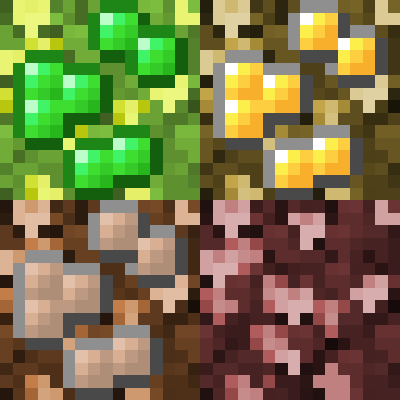
Oreberries
Minecraft Java mod. Downloads from the MC Java Mods app on Android.
⬇ Download on CurseForgeWhat does this mod do?
Tinkers' Construct added oreberries in 1.7.10, but they dropped this feature when they moved to newer versions of Minecraft. This mod brings back oreberries and their associated content, and makes them much more configurable than they used to be.
How do I use this mod?
You need Minecraft Forge installed first. Once that's done, just drop oreberries-version.jar in your Minecraft instance's mods/ directory and, optionally, configure it to taste.
What settings does this mod have?
This mod has two configuration files: oreberries.json, where types of oreberries are defined, and oreberries.cfg, where you can control growth chances, bonemeal ability, and tinker villagers.
Why can't I place/grow oreberry bushes?
The default oreberry bushes (with the exception of essence berry bushes) only grow in the dark. The light level needs to be below 13 to place them, and below 10 for them to ever grow.
How do I add/change oreberries?
Edit your oreberries.json file. See the oreberries.json page on the wiki for detailed instructions.
Why does Minecraft crash on startup after I edited oreberries.json?
You may have made a mistake while editing oreberries.json. A syntax error in that file will prevent Minecraft from starting. If you don't see the error, and the crash log doesn't help you find it, try validating the contents of oreberries.json with a tool like JSONLint.com.
How does this mod relate to Tinkers' Construct?
This mod does not depend on Tinkers' Construct, but it does integrate with it if present. Also, this mod uses resources from the 1.7.10 version of Tinkers' Construct, with parts licensed under CC0 and CC-BY 3.0 (both GPL-compatible).
Can I use this in my modpack?
Yes, even if you monetize it with adf.ly or something, and you don't need to ask me for my permission first.
Will this be backported to any older Minecraft versions?
I won't be doing so myself, but my mod is open-source, so you can port it yourself (or if you don't know how to program, pay/convince someone who does to do it).
- Edition: Minecraft Java
- File type: .jar
- How to install: Install the matching mod loader (Forge, Fabric or NeoForge) for your Minecraft version. → Download the .jar. → Put it in the .minecraft/mods folder and launch that loader profile.
- Where to get it: Opens on CurseForge — not every file is mirrored on our own servers.
Install steps are the general flow for this file type — How to install Minecraft Java mods & modpacks walks through it step by step.
Oreberries is a free Minecraft Java mod. Downloaded 9,057,413 times (via CurseForge). Download it and open it directly in the game.