
ModsJava
Head in the Clouds
I don't know my version or loader
Open the Minecraft launcher and look at the profile you play on — it names both, like fabric-loader-1.21.4. The version also shows in the bottom-right corner of the game's main menu.
No loader in the profile name? Then it's plain Minecraft, and these mods won't run — you need Fabric or NeoForge installed first.
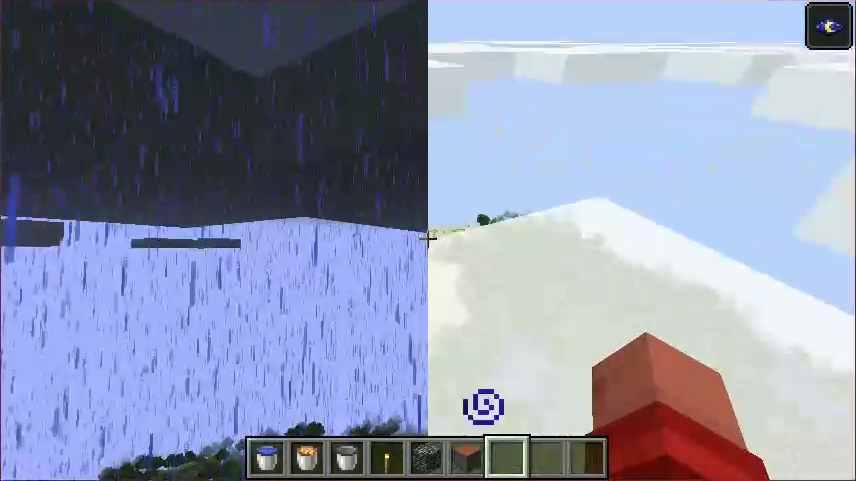
~ Nice weather is just few height meters away ~
===============================================
Can be used either client-only or client + serverside.
Client Rendering:
- Makes the environment sunny when above cloud level
Server Logic:
- All actions that depend on rainy weather will not work above cloud level (getting put out when on fire, using riptide tridents, extra crop ticks, ...)
- Since servers have no idea which height clouds are (this information does not exist on servers) you will have to add this information in the config file
Due to limitations in the way minecraft renders rain, you will not see rain rendered below the clouds when being above them
Quick facts
- Edition: Minecraft Java
- File type: .jar
- Minecraft versions listed: 1.21.11, 1.21.8, 1.21.5
- How to install: Install the matching mod loader (Forge, Fabric or NeoForge) for your Minecraft version. → Download the .jar. → Put it in the .minecraft/mods folder and launch that loader profile.
- Where to get it: Opens on CurseForge — not every file is mirrored on our own servers.
Install steps are the general flow for this file type — How to install Minecraft Java mods & modpacks walks through it step by step.
Verified by MCModsHub
- Ships as HeadInTheClouds-2.3.0+26.2.jar — drop this file into the mods folder
- Download size: 38 KB
- Download link checked 27 Aug 2026 — working
These come from our own check of the pack file, not from the source page.