
Create: Filters Anywhere
An addon for Create that expands usage of Attribute Filters and List Filters to support other mods. Also adds some QOL features to filters.
I don't know my version or loader
Create: Filters Anywhere
This mod adds a few extra feature's to the Create mod's excellent Attribute and List Filters!
The main feature (and the namesake of the mod) is added compatability to use Create's filters in other mod's filter slots! Additional mods will be added over time, but here are the supported mods so far:
- Filters now work inside the filter slots of upgrades, such as the pickup and void upgrades.
- Filters now work inside the filter slots of upgrades, such as the filter and void upgrades.
- Filters now work inside of View Cells, Import Bus, Export Bus, Storage Bus, and Formation Planes. Supports normal and Fuzzy card operation.
- Filters now work as filter items inside modules.
- Filters now work inside MR's Bulk Item Filter.
Tom's Simple Storage Mod (v1.1+)
- Filters now work inside of Tom's Basic Item Filter.
- Filters now work inside of LaserIO's Basic Filter cards.
- Filters now work inside of Oritech's Item Filter block.
Refined Storage (v1.3+, 1.20.1 only)
- Filters now work inside Exporters, Importers, Grid Filters, Destructors, and External Storages.
Vanilla
- Allays holding filters will pick up items that match the filter.
In addition to the above support, this adds interoperability between supported mod's filter items. For example, you can use Modular Routers filters inside Create's Smart Chutes to filter, or even use the FTB Filter System filters with your AE2 Storage Bus, and more!
New Attributes:
In addition to compatibility with existing mods, as of v1.2+, I have now started adding new attributes as well. You can see the current list below.
- "is a backpack with a UUID of <UUID>".
- "is a backpack with a <Upgrade Type>" (like Pickup Upgrade, Filter Upgrade, Magnet Upgrade.
- "is an Apotheosis gem with a <Bonus> bonus".
- "is a <Apotheosis Gem Type>".
- "has a <Apotheosis Gem Purity>".
- "is a unique Apotheosis gem".
- "has a <Affix> affix".
- "has an Apotheosis rarity".
- "has a <Rarity> rarity".
- "has at least <socket count> sockets.
- "has at least <empty socket count> empty sockets.
Built-In/Vanilla
- "can be charged"
- "is uncharged"
- "is fully charged"
- "is a <item>"
- "has a <data component type> data component"
Compatibility will only be applied when the mods are present, you should be able to use the mod whether all of the above mods are present or not.
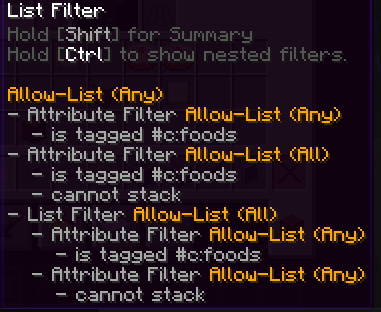
In addition to this compatibility, this mod also adds some nifty QOL features to Create's filters, such as the ability to view details on the filters inside of List Filters by using the CTRL key while hovering the filter. You can also delete individual attributes from a filter while editing it, instead of only being able to clear out all attributes and add back the ones you want.
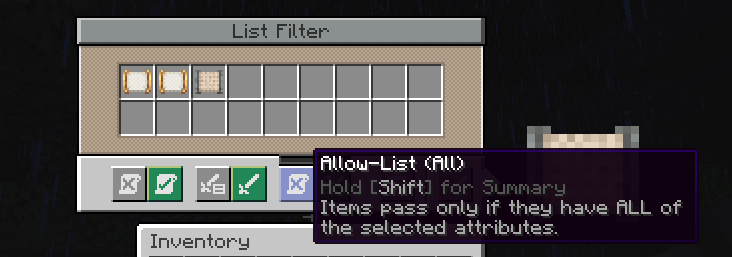
There is also the super useful addition of "Match All" to the List Filter, which when set, requires all of the filters to match inside of a List Filter instead of any of them for it to pass the filter.
Thank you to the incredible developers: Joseph Franci, rizek (radimous), and JustAHuman. As this is a port of the incredible original project, [Vault Filters](https://www.curseforge.com/minecraft/mc-mods/vault-filters)!
New features coming soon when I have time!
- Edition: Minecraft Java
- File type: .jar
- Minecraft versions listed: 1.21.1, 1.20.1
- How to install: Install the matching mod loader (Forge, Fabric or NeoForge) for your Minecraft version. → Download the .jar. → Put it in the .minecraft/mods folder and launch that loader profile.
- Where to get it: Opens on CurseForge — not every file is mirrored on our own servers.
Install steps are the general flow for this file type — How to install Minecraft Java mods & modpacks walks through it step by step.
- Ships as createfiltersanywhere-1.21.1-2.0.0.jar — drop this file into the mods folder
- Download size: 164 KB
- Download link checked 27 Aug 2026 — working
These come from our own check of the pack file, not from the source page.