Custom Portal Builder
Java mod listed for Minecraft 1.16–1.20. File opened and checked on 1 Oct 2026; downloads from the MC Java Mods app on Android.
⬇ Download on CurseForgeForge:
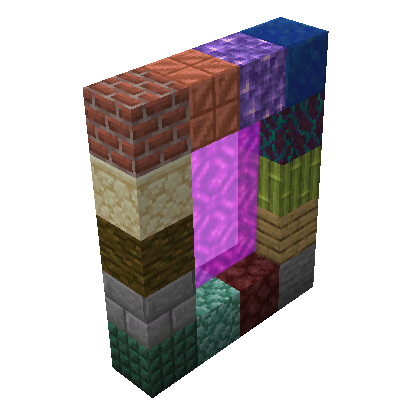
This mod uses the Custom Portal API to allow the user to configure custom portals to existing dimensions using existing blocks and items.
this is an example of the config to make a portal to the nether, that has stone as the frame, and a diamond as the igniter:
{
  "isFlat": false,
  "frameBlock": "minecraft:stone",
  "isFluidIgniter": false,
  "itemIgniter": "minecraft:diamond",
  "dimension": "minecraft:the_nether",
  "r": 200,
  "g": 50,
  "b": 50
}
all the options are as follows:
isFlat: determines if you want a nether like portal or one like the end portal
frameBlock: you designated block to make the portal from. DO NOT use the same block for multiple portals
isFluidIgniter: determines whether you want to light the portal with an item or with a liquid(lava, water, etc.)
itemIgniter: if isFluidIgniter is false then use this to sellect the item you want to use to ignite the portal
fluidIgniter: if isFluidIgniter is true then use this to sellect the fluid you want to use to ignite the portal
dimension: the id of the dimension you want the portal to lead to.
r, g, and b: These are the RGB values for the color of the portal.
Please note that on forge it the Custom Portal API Reforged by AzureDoomC is a required dependancy
- Edition: Minecraft Java
- File type: .jar
- Minecraft versions listed: 1.20.4, 1.20.2, 1.20.1
- How to install: Install the matching mod loader (Forge, Fabric or NeoForge) for your Minecraft version. → Download the .jar. → Put it in the .minecraft/mods folder and launch that loader profile.
- Where to get it: Opens on CurseForge — not every file is mirrored on our own servers.
Install steps are the general flow for this file type — How to install Minecraft Java mods & modpacks walks through it step by step.
Custom Portal Builder is a free Minecraft Java mod. Compatible with Minecraft 1.20.4, 1.20.2, 1.20.1, 1.20 and newer. Downloaded 1,010,833 times (via CurseForge). Download it and open it directly in the game.