Mineral Enhancements
Java modpack listed for Minecraft 1.20–1.21. Downloads from the MC Java Mods app on Android.
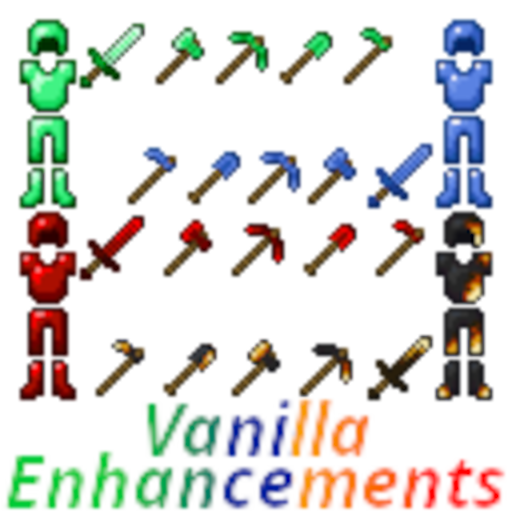
Here you will explore new items based on previously un-used Vanilla Ores for Tools, Weapons, and Armor - each with special abilities!
⬇ Download on CurseForgeJoin the Vanilla Enhancements official Minecraft Server!
mc.FireCrafting.net
Join the Discord to report issues, become part of the community, and get updates on new and existing mods!
Shaders and Extra Mods
The shaderpack must be downloaded separately: Download Iteration Shaders
This shaderpack is not made by me—it just fits the game nicely! Place the downloaded shaderpack in your profile's shaderpacks folder and select it in-game.
The pack also includes a few extra mods for performance, shaders, and voice chat while keeping the overall experience Vanilla-adjacent: Sodium, Sodium Extra, Iris, Simple Voice Chat, and VC Interaction, along with Fabric API.
Welcome to Mineral Enhancements!
The Vanilla Enhancements collection brings seven Enhancements mods together in a Fabric modpack for Minecraft 26.2. Craft material-themed tools, weapons, and armour, protect your gardens, organize your inventory, and set up your own survival world or connected server network!
Emerald, Lapis, Coal, and Redstone each offer a complete equipment set—including Spears—with their own abilities and uses.
Emerald Enhancements
Put your Emeralds to work as late-game equipment!
- Craft Emerald tools, weapons, and armour, including the Emerald Spear.
- Benefit from extra XP and built-in Fortune bonuses on applicable tool uses.
- Wear a full armour set and use Fortune-Sense to help locate nearby ores.
- Trade with villagers using Trading Gems, giving trading its own currency while Emeralds become a crafting material for your gear.
Lapis Enhancements
Lapis equipment is all about enchanting!
Craft Lapis tools, weapons, and armour—including the Lapis Spear—with automatic enchantments when crafted. The custom enchanting interface also lets you use Lapis equipment as an enchanting ingredient to improve the enchantments available for other gear.
Use the equipment on your adventures, or put it toward your next enchanted item!
Coal Enhancements
Turn Coal and Charcoal into early-game tools, weapons, and armour, including the Coal Spear.
- Coal weapons can set mobs on fire, cooking applicable food drops.
- Toggle Auto-Smelt on supported tools to smelt drops as you mine or chop. Turn logs into Charcoal, smelt supported ores, or turn Sand and Red Sand into Glass!
- Harvest suitable crops with the Coal Hoe to collect their cooked variants.
- Wear a full Coal Armour set for protection from fire and lava damage.
Watch your durability! Auto-Smelt consumes extra durability, and fire or lava rapidly wears down the armour. It can save you from an accidental fall into lava, but you still need to get out quickly! Coal Armour cannot use Mending or be repaired in an Anvil.
Redstone Enhancements
Build a charging station and power up your equipment! Redstone gear uses rechargeable Charge for its special abilities, separate from ordinary durability.
- Mine horizontal or vertical 3×3 areas with the Pickaxe and Shovel.
- Chop a natural tree's vertical log column with the Axe.
- Till, harvest, and replant crops across a 3×3 area with the Hoe.
- Chain electrical attacks between eligible mobs with the Sword.
- Light up nearby Redstone as you walk with the Redstone Spear.
- Wear the full armour set to unleash a pulse that damages and knocks back nearby eligible mobs.
Redstone Power Batteries store power and extend your charging network across your builds—even through connected Nether Portals. On-screen Charge meters help you keep track of your equipment and batteries.
Flower Enhancements
Stop accidentally destroying your garden!
Shift + Right-click with an empty hand while looking at supported flowers or foliage to toggle protection. With protection enabled, an accidental swing won't break your protected greenery. Turn it off when you actually want to clear an area, then turn it back on when you're finished!
Flower Enhancements also adds Rapid Leaf Decay after you fully chop down a natural tree. Leaves belonging to the chopped tree still decay when they touch another tree's leaves, so neighbouring trees won't leave those floating leaves behind.
Inventory Enhancements
Inventory Sorting
Middle-click to sort your inventory or an open container. Organize items alphabetically or by type, or return to the original arrangement with Baseline sorting. Your hotbar, main inventory, and container storage are sorted separately.
Floating Storage Pane
Shift + Right-click a full stack in your main player inventory to open five extra storage slots for more of that item type.
Keep several Pickaxes together, or carry up to six full stacks of Cobblestone in one inventory slot! The base slot must contain its normal full stack before the storage can be used—for a non-stackable tool, one item is already a full stack.
Crafting and Brewing Guides
Browse organized recipe categories, search for items, and filter the guide to see what you can make with the ingredients you have. Select a recipe to fill the crafting grid, or use the Brewing Stand guide to find and prepare brewing recipes.
Server Enhancements
Set up protected builds, convenient travel, and interactive areas for your players!
- World Protection: Protect entire dimensions or individual regions, with player-specific rules and visible in-world editing tools.
- Command Regions: Run commands, display messages, or send players to another server when they enter an area. Set per-player use limits for one-time starter kits, introductory teleports, or repeatable activities.
- World Spawns: Choose an exact entry position and facing direction, with automatic teleporting on selected entries or every entry. Players can also return using
/spawn. - Player Homes: Save a personal home with
/home set, return with/home, and invite another player to teleport there. - Organized Chat: Keep player conversations and server messages in separate Chat and System tabs, with notifications for messages in the other tab.
Managed Server Profiles
Want different mods on different servers without manually changing your modpack every time?
On participating servers, Server Enhancements prepares the mods needed for the server you are joining. Before accepting, you can review the full mod list, highlighted additions and removals, and any configured CurseForge or Modrinth links with their verification status.
If your active mods already match, you can join without restarting. If they differ, the mod prepares a separate temporary profile and handles the Minecraft restart and connection, with a loading screen while the next instance gets ready.
Supported personal settings and shaders carry between profiles, and your usual installed mods stay untouched. Temporary profiles are cleaned up after exit. Players are asked for consent by default; an optional checkbox remembers their choice until that server's profile changes.
Files come directly from the participating server. Published-file checks and checks of the downloaded bytes help identify mismatches, while unverified files are clearly marked. Only accept mods from servers you trust—a published match is not a guarantee that a mod is safe.
Installation and Compatibility
Use the pack release matching your Minecraft version. This release is for Minecraft 26.2 with Fabric and requires Java 25.
Install the pack in your launcher for single-player or multiplayer. For a dedicated server, install the matching gameplay mods and required dependencies on the server too; keep client-only rendering mods such as Iris and Sodium on the client.
Managed Server Profiles require administrator configuration on the participating servers. When using Velocity, install the same Server Enhancements JAR in the proxy's plugins folder as well as the backend servers' mods folders. Players do not need a separate profile-manager program.
Individual Project Pages
The descriptions above are summaries and may omit important details, including exact commands, statistics, loot tables, configuration options, recipes, and specific mechanics.
To view the complete and exact details of each mod, please visit its individual project page below:
- CurseForge | Modrinth — Emerald Enhancements
- CurseForge | Modrinth — Lapis Enhancements
- CurseForge | Modrinth — Coal Enhancements
- CurseForge | Modrinth — Redstone Enhancements
- CurseForge | Modrinth — Flower Enhancements
- CurseForge | Modrinth — Inventory Enhancements
- CurseForge | Modrinth — Server Enhancements
- Edition: Minecraft Java
- File type: .jar
- Minecraft versions listed: 1.21.5, 1.20.2, 1.20.5
- How to install: Install the matching mod loader (Forge, Fabric or NeoForge) for your Minecraft version. → Download the .jar. → Put it in the .minecraft/mods folder and launch that loader profile.
- Where to get it: Opens on CurseForge — not every file is mirrored on our own servers.
Install steps are the general flow for this file type — How to install Minecraft Java mods & modpacks walks through it step by step.
Mineral Enhancements is a free Minecraft Java modpack. Compatible with Minecraft 1.21.5, 1.20.2, 1.20.5, 1.20.1 and newer. Downloaded 915 times (via CurseForge). Download it and open it directly in the game.