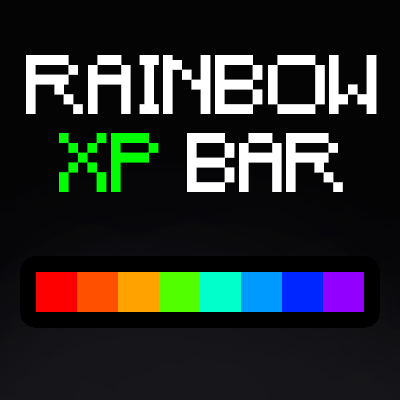
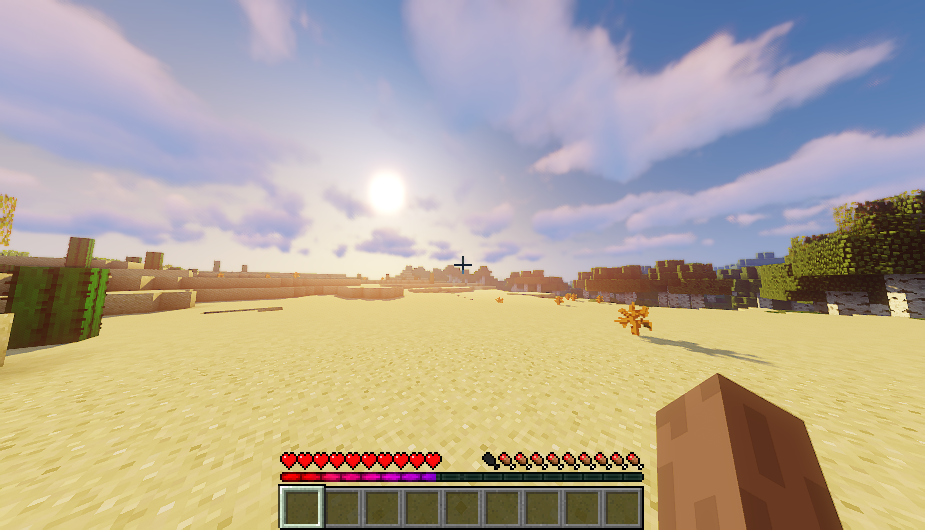
Rainbow XP Progress Bar is a vibrant texture pack designed to make your Minecraft XP bar more visually appealing with a stunning RGB (rainbow) effect. Say goodbye to the plain old green bar and enjoy a dynamic, colorful experience every time you gain experience points.

- Transforms the XP bar into a beautiful, continuously changing rainbow of colors.
- Adds a visually exciting element to your gameplay.
- Easy to install and compatible with other texture packs.
How to Install:
- Download the texture pack file from CurseForge.
- Open Minecraft and go to the resource packs menu.
- Click on "Open Pack Folder" and move the downloaded file into this folder.
- Return to Minecraft and activate the Rainbow XP Progress Bar texture pack.
Enjoy a more colorful and lively Minecraft adventure with the Rainbow XP Progress Bar!
Quick facts
- Edition: Minecraft Java
- File type: .zip (resource pack)
- Minecraft versions listed: 1.16.3, 1.17.1, 1.16.1
- How to install: Download the .zip resource pack — do not unzip it. → Put it in .minecraft/resourcepacks. → Enable it in Options → Resource Packs.
- Where to get it: Opens on CurseForge — not every file is mirrored on our own servers.
Install steps are the general flow for this file type — How to install Minecraft Java resource packs walks through it step by step.
Verified by MCModsHub
- Downloads as Rainbow XP Bar.zip
- Download size: 61 KB
- Download link checked 28 Aug 2026 — working
These come from our own check of the pack file, not from the source page.