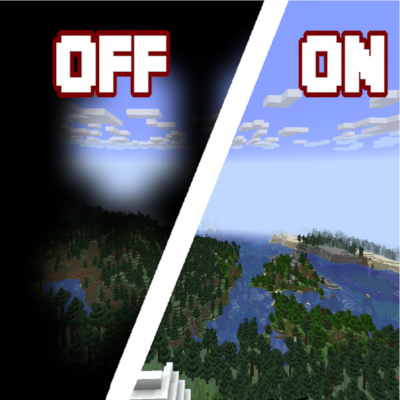
This resource pack delets a texture inside a pumpkin and spyglasses. If it annoys you that a pumpkin covers half your screen, this is the resource pack for you.
To install resource pack:
1. Click "Win" + "R",
2. Click "Enter",
3. Go to the ".minecraft" folder and double click the "resourcepack" folder,
4. Move your Resource Pack here.
Quick facts
- Edition: Minecraft Java
- File type: .zip (resource pack)
- Minecraft versions listed: 1.21.5, 1.19.2, 1.19.1
- How to install: Download the .zip resource pack — do not unzip it. → Put it in .minecraft/resourcepacks. → Enable it in Options → Resource Packs.
- Where to get it: Opens on CurseForge — not every file is mirrored on our own servers.
Install steps are the general flow for this file type — How to install Minecraft Java resource packs walks through it step by step.
Invisible inside of the pumpkin and spyglasses is a free Minecraft Java resourcepack. Compatible with Minecraft 1.21.5, 1.19.2, 1.19.1, 1.19 and newer. Downloaded 1,099 times (via CurseForge). Download it and open it directly in the game.