![𝗠𝗼𝗿𝗲 𝗕𝗼𝗱𝘆 𝗔𝗰𝘁𝗶𝗼𝗻𝘀 + 𝗣𝗶𝗰𝗸 𝘂𝗽 & 𝗖𝗮𝗿𝗿𝘆 [Always latest files]](https://files.mcmodshub.com/img/mcpedl/24344.png)
𝗠𝗼𝗿𝗲 𝗕𝗼𝗱𝘆 𝗔𝗰𝘁𝗶𝗼𝗻𝘀 + 𝗣𝗶𝗰𝗸 𝘂𝗽 & 𝗖𝗮𝗿𝗿𝘆 [Always latest files]
Bedrock add-on listed for Minecraft 1.13–1.21 (behavior pack only). Needs Beta APIs. File opened and checked on 12 Oct 2026; installs from the MC Bedrock Mods app on Android.
⬇ DownloadThis addon is a combination of two of my separately incompatible addons. Here is a brief description of each addon:
=============================
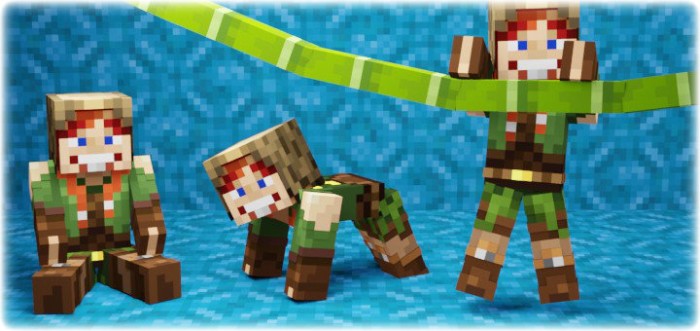
𝗠𝗼𝗿𝗲 𝗕𝗼𝗱𝘆 𝗔𝗰𝘁𝗶𝗼𝗻𝘀
“This addon allows you to sit, lie down, crawl, and climb over walls! The first-person camera adjusts its position depending on the body's state! You can also crawl through a 1-block hole! It also works in multiplayer!”



[ How to use ] (More Body Actions)
To sit down, just look as far down as possible and sneak
To lie down, just look as far up as possible and sneak
To start crawling on all fours, first sit down and then just walk forward.
To start crawling normally, jump while crawling on all fours. Jump again to get back on all fours.
To get up, just press sneak
To grasp onto a wall, approach it closely, look slightly upwards, and jump. Then you can move along the edge of the wall to the right or left, or climb onto it by jumping.
Grasping is only possible under the following conditions:
- Both of your hands are free (not holding any items)
- The height of the wall is not more than 3 blocks.
- You're not sneaking
- You are looking slightly upwards (not at a 90-degree angle, but within the range of 30 to 85 degrees).
Learn more about “More Body Actions”
=============================
𝗣𝗶𝗰𝗸 𝘂𝗽 & 𝗖𝗮𝗿𝗿𝘆
“Pick up the player, mob, or chest with items and carry it to the right place! All mobs, players and blocks with items are carryable! Even mobs or blocks from other addons!”
[ How to use ] (Pickup & Carry)
How to pick up a mob or player:
- Make sure you are not holding any items in your hands (mainhand & offhand)
- Get as close to a mob or player as possible, look at it, then sneak and jump
How to pick up a block with items:
- Make sure you are in "survival" mode
- Make sure you are not holding any items in your hands (mainhand & offhand)
- Approach the block as closely as possible (but do not stand on it)
- Begin sneaking and jumping while simultaneously start breaking the block you want to pick up
You can pick up any block that can store items (chest, dispenser, furnace, etc.). Pickup is only possible if there is at least 0.5 blocks of free space above the block you want to pick up. If the block is at head level, you can still pick it up even if there is no free space above it.
Learn more about “Pickup & Carry”
- Edition: Minecraft Bedrock
- File type: .mcpack or .mcaddon
- Minecraft version listed: 1.21
- How to install: Download the .mcpack or .mcaddon file. → Open it — Minecraft imports it. → In your world: Behavior Packs → Available → Activate, then the same under Resource Packs.
- Where to get it: In MCModsHub, or directly above on this page.
Install steps are the general flow for this file type — How to install Minecraft Bedrock addons & mods walks through it step by step.
- Save it as 24344.mcpack before opening — it downloads as .mcaddon, but it is a .mcpack pack
- Manifest requires Minecraft 1.13.0 or newer
- Needs Beta APIs switched on in the world settings
- Complete pack — everything it depends on is inside the file
- Download size: 512 KB
- Download link checked 3 Aug 2026 — working
- Mirrored on our own servers — the download does not depend on the original host
These come from our own check of the pack file, not from the source page.