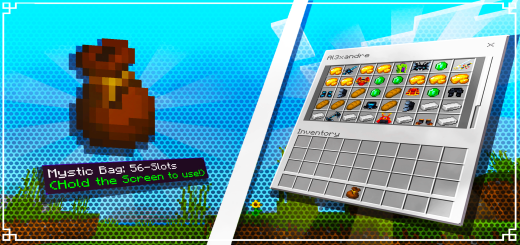
Mystic Bag 1.5 Add-on
Bedrock add-on listed for Minecraft 1.20–1.21 (behavior pack only). File opened and checked on 5 Oct 2026; installs from the MC Bedrock Mods app on Android.
⬇ DownloadHow Does It Work? 🛠️
Versions of the Mystic Bag:
Version 1: 5 slots
Version 2: 12 slots
Version 3: 27 slots
Version 4: 56 slots

Each version offers increased storage capacity, allowing the player to choose the one that best suits their needs.
The more slots, the more items you can securely carry!
Crafting the Mystic Bag:
Players can craft the Mystic Bag using common Minecraft resources such as leather,
iron, blaze powder, and other magical items.
After crafting the item, simply interact with the bag to open its inventory and store your items.
Benefits and Importance of the Mystic Bag:
Portable and Secure Storage:
No more carrying bulky chests or worrying about limited chest space.
With the Mystic Bag, you can store your items compactly and securely, taking them wherever you go.
Four Versions for Different Needs:
Choose between the 5, 12, 27, or 56-slot versions, depending on how much storage space you need.
The varying options cater to both beginner players and experienced ones who require more capacity.
Easy to Use:
Simply interact with the bag to open its inventory.
Compatibility:
The Mystic Bag is fully compatible with other addons,
allowing seamless integration with existing modifications in your game.
To remove the message in the top right corner:
Simply download it from the website using my creator link in the downloads section.
- Edition: Minecraft Bedrock
- File type: .mcpack or .mcaddon
- Minecraft versions listed: 1.21.73, 1.21.70, 1.21.50
- How to install: Download the .mcpack or .mcaddon file. → Open it — Minecraft imports it. → In your world: Behavior Packs → Available → Activate, then the same under Resource Packs.
- Where to get it: In MCModsHub, or directly above on this page.
Install steps are the general flow for this file type — How to install Minecraft Bedrock addons & mods walks through it step by step.
- Save it as 24349.mcpack before opening — it downloads as .mcaddon, but it is a .mcpack pack
- Manifest requires Minecraft 1.20.0 or newer
- Complete pack — everything it depends on is inside the file
- Download size: 62 KB
- Download link checked 3 Aug 2026 — working
- Mirrored on our own servers — the download does not depend on the original host
These come from our own check of the pack file, not from the source page.